• Send Us A Tip
  • Calling all Tech Writers
  • Advertise
Sunday, July 12, 2026
  • Login
TechStory
  • News
  • Crypto
  • Gadgets
  • Memes
  • Gaming
  • Cars
  • AI
  • Startups
  • Markets
  • How to
No Result
View All Result
  • News
  • Crypto
  • Gadgets
  • Memes
  • Gaming
  • Cars
  • AI
  • Startups
  • Markets
  • How to
No Result
View All Result
TechStory
No Result
View All Result
Home Gadgets

How to rotate the screen of your iPhone

by Arya Roy
July 7, 2021
in Gadgets, How to, Tech
Reading Time: 2 mins read
0
How to rotate the screen of your iPhone

Source: https://ios.gadgethacks.com/how-to/get-iphone-6-plus-resolution-home-screen-landscape-mode-your-iphone-6-0158455/

TwitterWhatsappLinkedin

Some things on your phone, such as games and videos, just look better when your device is in landscape. Portrait orientation makes texting and browsing very easy and convenient, it can be useful to flip your phone screen from time to time to get a better look at images, maps and other forms of content that are more optimised to a landscape format.

You might also like

How to beat Mega Mewtwo X in Pokémon Go?

How to delete a TikTok account?

How to get Zeraora in Pokémon Go?

Fortunately, the screen on your iPhone has the ability to rotate so that you can see view apps and their content in both portrait or landscape mode, depending on your preference. Here is a guide on how you can manage to do so.

Rotating a screen in an iPhone without a Home button 

iPhones that do not have a Home button include any model that is newer than the iPhone X. For devices like these, do the following:

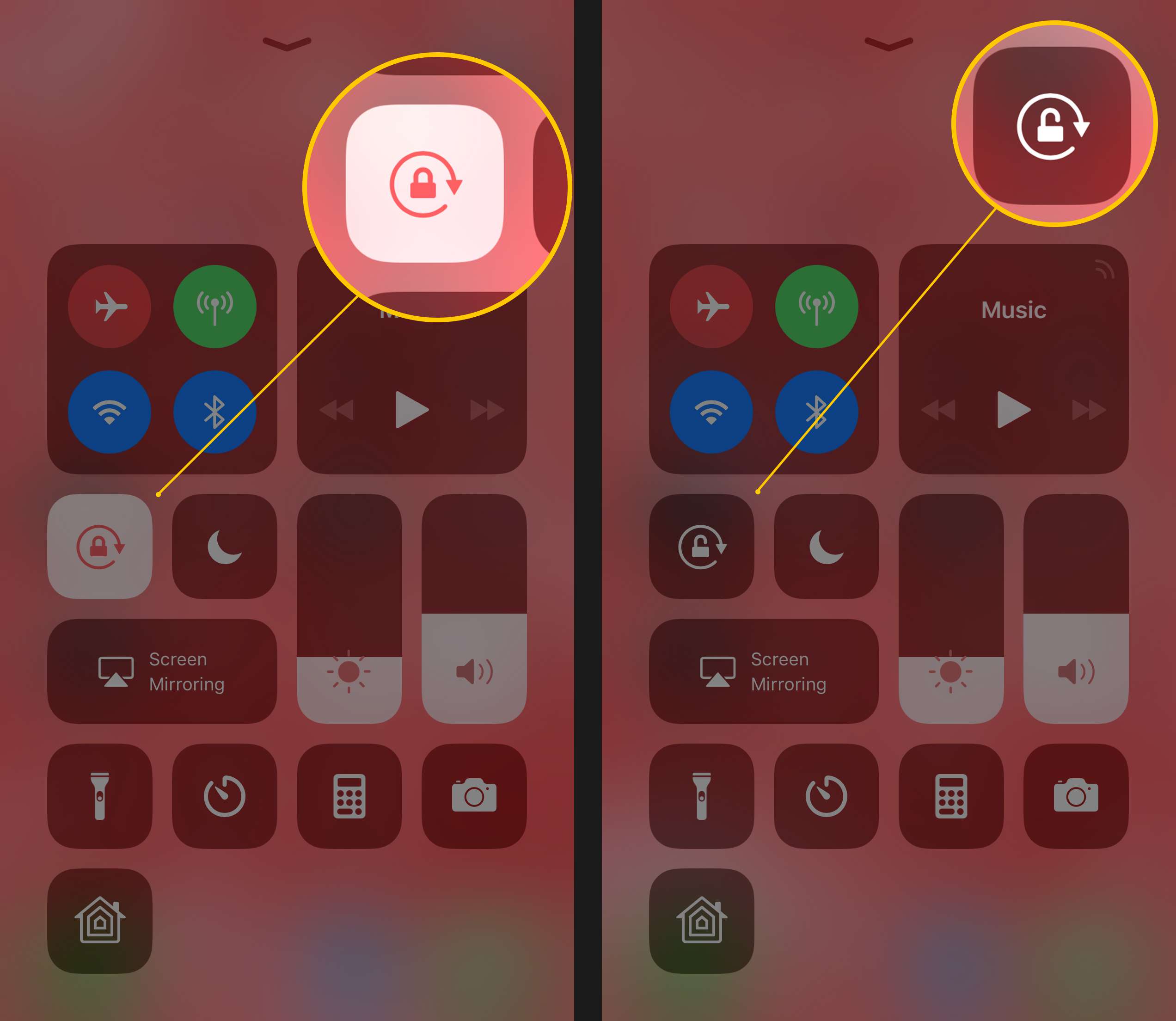
  1. Swipe down from the top right corner of your screen to open the Control Centre.
  2. Tap the Portrait Orientation Lock button to make sure that it is turned off. This button is visually represented by a padlock encircled by an arrow.
  3. Turn your iPhone sideways, 90 degrees to either the left or right side, and your screen will flip according to your choice of movement.
  4. If you want to go one step further and lock the orientation in either landscape or portrait mode (depending on your preference), open the Control Centre again and tap on the same button as before.
  5. To unlock the orientation, simply repeat the aforementioned process.
Source: https://www.lifewire.com/my-iphone-screen-wont-rotate-2000283

Rotating a screen in an iPhone with a Home button 

iPhones that do have a Home button are iPhone SE, iPhone 8, and any earlier model. While the method to rotate the screen on these devices is a little different, it is just as simple.

  1. Swipe up from the bottom edge of your screen to open the Control Centre.
  2. Tap the Portrait Orientation Lock button to make sure that it is turned off.
  3. Turn your iPhone sideways, 90 degrees to either the left or right side, and your screen will flip according to your choice of movement.

Keep in mind that some specific applications in your iPhone may not even support rotation, so your screen may not rotate even if Portrait Orientation Lock is disabled from the Control Centre. An example of such an app is Instagram.


Tags: iPhone
Tweet55SendShare15
Previous Post

10-billion-dollar cloud computing contract canceled by Pentagon

Next Post

Binance has terminated Euro deposits via SEPA bank

Arya Roy

Hi, this is Arya! Writing has always been a passion of mine, regardless of the topic I choose. Besides that, I am a huge foodie and music lover, whose interests range from world politics to horror films to everything in between.

Recommended For You

How to beat Mega Mewtwo X in Pokémon Go?

by Afeefa Ansari
July 12, 2026
0
Pokemon-Go-Mega-Mewtwo X

Want to beat Mega Mewtwo X in Pokémon Go? Follow the guide to know how you can make it happen and knock out this strong Pokémon. So, let's...

Read more

How to delete a TikTok account?

by Afeefa Ansari
July 12, 2026
0
TikTok

Do you have a TikTok account you would like to delete? That happens. Let's help you do so and get one thing off your mind. It will be...

Read more

How to get Zeraora in Pokémon Go?

by Afeefa Ansari
July 12, 2026
0
Zeraora

Are you looking for Zeraora in Pokémon Go? Here is all you need to know about it, along with the steps that can help you find one. So,...

Read more
Next Post
Binance has complied with all legal requirements in the UK

Binance has terminated Euro deposits via SEPA bank

Please login to join discussion

Techstory

Tech and Business News from around the world. Follow along for latest in the world of Tech, AI, Crypto, EVs, Business Personalities and more.
reach us at info@techstory.in

Advertise With Us

Reach out at - info@techstory.in

Aviator Game India 2026

BROWSE BY TAG

#Crypto #howto 2024 acquisition AI amazon Apple Artificial Intelligence bitcoin Business China cryptocurrency e-commerce electric vehicles Elon Musk Ethereum facebook funding Gaming Google India Instagram Investment ios iPhone IPO Market Markets Meta Microsoft News OpenAI samsung Social Media SpaceX startup startups tech technology Tesla TikTok trend trending twitter US

© 2025 Techstory.in

No Result
View All Result
  • News
  • Crypto
  • Gadgets
  • Memes
  • Gaming
  • Cars
  • AI
  • Startups
  • Markets
  • How to

© 2025 Techstory.in

Welcome Back!

Login to your account below

Forgotten Password?

Retrieve your password

Please enter your username or email address to reset your password.

Log In
Are you sure want to unlock this post?
Unlock left : 0
Are you sure want to cancel subscription?