• Send Us A Tip
  • Calling all Tech Writers
  • Advertise
Monday, July 6, 2026
  • Login
TechStory
  • News
  • Crypto
  • Gadgets
  • Memes
  • Gaming
  • Cars
  • AI
  • Startups
  • Markets
  • How to
No Result
View All Result
  • News
  • Crypto
  • Gadgets
  • Memes
  • Gaming
  • Cars
  • AI
  • Startups
  • Markets
  • How to
No Result
View All Result
TechStory
No Result
View All Result
Home Design

How to add colour to black and white photos

by Arya Roy
July 14, 2021
in Design, How to, Tech
Reading Time: 2 mins read
0
How to add colour to black and white photos

Source: https://playback.fm/colorize-photo

TwitterWhatsappLinkedin

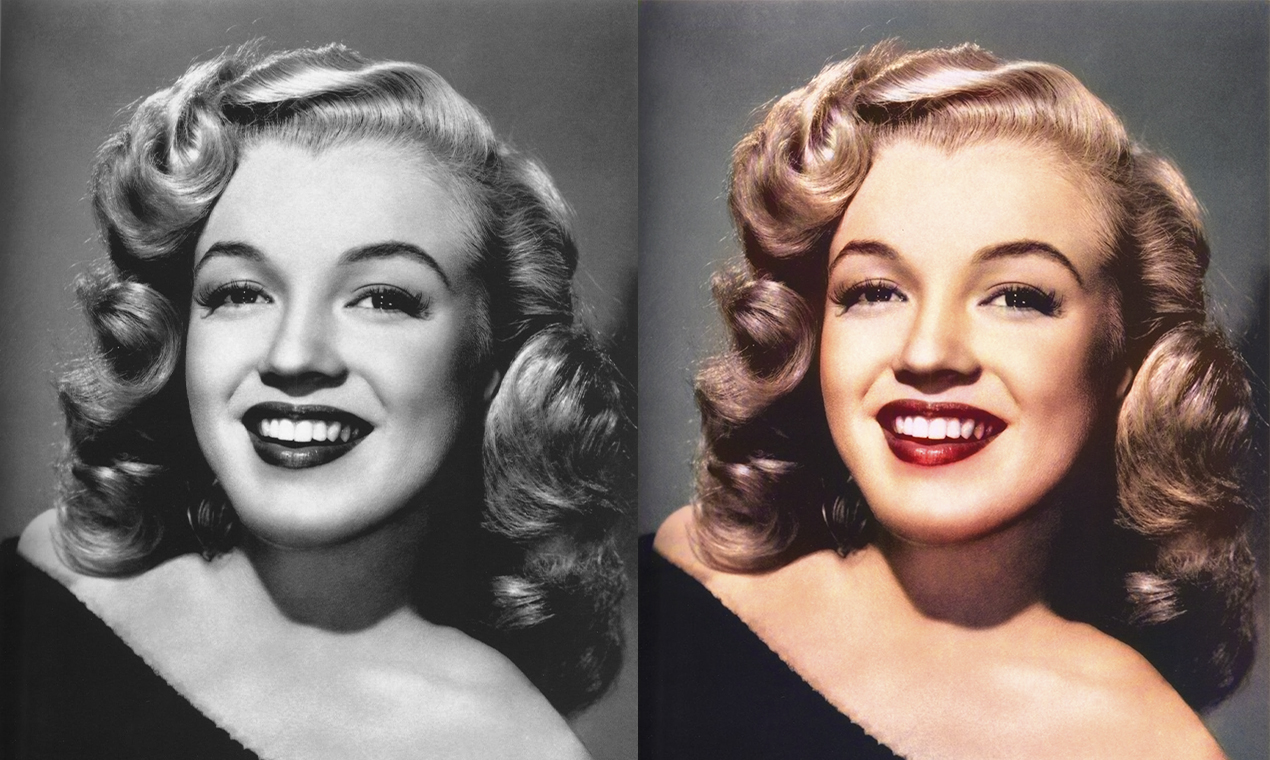
Old and vintage photos in black and white might be great for some occasions and uses, but adding full colour to these pictures can add some life and vitality to them. Here is a guide on how to do it by using Photoshop.
You might also like

How to view instants on Instagram?

How to get coin bags in Pokémon Go?

How to request money on X?

Source: https://hotpot.ai/colorize-picture

It should take you around 30 minutes to do so in the first few times, but as you grow accustomed to the process mentioned below, it should not take more than 10 – 15 minutes.

  1. Select a black and white photo from your laptop that you want to have or see in colour and open the image with Photoshop.
  2. Use the tool to separate the background from the subject of the image and select the background. such as the sky or grass. In order to activate the ‘Quick Selection’ tool, simply click on the ‘W’ key on your keyboard.
  3. Once you have successfully made your choice of background, make a solid colour fill layer, which can be done by clicking on the half-and-half icon. Then, click on ‘Solid colour,’ where you can choose a colour.
  4. Since you probably do not want the colour to appear as if it has simply been filled there, you will have to change the blend mode. To do this, change the fill layer from the Layers tab, open the highlighted dropdown menu, and select ‘overlay’.
  5. Correct all those edges where colour has ended up bleeding onto the subject. To do this, use the brush tool which has a suitable colour to fix the colouring of the original image again.
  6. Add some colour to the subject by using the ‘Quick Selection’ tool and selecting a colour of your choice that is also suitable. Keep in mind that this time, do not set the blend mode for this layer to ‘overlay’, and instead, change it to ‘colour’.
  7. If you ever end up making a mistake during this process, simply tap on the letter ‘E’ on your keyboard to access the eraser.
  8. Save your changes and download the final product.
Tags: Photoshop
Tweet55SendShare15
Previous Post

Google Pixel 5a 5G to be powered with Snapdragon 750G processor, says leaks

Next Post

Apple launches MagSafe battery pack accessory for iPhone 12 series at $99

Arya Roy

Hi, this is Arya! Writing has always been a passion of mine, regardless of the topic I choose. Besides that, I am a huge foodie and music lover, whose interests range from world politics to horror films to everything in between.

Recommended For You

How to view instants on Instagram?

by Afeefa Ansari
July 6, 2026
0
Instants

Receiving instant messages from friends on Instagram? Here is how you can receive and open them when sent. Let us see how it can be done and how...

Read more

How to get coin bags in Pokémon Go?

by Afeefa Ansari
July 6, 2026
0
Coin Bags

Do you want to get a coin bag in Pokémon Go? Follow the guide to know how you can get this item in the game and then use...

Read more

How to request money on X?

by Afeefa Ansari
July 6, 2026
0
X

Want to ask for money from someone on X? Let us assist you. Follow the guide to know how you can judge someone to get money if you're...

Read more
Next Post
Apple launches MagSafe battery pack accessory for iPhone 12 series at $99

Apple launches MagSafe battery pack accessory for iPhone 12 series at $99

Please login to join discussion

Techstory

Tech and Business News from around the world. Follow along for latest in the world of Tech, AI, Crypto, EVs, Business Personalities and more.
reach us at info@techstory.in

Advertise With Us

Reach out at - info@techstory.in

Aviator Game India 2026

BROWSE BY TAG

#Crypto #howto 2024 acquisition AI amazon Apple Artificial Intelligence bitcoin Business China cryptocurrency e-commerce electric vehicles Elon Musk Ethereum facebook funding Gaming Google India Instagram Investment ios iPhone IPO Market Markets Meta Microsoft News OpenAI samsung Social Media SpaceX startup startups tech technology Tesla TikTok trend trending twitter US

© 2025 Techstory.in

No Result
View All Result
  • News
  • Crypto
  • Gadgets
  • Memes
  • Gaming
  • Cars
  • AI
  • Startups
  • Markets
  • How to

© 2025 Techstory.in

Welcome Back!

Login to your account below

Forgotten Password?

Retrieve your password

Please enter your username or email address to reset your password.

Log In
Are you sure want to unlock this post?
Unlock left : 0
Are you sure want to cancel subscription?