• Send Us A Tip
  • Calling all Tech Writers
  • Advertise
Wednesday, July 15, 2026
  • Login
TechStory
  • News
  • Crypto
  • Gadgets
  • Memes
  • Gaming
  • Cars
  • AI
  • Startups
  • Markets
  • How to
No Result
View All Result
  • News
  • Crypto
  • Gadgets
  • Memes
  • Gaming
  • Cars
  • AI
  • Startups
  • Markets
  • How to
No Result
View All Result
TechStory
No Result
View All Result
Home Gadgets

How to send GIFs on Snapchat

by Arya Roy
July 16, 2021
in Gadgets, How to, Tech
Reading Time: 2 mins read
0
How to send GIFs on Snapchat

Source: https://techcrunch.com/2020/07/13/snapchat-tests-tiktok-style-navigation-for-exploring-public-content/

TwitterWhatsappLinkedin

Texting through the conventional way of words can be great, but sometimes they fail to completely express what you are feeling, such as extreme joy, excitement, or sorrow. For this, you have a range of options, such as emojis or sending pictures. Another option is GIFs. Here is a guide on how to do so on Snapchat. The same instructions will apply to both Android and Apple devices.

You might also like

Why Companies Buy Startups Instead of Building Products?

Powering Down the Future New York Becomes First State to Enact AI Data Center Moratorium

Why Everything Is Becoming a Subscription?

  1. Tap on the camera icon which can be found at the bottom of the screen to take a snap. You will be required to take either a picture or video before you can move on to the next step in the process.
  2. Tap on the sticker icon which is located on the right-hand side of your image.
  3. Tap on the option that reads GIF. You can also choose to use a sticker from this area if you would like to, or you can add other typical Snapchat accessories, such as the date or temperature.
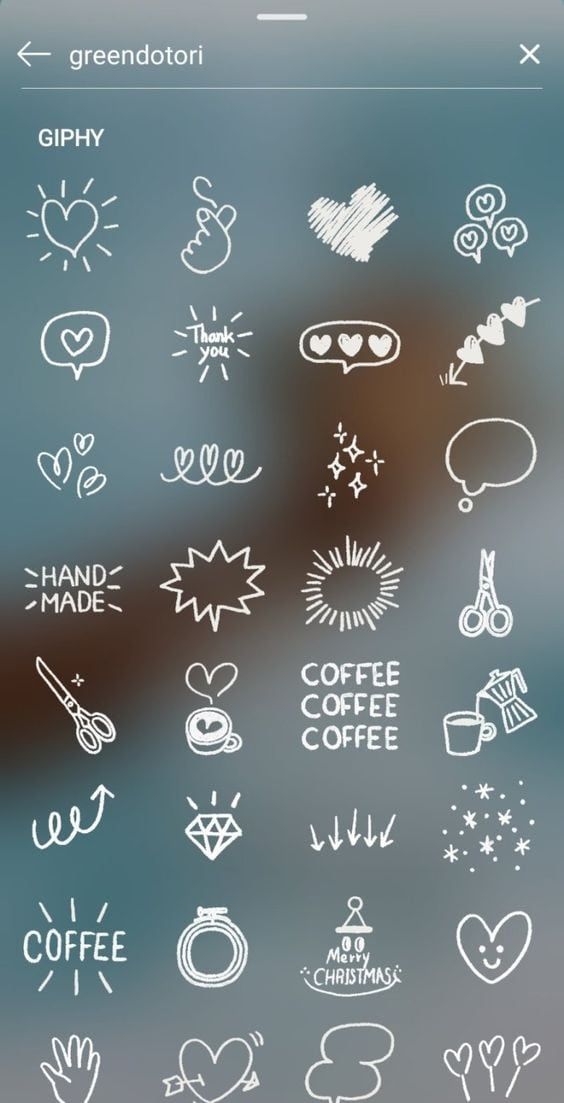
  4. Select a GIF from the GIPHY section, which might also be called Giphy Trending on some devices. Alternatively, you can also search for your own GIF by using the search bar. While searching for a GIF, tap on the clock to take a look at previously or recently used GIFs, emojis, ad stickers. If you no longer wish to search for a GIF or other visual icon, tap on the document icon in the top-right corner to return to your snap.
  5. Place the GIF where you want to by dragging it across the screen. If you want to change the size of the GIF, use your finger to pinch it either outwards or inwards, depending on whether you want to make it bigger or smaller.
  6. Tap Send to get the options of sending the completed image to a friend or post it to your story.
Source: https://in.pinterest.com/pin/63824519707722402/
Tags: androidAppleSnapchat
Tweet54SendShare15
Previous Post

American rooftop solar installations with a tool that enables instant permits

Next Post

How to scan QR codes on your Android phone

Arya Roy

Hi, this is Arya! Writing has always been a passion of mine, regardless of the topic I choose. Besides that, I am a huge foodie and music lover, whose interests range from world politics to horror films to everything in between.

Recommended For You

Why Companies Buy Startups Instead of Building Products?

by Sneha Singh
July 15, 2026
0
Why Companies Buy Startups Instead of Building Products?

Understanding why companies buy startups instead of building products will shed light on many of the largest acquisitions in technology, healthcare, finance, and consumer industries. From artificial intelligence...

Read more

Powering Down the Future New York Becomes First State to Enact AI Data Center Moratorium

by Anochie Esther
July 15, 2026
0
New York AI data center moratorium

The nationwide race to construct the massive physical infrastructure backing the generative artificial intelligence boom has officially run into its first statewide legislative roadblock. As tech conglomerates rush...

Read more

Why Everything Is Becoming a Subscription?

by Sneha Singh
July 15, 2026
0
Why Everything Is Becoming a Subscription?

Subscription-based services have become widespread, and today customers regularly pay money for movies, music, cloud storage space, software, fitness apps, and even car components that used to be...

Read more
Next Post
How to scan QR codes on your Android phone

How to scan QR codes on your Android phone

Please login to join discussion

Techstory

Tech and Business News from around the world. Follow along for latest in the world of Tech, AI, Crypto, EVs, Business Personalities and more.
reach us at info@techstory.in

Advertise With Us

Reach out at - info@techstory.in

Aviator Game India 2026

BROWSE BY TAG

#Crypto #howto 2024 acquisition AI amazon Apple Artificial Intelligence bitcoin Business China cryptocurrency e-commerce electric vehicles Elon Musk Ethereum facebook funding Gaming Google India Instagram Investment ios iPhone IPO Market Markets Meta Microsoft News OpenAI samsung Social Media SpaceX startup startups tech technology Tesla TikTok trend trending twitter US

© 2025 Techstory.in

No Result
View All Result
  • News
  • Crypto
  • Gadgets
  • Memes
  • Gaming
  • Cars
  • AI
  • Startups
  • Markets
  • How to

© 2025 Techstory.in

Welcome Back!

Login to your account below

Forgotten Password?

Retrieve your password

Please enter your username or email address to reset your password.

Log In
Are you sure want to unlock this post?
Unlock left : 0
Are you sure want to cancel subscription?