
• Send Us A Tip
  • Calling all Tech Writers
  • Advertise
Friday, July 17, 2026
  • Login
TechStory
  • News
  • Crypto
  • Gadgets
  • Memes
  • Gaming
  • Cars
  • AI
  • Startups
  • Markets
  • How to
No Result
View All Result
  • News
  • Crypto
  • Gadgets
  • Memes
  • Gaming
  • Cars
  • AI
  • Startups
  • Markets
  • How to
No Result
View All Result
TechStory
No Result
View All Result
Home How to

Delete Last 15 minutes: How to

by Keziah George
July 19, 2021
in How to, Tech
Reading Time: 2 mins read
0
Google Search
TwitterWhatsappLinkedin

Google has unveiled a new feature on its search app, ‘delete last 15 minutes’.  Google is making it easier for iOS and android users to delete their search history for a span of 15 minutes by just a click. In the age of the internet, what you search for should generally be in the privacy between you and your service provider. This feature however, helps limit your browser history of the last 15 minutes to yourself. If you are an iOS user this feature should be available to you already and will soon be available for android users as well.

You might also like

How To Get And Use The Sprite Locator In Fortnite

Thinking Machines Launches Inkling Open-Weight AI Model to Challenge Global Rivals

Nissan Reworks U.S. Lineup as Altima Survives, Rogue Plug-In Heads for Exit

Keeping you in control of your privacy is one of the many ways we make every day safer with Google. At #GoogleIO, we announced quick delete in search, which allows you to easily delete the last 15 minutes of your search history. Learn more → https://t.co/bkFS6NYYyA pic.twitter.com/rEL3HorII1

— googledownunder (@googledownunder) May 28, 2021

How to use “delete last 15 minutes’ feature

  1.  Go to the Google search app
  2.  Click on your ‘Account Profile’ on the upper right corner
  3. Move to ‘Search History’
  4. And finally, under which there will be a new option “Delete the last 15 minutes”.

We’ve released a new way for you to quickly delete your last 15 minutes of search history, if you’ve chosen to save that. It works for the Google app on iOS & comes to Android later this year. Learn more, as well as a reminder of our auto-delete options: https://t.co/CudKlSXy8i

— Google SearchLiaison (@searchliaison) July 15, 2021

Users can also delete their search history manually by just clicking on their account profile and moving to their search history. For web users it may be slightly different. Click on your account profile and move to ‘Manage your google account’. Under activity controls move to ‘Web and app activity’. Under ‘Activity controls’ you can ‘Manage your activity’. Android users have options to delete their search history according to ‘Delete today’, ‘Delete custom range’, ‘Delete all time’, and ‘Auto-delete’. Custom range gives users a time frame to which they would like to delete.
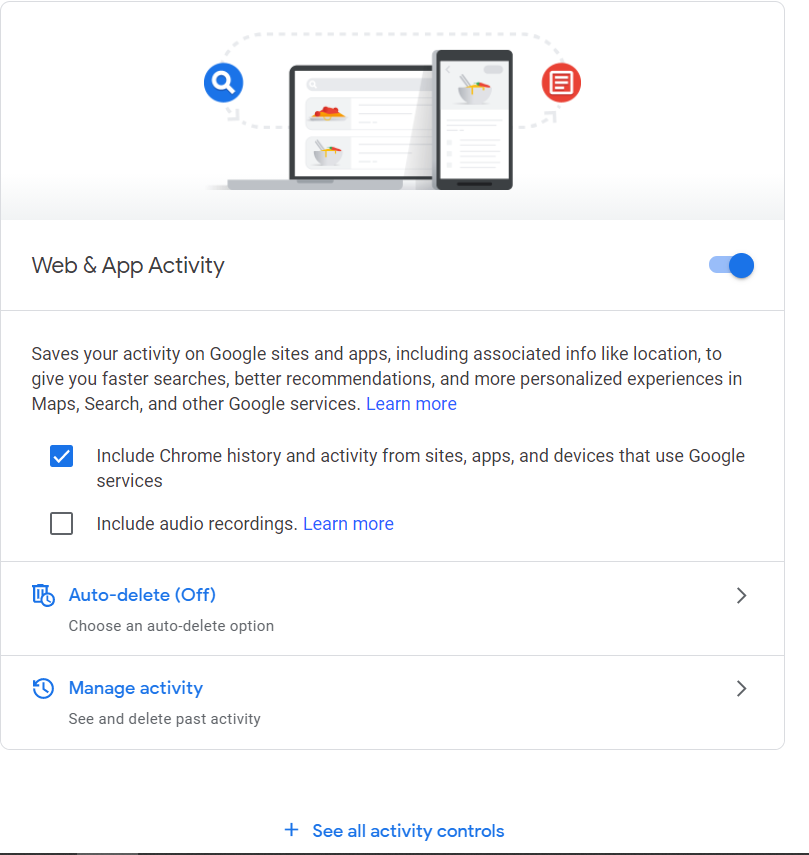
Web and App Activity page

All tech companies are on the path to harbor an environment with greater privacy and security. This new feature gives users more privacy by just a click. Increasing the accessibility and ease of operation enhances the overall user experience. All users today may not have the choice on whether they want to share their information with third parties but features like these are all steps to right direction when it comes to greater user privacy protection.


Tags: Google search updateHow totech
Tweet54SendShare15
Previous Post

What is Pegasus spyware, how it works and targets journalists and activists

Next Post

How to catch Hoopa in Pokemon Go

Keziah George

Recommended For You

How To Get And Use The Sprite Locator In Fortnite

by Khilav Jadav
July 17, 2026
0
How To Redeem Codes in Fortnite

If you are trying to complete Spirit Realm activities or simply want to find Sprites more quickly, the Sprite Locator is one of the most useful tools available...

Read more

Thinking Machines Launches Inkling Open-Weight AI Model to Challenge Global Rivals

by Rounak Majumdar
July 16, 2026
0
Thinking Machines Launches Inkling Open-Weight AI Model to Challenge Global Rivals

Thinking Machines, the San Francisco-based AI business founded by former OpenAI Chief Technology Officer Mira Murati, has launched its first general-purpose AI model, Inkling, an open-weight system with...

Read more

Nissan Reworks U.S. Lineup as Altima Survives, Rogue Plug-In Heads for Exit

by Samir Gautam
July 16, 2026
0
Nissan Reworks U.S. Lineup as Altima Survives, Rogue Plug-In Heads for Exit

Nissan is making significant adjustments to its product strategy in the United States, but one familiar nameplate isn't disappearing just yet. After reports suggested the Nissan Altima was...

Read more
Next Post
How to catch Hoopa in Pokemon Go

How to catch Hoopa in Pokemon Go

Please login to join discussion

Techstory

Tech and Business News from around the world. Follow along for latest in the world of Tech, AI, Crypto, EVs, Business Personalities and more.
reach us at info@techstory.in

Advertise With Us

Reach out at - info@techstory.in

Aviator Game India 2026

BROWSE BY TAG

#Crypto #howto 2024 acquisition AI amazon Apple Artificial Intelligence bitcoin Business China cryptocurrency e-commerce electric vehicles Elon Musk Ethereum facebook funding Gaming Google India Instagram Investment ios iPhone IPO Market Markets Meta Microsoft News OpenAI samsung Social Media SpaceX startup startups tech technology Tesla TikTok trend trending twitter US

© 2025 Techstory.in

No Result
View All Result
  • News
  • Crypto
  • Gadgets
  • Memes
  • Gaming
  • Cars
  • AI
  • Startups
  • Markets
  • How to

© 2025 Techstory.in

Welcome Back!

Login to your account below

Forgotten Password?

Retrieve your password

Please enter your username or email address to reset your password.

Log In
Are you sure want to unlock this post?
Unlock left : 0
Are you sure want to cancel subscription?