• Send Us A Tip
  • Calling all Tech Writers
  • Advertise
Sunday, July 26, 2026
  • Login
TechStory
  • News
  • Crypto
  • Gadgets
  • Memes
  • Gaming
  • Cars
  • AI
  • Startups
  • Markets
  • How to
No Result
View All Result
  • News
  • Crypto
  • Gadgets
  • Memes
  • Gaming
  • Cars
  • AI
  • Startups
  • Markets
  • How to
No Result
View All Result
TechStory
No Result
View All Result
Home How to

How to add text in Premiere Pro

by Arya Roy
July 21, 2021
in How to, Tech
Reading Time: 2 mins read
0
How to add text in Premiere Pro

Source: https://www.indiamart.com/proddetail/adobe-premiere-pro-cc-2020-22637369662.html

TwitterWhatsappLinkedin

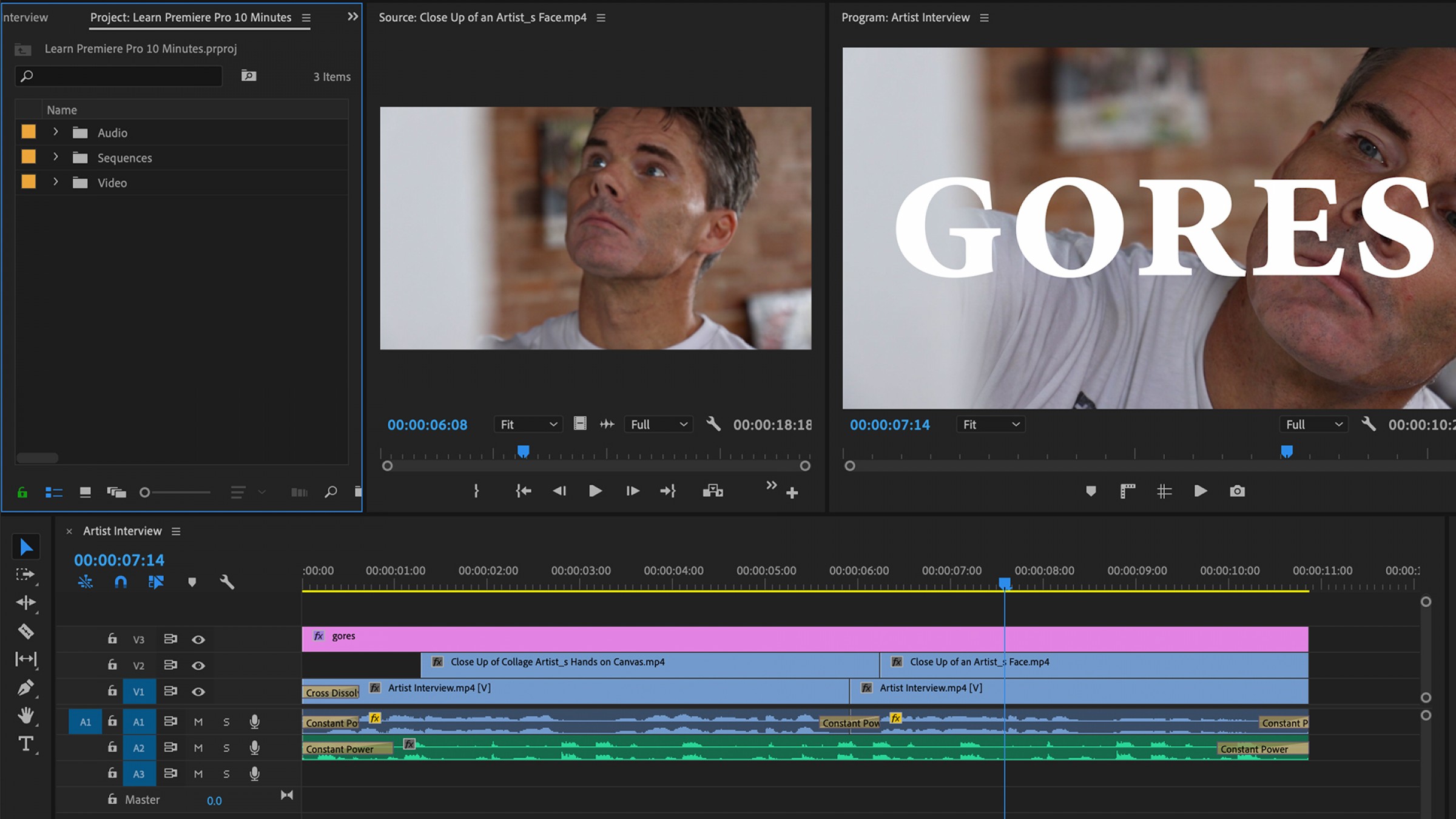
This guide is going to show the basics of using text in Premiere Pro, such as how to add it, formatting, and adding effects.
You might also like

Silicon Megadeal Samsung Lands Landmark $200 Billion AI Chip Contract with Broadcom

The Pentagon’s $7 Billion Lifeline Can Defense Cash Stop the Oracle Stock Collapse?

Why Semiconductor Factories Cost Billions: Inside the World’s Most Expensive Buildings

Source: https://nofilmschool.com/learn-how-use-adobe-premiere-pro-tutorial

Adding text

  1. To add text to your project, first select the Type tool by clicking on the T icon in the toolbar next to your timeline. You can also use the keyboard shortcut by typing in the letter T.
  2. You will now be able to drag your cursor across the screen to create a text box. Your text box will appear as a graphic layer on your timeline, which you can move, extend, or shorten.
  3. Click inside the text box and start typing to add your text.
  4. To change the size of your text box, click on the selection tool from the toolbar next to your timeline here or press V on your keyboard.
  5. Drag the corners of the text box to resize. Click and drag to change the text position.

Formatting text

  1. To format your text, first select your text box from the right-hand side of your screen.
  2. Click on the Essential Graphics tab, and then on Edit. Be sure that your text is highlighted.
  3. Now you can change the format of the text, including the font, size, and orientation. You can align the text perfectly to the horizontal centre of the frame by selecting the Align Vertically icon. You can perfectly align to the vertical centre of the frame by selecting its icon.
  4. To change the colour, click on the coloured box next to Fill. Select the colour that you want from the colour picker, and then click on OK. If you want to add an outer stroke, background, or shadow to your text, click on the checkmark and select your desired colour. You can change the density of the outer stroke by changing the number next to it.

Adding effects

You can add effects and transitions to your text layer on the timeline in the same way that you would on a normal layer.

  1. Start a cross dissolve to either side, so that the text gradually appears and disappears.
  2. From the right-hand side, go to the Effects tab, and then under the Video Transitions drop-down, find Dissolve and then Cross Dissolve.
  3. Click and drag the effect from the menu onto your text layer on the timeline. The effect has now been applied to your text.
  4. You change the duration of the transition by clicking and dragging on the effect. Repeat on the other side of the text clip to cross-dissolve out.

Tags: AdobePremiere Pro
Tweet55SendShare15
Previous Post

J.P. Morgan’s strategist warns investors of the probable bull trap

Next Post

12Bet App (APK) Download for Android & iOS

Arya Roy

Hi, this is Arya! Writing has always been a passion of mine, regardless of the topic I choose. Besides that, I am a huge foodie and music lover, whose interests range from world politics to horror films to everything in between.

Recommended For You

Silicon Megadeal Samsung Lands Landmark $200 Billion AI Chip Contract with Broadcom

by Anochie Esther
July 26, 2026
0
Samsung $200 billion chip deal with Broadcom

The global race to supply physical hardware for artificial intelligence workloads has produced the largest semiconductor manufacturing contract in history. As tech giants build out gigawatt-scale data centers...

Read more

The Pentagon’s $7 Billion Lifeline Can Defense Cash Stop the Oracle Stock Collapse?

by Anochie Esther
July 26, 2026
0
Pentagon $7 billion Oracle contract

The intersection of national defense procurement and Silicon Valley balance sheets has produced one of the most high-stakes corporate rescue narratives of the year. For nearly a decade,...

Read more

Why Semiconductor Factories Cost Billions: Inside the World’s Most Expensive Buildings

by Ishaan Negi
July 26, 2026
0
Why Semiconductor Factories Cost Billions: Inside the World’s Most Expensive Buildings

Every time a company announces a new semiconductor factory, the headline almost always includes a staggering price tag. $10 billion. $20 billion. $50 billion. Some projects now stretch...

Read more
Next Post
12Bet App (APK) Download for Android & iOS

12Bet App (APK) Download for Android & iOS

Please login to join discussion

Techstory

Tech and Business News from around the world. Follow along for latest in the world of Tech, AI, Crypto, EVs, Business Personalities and more.
reach us at info@techstory.in

Advertise With Us

Reach out at - info@techstory.in

Aviator Game India 2026

BROWSE BY TAG

#Crypto #howto 2024 acquisition AI amazon Apple Artificial Intelligence bitcoin Business China cryptocurrency e-commerce electric vehicles Elon Musk Ethereum facebook funding Gaming Google India Instagram Investment ios iPhone IPO Market Markets Meta Microsoft News OpenAI samsung Social Media SpaceX startup startups tech technology Tesla TikTok trend trending twitter US

© 2025 Techstory.in

No Result
View All Result
  • News
  • Crypto
  • Gadgets
  • Memes
  • Gaming
  • Cars
  • AI
  • Startups
  • Markets
  • How to

© 2025 Techstory.in

Welcome Back!

Login to your account below

Forgotten Password?

Retrieve your password

Please enter your username or email address to reset your password.

Log In
Are you sure want to unlock this post?
Unlock left : 0
Are you sure want to cancel subscription?