• Send Us A Tip
  • Calling all Tech Writers
  • Advertise
Sunday, July 12, 2026
  • Login
TechStory
  • News
  • Crypto
  • Gadgets
  • Memes
  • Gaming
  • Cars
  • AI
  • Startups
  • Markets
  • How to
No Result
View All Result
  • News
  • Crypto
  • Gadgets
  • Memes
  • Gaming
  • Cars
  • AI
  • Startups
  • Markets
  • How to
No Result
View All Result
TechStory
No Result
View All Result
Home How to

Hide your caller ID on iPhone and Android devices

by Keziah George
July 27, 2021
in How to, Mobile, Other
Reading Time: 2 mins read
0
Hide your caller ID on iPhone and Android devices
TwitterWhatsappLinkedin

In light of many malicious activities like hackings and spyware installations on devices, it is best to stay anonymous. Protect yourself and your contacts from being exposed to malware from scammers. The best way to protect your privacy is to stay undetected but is a difficult feat when our phones can literally track our locations. One way to stop receiving unnecessary calls and messages is to block your number and hide your caller ID. Read further for steps on how to hide your caller ID.
You might also like

How to beat Mega Mewtwo X in Pokémon Go?

How to delete a TikTok account?

How to get Zeraora in Pokémon Go?

How to block your number and hide your caller ID

  • Dial *67 before the number you would like to call. Copy the number to your clipboard and add *67 to the beginning of the number to hide your caller ID. No caller ID will be shown on the receiver’s phone.

More of the calls you want, less of the ones you don’t. Block unwanted callers in iPhone. ✋ pic.twitter.com/ddzkXHZ18L

— Apple Support (@AppleSupport) January 14, 2017

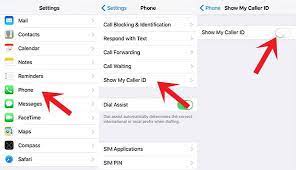
  • You have the option of also changing a few settings on your phone to block your number. You will either show up as blocked, private or with No caller ID on the receiver’s phone. Go to Settings then go to your Message Settings on your phone, scroll down to Block Numbers and then click on “Caller ID and spam protection” turn off “Show your name and number“.

Some humorous tweets by people from the Twitter community trying to lighten the situation. You might also find yourself learning some useful information from the platform.

Fun fact: if someone calls you and it says “No Caller ID” it’s someone on your contact list. If it says “Unknown” then it’s an unsaved number.

— Brittney (@brittsus) January 13, 2021

You’ll block someone’s number only for them to call you on No Caller ID https://t.co/J97KyKzMAS

— MVB ♛ (@MVB2207) April 20, 2020

If your phone doesn’t have an option to block your number then you can directly call your cell carrier and make a request to block your number. they will guide you on how to block your number through their app. To unblock your number just dial *82 before the number you want to call.

It is always better to be on the side of caution and takes steps to protect your privacy. Don’t be a victim of unnecessary spam calls, messages, and malware. Install anti-malware software before it is too late, stay ahead of any possible attack. Read further to know more on how to protect your phone here.


Tags: block a mobile number on an iPhone or on an Android smartphonecaller directoryHow to
Tweet54SendShare15
Previous Post

How to manage subscription on iPhone

Next Post

How to hide and delete hidden apps on iPhone

Keziah George

Recommended For You

How to beat Mega Mewtwo X in Pokémon Go?

by Afeefa Ansari
July 12, 2026
0
Pokemon-Go-Mega-Mewtwo X

Want to beat Mega Mewtwo X in Pokémon Go? Follow the guide to know how you can make it happen and knock out this strong Pokémon. So, let's...

Read more

How to delete a TikTok account?

by Afeefa Ansari
July 12, 2026
0
TikTok

Do you have a TikTok account you would like to delete? That happens. Let's help you do so and get one thing off your mind. It will be...

Read more

How to get Zeraora in Pokémon Go?

by Afeefa Ansari
July 12, 2026
0
Zeraora

Are you looking for Zeraora in Pokémon Go? Here is all you need to know about it, along with the steps that can help you find one. So,...

Read more
Next Post
How to hide and delete hidden apps on iPhone

How to hide and delete hidden apps on iPhone

Please login to join discussion

Techstory

Tech and Business News from around the world. Follow along for latest in the world of Tech, AI, Crypto, EVs, Business Personalities and more.
reach us at info@techstory.in

Advertise With Us

Reach out at - info@techstory.in

Aviator Game India 2026

BROWSE BY TAG

#Crypto #howto 2024 acquisition AI amazon Apple Artificial Intelligence bitcoin Business China cryptocurrency e-commerce electric vehicles Elon Musk Ethereum facebook funding Gaming Google India Instagram Investment ios iPhone IPO Market Markets Meta Microsoft News OpenAI samsung Social Media SpaceX startup startups tech technology Tesla TikTok trend trending twitter US

© 2025 Techstory.in

No Result
View All Result
  • News
  • Crypto
  • Gadgets
  • Memes
  • Gaming
  • Cars
  • AI
  • Startups
  • Markets
  • How to

© 2025 Techstory.in

Welcome Back!

Login to your account below

Forgotten Password?

Retrieve your password

Please enter your username or email address to reset your password.

Log In
Are you sure want to unlock this post?
Unlock left : 0
Are you sure want to cancel subscription?