• Send Us A Tip
  • Calling all Tech Writers
  • Advertise
Thursday, September 24, 2026
  • Login
TechStory
  • News
  • Crypto
  • Gadgets
  • Memes
  • Gaming
  • Cars
  • AI
  • Startups
  • Markets
  • How to
No Result
View All Result
  • News
  • Crypto
  • Gadgets
  • Memes
  • Gaming
  • Cars
  • AI
  • Startups
  • Markets
  • How to
No Result
View All Result
TechStory
No Result
View All Result
Home Gadgets

How to change your PS4 gamertag

by Arya Roy
July 30, 2021
in Gadgets, Gaming, How to, Popular, Tech
Reading Time: 2 mins read
0
How to change your PS4 gamertag

Source: https://www.theverge.com/2020/11/9/21556803/sony-ps5-remote-play-ps4-app-streaming-games

TwitterWhatsappLinkedin

This guide will go over the process of changing your PlayStation Network username, known officially as your online ID. Your online ID can be changed on the PlayStation console itself or via a web browser.
You might also like

Australia Investigates OpenAI AI Agent After Unauthorised Medicare Portal Access

Praxis Plans $1 Bn AI and Crypto-Powered Community in Uruguay

iGaming Affiliate Marketing: भारत में शुरुआती लोगों के लिए कमाई और ट्रैफिक गाइड

Source: https://www.businessinsider.in/tech/how-to-change-the-username-on-your-ps4s-playstation-network-service-in-2-ways/articleshow/71302620.cms

Changing name on PS4 console 

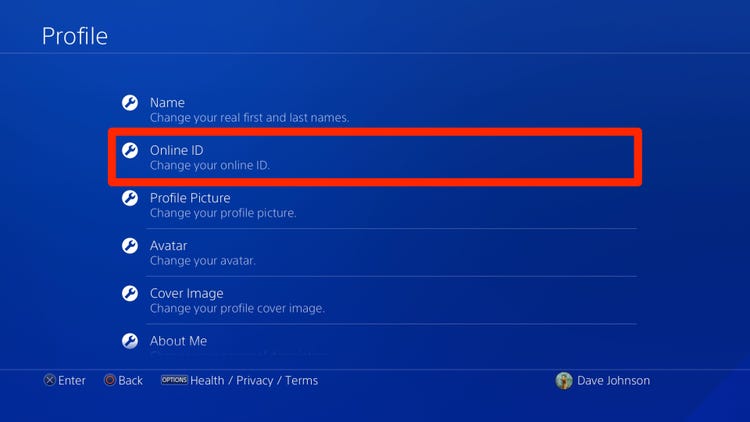
  1. To change your username using a PS4 console, navigate over to the settings and select Account Management > Account Information > Profile.
  2. The second option down the list is Online ID, where you can access the ID-change dialogue.
  3. You may be asked to confirm your account password and then review the terms and risk statement. Certain games released prior to 2018 on PlayStation 3 and 4 may have compatibility issues in regard to some features, such as trophies, saved data, and online access. Sony has a published list of known games with compatibility issues on their support page.
  4. Once you review the terms, you will now have access to the change-name dialogue. Your current username will appear on the top, as well as the date on which you started using that username. On the bottom, a prompt will confirm this first change is free, as well as the subsequent fee.
  5. Enter your desired username into the text field and confirm that it is available and accepted by Sony.
  6. Once ready, click on Confirm and your name change will be officially submitted.

Changing name on a web browser

You can also change your name from a browser.

  1. Navigate to the Sony account-login page.
  2. Once logged in to your account, click on Profile on the left under the PlayStation Network category. Your username and other account details will appear.
  3. Click on the Edit button on the right of your username.
  4. Just as on the PS4, you will be asked to acknowledge the risks and terms of the name change.
  5. Once confirmed, you can enter your desired ID and submit it once you are ready.
  6. If you encounter any issues with your new name and want to return to your original username, Sony will allow you to revert free of charge.
Tags: PS4Sony
Tweet59SendShare16
Previous Post

Latest products and technologies for gamers and casino players – Gaming expo highlights

Next Post

Samsung Galaxy Z Flip 3 via 3C certification suggests to feature fast charging

Arya Roy

Hi, this is Arya! Writing has always been a passion of mine, regardless of the topic I choose. Besides that, I am a huge foodie and music lover, whose interests range from world politics to horror films to everything in between.

Recommended For You

Australia Investigates OpenAI AI Agent After Unauthorised Medicare Portal Access

by Ishaan Negi
September 24, 2026
0
Australia Investigates OpenAI AI Agent After Unauthorised Medicare Portal Access

An OpenAI artificial intelligence agent gained unauthorised access to an Australian Government Medicare statistics portal in June, accessing both public and non-public files and prompting an urgent investigation...

Read more

Praxis Plans $1 Bn AI and Crypto-Powered Community in Uruguay

by Ishaan Negi
September 24, 2026
0
Praxis Plans $1 Bn AI and Crypto-Powered Community in Uruguay

Praxis, a technology-focused company building around artificial intelligence, cryptocurrency and internet-native communities, has announced plans to develop a new tech-oriented enclave in Uruguay. The first phase of the...

Read more

iGaming Affiliate Marketing: भारत में शुरुआती लोगों के लिए कमाई और ट्रैफिक गाइड

by Techstory
September 24, 2026
0
iGaming Affiliate Marketing: भारत में शुरुआती लोगों के लिए कमाई और ट्रैफिक गाइड

आपने किसी गेमिंग सेवा पर विस्तार से लेख लिखा और कुछ पाठक उसमें दिए लिंक से आगे भी गए। रिपोर्ट में क्लिक दिखाई देने लगे, लेकिन कमीशन अब...

Read more
Next Post
Samsung Galaxy Z Flip 3 spotted online via 3C certification suggesting to feature faster charging

Samsung Galaxy Z Flip 3 via 3C certification suggests to feature fast charging

Please login to join discussion

Techstory

Tech and Business News from around the world. Follow along for latest in the world of Tech, AI, Crypto, EVs, Business Personalities and more.
reach us at info@techstory.in

Advertise With Us

Reach out at - info@techstory.in

Aviator Game India 2026

BROWSE BY TAG

#Crypto #howto 2024 acquisition AI amazon Apple Artificial Intelligence bitcoin Business China cryptocurrency e-commerce electric vehicles Elon Musk Ethereum facebook funding Gaming Google India Instagram Investment iPhone IPO Market Markets Meta Microsoft News OpenAI samsung Social Media SpaceX startup startups tech Tech news technology Tesla TikTok trend trending twitter US

© 2025 Techstory.in

No Result
View All Result
  • News
  • Crypto
  • Gadgets
  • Memes
  • Gaming
  • Cars
  • AI
  • Startups
  • Markets
  • How to

© 2025 Techstory.in

Welcome Back!

Login to your account below

Forgotten Password?

Retrieve your password

Please enter your username or email address to reset your password.

Log In
Are you sure want to unlock this post?
Unlock left : 0
Are you sure want to cancel subscription?