Our inboxes are swamped in the twenty-first century. The more we wait for a response, the more we begin to worry if the communication was ever received.
Text messages add to the stream of conversation. You send a text and expect a response right away. But what happens if you don’t receive a response? Find out how to identify if someone is reading your text messages.
Fortunately, there are two techniques to determine whether or not an email has been read:
- Request a return receipt.
- Make use of an email tracking programme.
Return receipt requests and email tracking aren’t always effective. However, there are rare instances where an email return request is appropriate. It’s especially useful for urgent messages or when you need to know if your message got delivered.
Requesting a return receipt from your email service is the first approach to find out if someone has opened your email. We’ll look at how the return receipt function works in Microsoft Outlook and then how it works in GSuite Gmail in this section. Let’s start with Outlook:
For requesting a return receipt in Outlook, you have two options:
- Receipt once delivered
- Receipt once read
When you choose the first option, you’ll be notified when an email has been delivered to the intended recipient. Of course, just because a message was delivered does not guarantee that it was read. You may not be aware that the message is sitting in someone’s email inbox, unopened.
This brings us to Outlook’s next return receipt choice. When your receiver selects the second option, they will be asked to send a notification when they open the email.
Click the checkbox to the left of Request a Delivery Receipt to request a delivery receipt when your message is sent. Click the checkbox to the left of the Request a Read Receipt option to request a receipt when your message is opened. If you want, you can choose both alternatives.
Send your mail as normal now. When the recipient opens your message and selects Request a Read Receipt, they will be asked to send a notification. If they say yes to the prompt, you’ll get a read receipt, which is a brief message confirming that your initial message was read. Tracking settings can also be used to automate Outlook’s handling of message receipts for both outgoing and incoming messages.
The return receipt feature is not available in the free version of Gmail. GSuite, on the other hand, offers the feature. You must first enable the return receipt option in GSuite Gmail before you can utilise it.
Go to your GSuite Admin Console to enable the return receipt feature. Choose Apps > GSuite > Settings for Gmail > Advanced settings from the Apps menu. The Advanced Options window appears. Scroll down to the Email Read Receipts option using the scroll bar on the right of the screen.
Allow email read receipts to be sent to all addresses in my organisation as well as the following email addresses by clicking the toggle option to the left of Allow email read receipts to be sent to all addresses in my organisation and the following email addresses. Users in your company can request and return email receipts if this option is enabled.
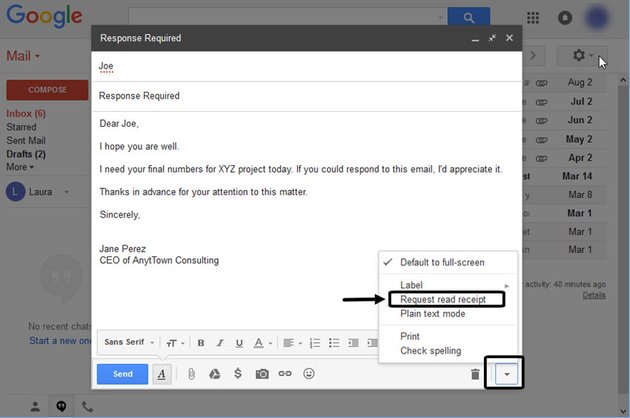
Simply type your email as usual once the Read Receipt feature is enabled. When you’re done, click the down arrow in the lower right corner to bring up a menu. From the popup menu, select Request a read receipt. When you’re finished, click Send to send your email as usual. When your receiver opens the communication, they will be asked to give a receipt.
As you’ve just discovered, relying on the native email return receipt feature to determine whether your message was received isn’t always the most reliable option. If you only need to know if your email was read once in a while, it’s probably plenty.
However, you may require a more accurate method of determining whether your email recipients have viewed the messages you have sent them. Perhaps you’re concerned about how your request for a return receipt will be received.
There is a solution to get rid of your troubles. There are a variety of extensions available that provide reliable email tracking. Frequently, the monitoring tool works without your receiver being aware that their messages are being tracked.