• Send Us A Tip
  • Calling all Tech Writers
  • Advertise
Monday, July 6, 2026
  • Login
TechStory
  • News
  • Crypto
  • Gadgets
  • Memes
  • Gaming
  • Cars
  • AI
  • Startups
  • Markets
  • How to
No Result
View All Result
  • News
  • Crypto
  • Gadgets
  • Memes
  • Gaming
  • Cars
  • AI
  • Startups
  • Markets
  • How to
No Result
View All Result
TechStory
No Result
View All Result
Home How to

How to bookmark a tweet

by Arya Roy
July 16, 2021
in How to, Tech
Reading Time: 2 mins read
0
How to bookmark a tweet

Source: https://www.history.com/this-day-in-history/twitter-launches

TwitterWhatsappLinkedin

You might be familiar with a situation where you have run into something that looked interesting while briefly browsing through your Twitter feed, and instead of giving the tweet your complete attention, you often end up either watching that video half-heartedly or skipping it completely because of your time restrictions. However, what you can do instead is ‘bookmark’ the tweet so that you are able to view it later when it is more convenient for you to do so.

You might also like

How to view instants on Instagram?

How to get coin bags in Pokémon Go?

How to request money on X?

Twitter bookmarks let you save a tweet and return to it later when you have the luxury of time and patience. The feature has been around since 2018 but many people are still not aware and end up liking tweets or sharing the tweet with their friends and family, just so that they can then access them much later.

Here is a guide on how you can easily use the Bookmark feature on Twitter.

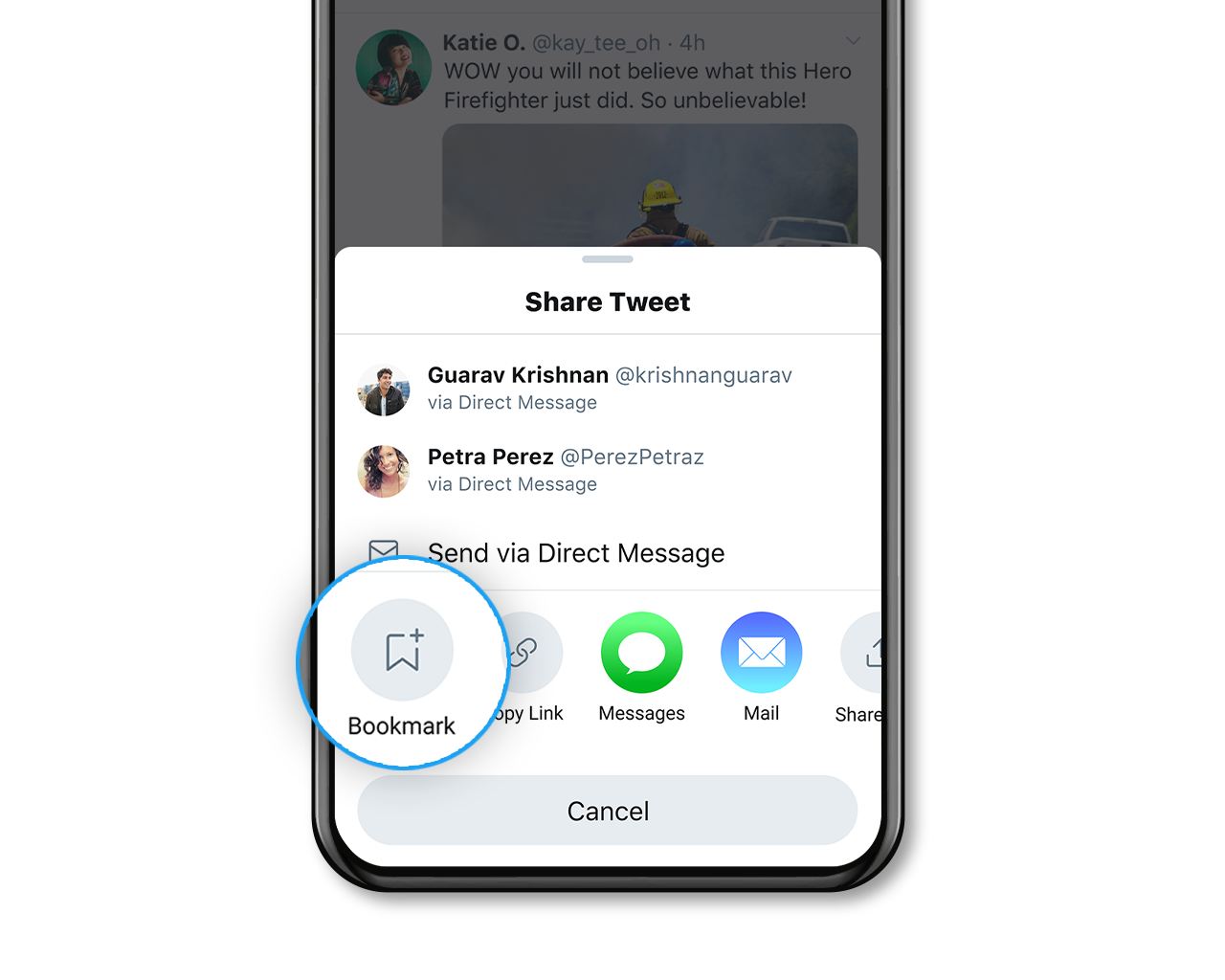
  1. Go to the tweet that you would like to bookmark so that you can see it later on when it is more convenient for you.
  2. Click on the share button that can be found below the tweet.
  3. Amongst the given share options, look for the ‘bookmark’ icon.
  4. Click on the bookmark icon, and the tweet will automatically be added to your list of bookmarked tweets.
  5. Navigate to the Twitter hamburger menu on your Twitter homepage by clicking on the three lines that are located in the top left corner of the screen.
  6. Under the ‘Bookmarks’ tab, you should be able to find a scrollable list of all of your bookmarked tweets, which you can now view at your own time, speed, and convenience.
Source: https://help.twitter.com/en/resources/twitter-guide/topics/how-to-join-the-conversation-on-twitter/how-to-use-bookmarks-on-twitter

Practice this process with the tweet given below.

The countdown begins! ⏱️⁠#Tokyo2020 #Olympics #StrongerTogether pic.twitter.com/a7PdoQEaFR

— The Olympic Games (@Olympics) July 13, 2021

Tags: Olympics 2020twitter
Tweet54SendShare15
Previous Post

How to reset an iPad without a password

Next Post

Cryptocurrency trading bots – How secure they really are

Arya Roy

Hi, this is Arya! Writing has always been a passion of mine, regardless of the topic I choose. Besides that, I am a huge foodie and music lover, whose interests range from world politics to horror films to everything in between.

Recommended For You

How to view instants on Instagram?

by Afeefa Ansari
July 6, 2026
0
Instants

Receiving instant messages from friends on Instagram? Here is how you can receive and open them when sent. Let us see how it can be done and how...

Read more

How to get coin bags in Pokémon Go?

by Afeefa Ansari
July 6, 2026
0
Coin Bags

Do you want to get a coin bag in Pokémon Go? Follow the guide to know how you can get this item in the game and then use...

Read more

How to request money on X?

by Afeefa Ansari
July 6, 2026
0
X

Want to ask for money from someone on X? Let us assist you. Follow the guide to know how you can judge someone to get money if you're...

Read more
Next Post
Cryptocurrency trading bots – How secure they really are

Cryptocurrency trading bots - How secure they really are

Please login to join discussion

Techstory

Tech and Business News from around the world. Follow along for latest in the world of Tech, AI, Crypto, EVs, Business Personalities and more.
reach us at info@techstory.in

Advertise With Us

Reach out at - info@techstory.in

Aviator Game India 2026

BROWSE BY TAG

#Crypto #howto 2024 acquisition AI amazon Apple Artificial Intelligence bitcoin Business China cryptocurrency e-commerce electric vehicles Elon Musk Ethereum facebook funding Gaming Google India Instagram Investment ios iPhone IPO Market Markets Meta Microsoft News OpenAI samsung Social Media SpaceX startup startups tech technology Tesla TikTok trend trending twitter US

© 2025 Techstory.in

No Result
View All Result
  • News
  • Crypto
  • Gadgets
  • Memes
  • Gaming
  • Cars
  • AI
  • Startups
  • Markets
  • How to

© 2025 Techstory.in

Welcome Back!

Login to your account below

Forgotten Password?

Retrieve your password

Please enter your username or email address to reset your password.

Log In
Are you sure want to unlock this post?
Unlock left : 0
Are you sure want to cancel subscription?