

• Send Us A Tip
  • Calling all Tech Writers
  • Advertise
Friday, June 19, 2026
  • Login
TechStory
  • News
  • Crypto
  • Gadgets
  • Memes
  • Gaming
  • Cars
  • AI
  • Startups
  • Markets
  • How to
No Result
View All Result
  • News
  • Crypto
  • Gadgets
  • Memes
  • Gaming
  • Cars
  • AI
  • Startups
  • Markets
  • How to
No Result
View All Result
TechStory
No Result
View All Result
Home How to

How to check E-challan status online

by Arya Roy
May 20, 2021
in How to, India News
Reading Time: 2 mins read
0
How to check E-challan status online

Source: https://www.policeresults.com/online-traffic-e-challan-status/

TwitterWhatsappLinkedin

Traffic violations have been consistently increasing in frequency, but most of them unchecked in our country due to a severe lack of manpower, resources, and adequate technology. However, by introducing the New Motor Vehicles Act of 2019, the Government of India has focused on the integration of modern technology, stricter enforcement, and higher penalties to make sure that the degree of road safety improves significantly.

You might also like

How To Use Discord On Xbox

How To Change Your Roblox Username

How To Get Out Of Claude Design

As part of its initiative to integrate technology for increased road safety and curtail corruption, the government has also adopted a wide variety of Intelligence Traffic Management Systems (ITMS) for traffic surveillance, monitoring, enforcement, and penalisation.

Some larger metropolitan cities are currently using high-tech ITMS suites, such as those for Red Light Violation Detection (RLVD), speed violation detection, Automatic Number Plate Recognition (ANPR) and the use of e-challan. Also, many states in India are using traffic e-challan for improved tracking, better enforcement, and the efficient collection of fines.

Some of the states that have implemented an e-challan payment system include Delhi, Maharashtra, Haryana, Punjab, Rajasthan, Gujarat, Himachal Pradesh, Jammu & Kashmir, and Tamil Nadu, among others. Furthermore, in Uttar Pradesh, traffic violators can check the e-challan status and make a traffic challan enquiry at the E-challan UP website if required.

The Government of India has introduced this facility to make traffic-related services convenient for citizens and to make the monitoring process easy and effective for authorities. The traffic e-challan is sent through an Android application and web gateway. The application is associated with the web portal implemented by the government, which is Sarathi and Vahan. These two portals make several traffic challan-related facilities easier to access. You can make an online e-challan payment and check your challan status online.

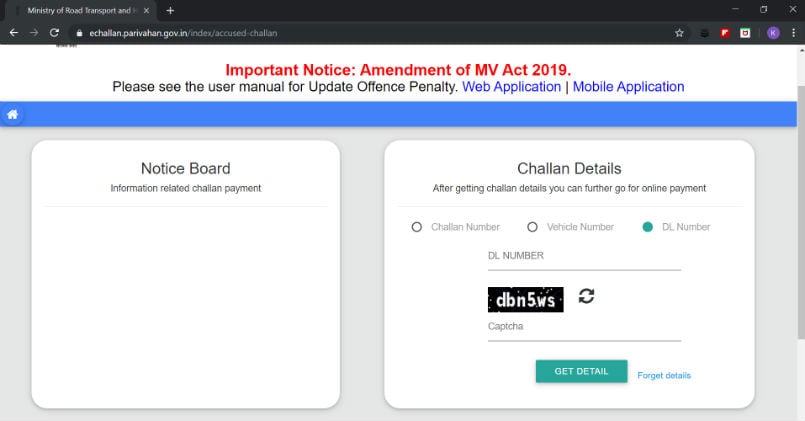
Once an e-challan is issued in the name of a vehicle owner, he can go to the designated website of the concerned RTO and check his e-challan status. In order to avoid legal action and related penalties, the vehicle owner can make an e-challan payment without visiting the local RTO office. In fact, he can even make the payment online using credit cards, debit cards, or net banking.
Source: https://technosavvy.net/traffic-fines-heres-how-to-check-and-pay-challan-online-instantly/

To check your e-challan status online, use the following steps:

  1. Visit https://echallan.parivahan.gov.in/ using any browser of your choice.
  2. Click on the ‘Check Challan Status’ tab.
  3. Once you do so, a new page will open where you can enter your vehicle or D number to check your traffic challan status online.
  4. If there are no current traffic challans against you, a dialogue box saying ‘Challan Not Found’ will pop up on your screen, and the row will be blank.

Tags: E-challan
Tweet55SendShare15
Previous Post

Income Tax Department to launch new portal, and Twitter is filled with reactions and responses

Next Post

Internet Explorer will soon be laid to rest, and netizens cannot rest.

Arya Roy

Hi, this is Arya! Writing has always been a passion of mine, regardless of the topic I choose. Besides that, I am a huge foodie and music lover, whose interests range from world politics to horror films to everything in between.

Recommended For You

How To Use Discord On Xbox

by Khilav Jadav
June 19, 2026
0
How to Fix Discord Awaiting Endpoint 

Discord is one of the most popular communication platforms for gamers. Thanks to official support from Microsoft, Xbox players can now use Discord voice chat while playing their...

Read more

How To Change Your Roblox Username

by Khilav Jadav
June 19, 2026
0
How to Enchant in Prospecting

Changing your username in Roblox is a great way to refresh your identity and give your account a new look. Whether you created your account years ago or...

Read more

How To Get Out Of Claude Design

by Khilav Jadav
June 19, 2026
0
How To Get Out Of Claude Design

Claude Design is a new workspace inside Claude that allows users to create prototypes, presentations, and other visual projects. While many people enjoy using it, some users accidentally...

Read more
Next Post
Internet Explorer

Internet Explorer will soon be laid to rest, and netizens cannot rest.

Please login to join discussion

Techstory

Tech and Business News from around the world. Follow along for latest in the world of Tech, AI, Crypto, EVs, Business Personalities and more.
reach us at info@techstory.in

Advertise With Us

Reach out at - info@techstory.in

Aviator Game India 2026

BROWSE BY TAG

#Crypto #howto 2024 acquisition AI amazon Apple Artificial Intelligence bitcoin Business China cryptocurrency e-commerce electric vehicles Elon Musk Ethereum facebook funding Gaming Google India Instagram Investment ios iPhone IPO Market Markets Meta Microsoft News OpenAI samsung Social Media SpaceX startup startups tech technology Tesla TikTok trend trending twitter US

© 2025 Techstory.in

No Result
View All Result
  • News
  • Crypto
  • Gadgets
  • Memes
  • Gaming
  • Cars
  • AI
  • Startups
  • Markets
  • How to

© 2025 Techstory.in

Welcome Back!

Login to your account below

Forgotten Password?

Retrieve your password

Please enter your username or email address to reset your password.

Log In
Are you sure want to unlock this post?
Unlock left : 0
Are you sure want to cancel subscription?
