• Send Us A Tip
  • Calling all Tech Writers
  • Advertise
Monday, July 6, 2026
  • Login
TechStory
  • News
  • Crypto
  • Gadgets
  • Memes
  • Gaming
  • Cars
  • AI
  • Startups
  • Markets
  • How to
No Result
View All Result
  • News
  • Crypto
  • Gadgets
  • Memes
  • Gaming
  • Cars
  • AI
  • Startups
  • Markets
  • How to
No Result
View All Result
TechStory
No Result
View All Result
Home How to

How to get bots on Discord

by Srestha Roy
September 10, 2021 - Updated On January 26, 2022
in How to
Reading Time: 2 mins read
0
How to get bots on Discord
TwitterWhatsappLinkedin

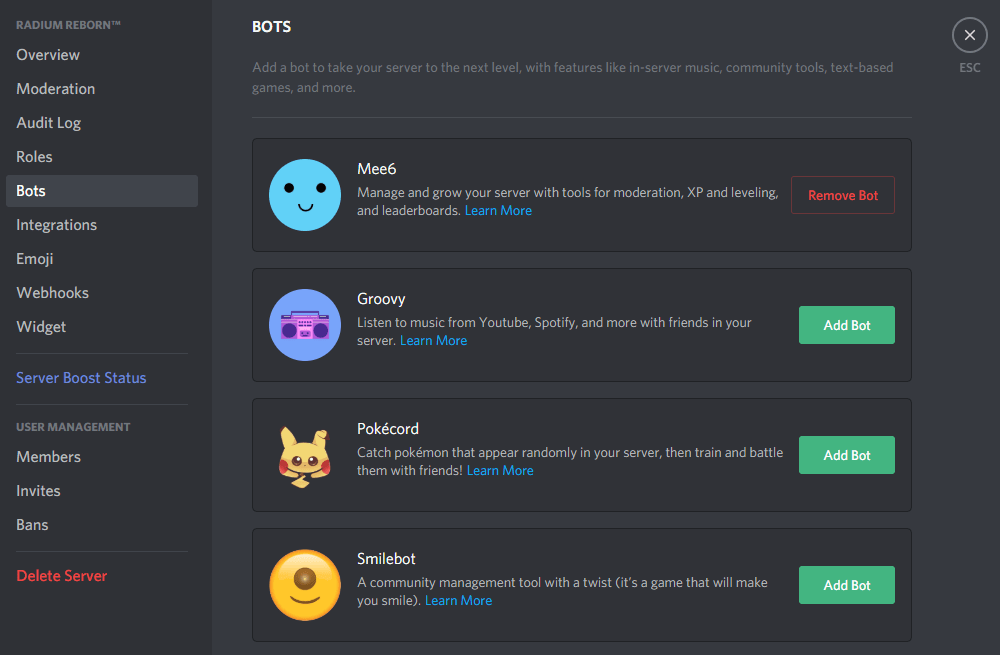
Bots on Discord, a group messaging application, are handy artificial intelligence that can automate a variety of activities on your server.
You might also like

How to view instants on Instagram?

How to get coin bags in Pokémon Go?

How to request money on X?

Source – Know It Info

This involves greeting new members, removing offenders, and regulating the conversation. Some bots even allow you to play music or play games on your server.

According to Increditools, to add an automaton to your server, you don’t need to be a coding expert. You just tweak what the bots do and say after downloading them. We’ll go through how to get the MEE6 bot and how to use it as a greeting bot, a moderating bot, and a bot that informs your server when you’re streaming.

How to add a bot to Discord

You may use a variety of ready-made bots on your server. MEE6 is one of the most well-known.

  • MEE6 may be downloaded from the link below.

https://mee6.xyz/

  • Select “Add to Discord” from the drop-down menu.
  • To verify your account, enter your Discord username and password. Click “Authorize” if a pop-up asks for your permission to use your account.
  • Next to your server name, click “Set up MEE6.”
  • In the pop-up box, select your server and click “Continue.”
  • Choose whatever permissions you want to grant this bot.
  • Click “Authorize” at the bottom of the page.

How to set up MEE6 as a Discord welcoming bot

You’ll be given options for what sort of bot you may make once you’ve authorised MEE6. We’ll start by making a bot that greets newcomers to your server.

  • Select “Welcome” from the drop-down menu.
  • Choose what you’d want the bot to accomplish. “Send a message when a user joins the server,” “Send a private message to new users,” “Give a role to new users,” and “Send a message when a user quits the server” are the choices available to you.
  • You may customise everything about your bot, including the text colour and font, as well as the channel in which it will post.
  • When you’re finished, click “Save.” If you wish to make modifications, return to this plug-ins page.

How to set up MEE6 as a Discord moderating bot

  • Return to the MEE6 website’s plug-ins page to set up your moderator bot. A moderator may restrict profanity and throw bad actors off your server, among other things.
  • Select the “Moderator” symbol from the drop-down menu.
  • Then, in the pop-up, select “Yes” to activate it.
  • Select the rules you want your bot to enforce by scrolling down to “Auto-moderator.” Bad language, spoilers, and excessive emojis can all be censored.
  • You may choose how your bot reprimands people when you choose what your bot will monitor. The message can be automatically removed, or a warning message can be issued to the user who prompted the auto-moderation.
  • To adjust the threshold for when the bot is triggered, go to “Settings.” For example, after a post has received a specific amount of spoiler tags, the bot can take action. You may also choose which channels the bot should ignore.
  • Save any changes you’ve made.
Tags: BotsBots on DoscordDiscordMEE6Moderating bot
Tweet54SendShare15
Previous Post

Bitcoin may collapse like trading stamps: Sweden’s central bank chief

Next Post

MasterCard Acquires CipherTrace to Improve Crypto Capabilities

Srestha Roy

Recommended For You

How to view instants on Instagram?

by Afeefa Ansari
July 6, 2026
0
Instants

Receiving instant messages from friends on Instagram? Here is how you can receive and open them when sent. Let us see how it can be done and how...

Read more

How to get coin bags in Pokémon Go?

by Afeefa Ansari
July 6, 2026
0
Coin Bags

Do you want to get a coin bag in Pokémon Go? Follow the guide to know how you can get this item in the game and then use...

Read more

How to request money on X?

by Afeefa Ansari
July 6, 2026
0
X

Want to ask for money from someone on X? Let us assist you. Follow the guide to know how you can judge someone to get money if you're...

Read more
Next Post
MasterCard Acquires CipherTrace to Improve Crypto Capabilities

MasterCard Acquires CipherTrace to Improve Crypto Capabilities

Please login to join discussion

Techstory

Tech and Business News from around the world. Follow along for latest in the world of Tech, AI, Crypto, EVs, Business Personalities and more.
reach us at info@techstory.in

Advertise With Us

Reach out at - info@techstory.in

Aviator Game India 2026

BROWSE BY TAG

#Crypto #howto 2024 acquisition AI amazon Apple Artificial Intelligence bitcoin Business China cryptocurrency e-commerce electric vehicles Elon Musk Ethereum facebook funding Gaming Google India Instagram Investment ios iPhone IPO Market Markets Meta Microsoft News OpenAI samsung Social Media SpaceX startup startups tech technology Tesla TikTok trend trending twitter US

© 2025 Techstory.in

No Result
View All Result
  • News
  • Crypto
  • Gadgets
  • Memes
  • Gaming
  • Cars
  • AI
  • Startups
  • Markets
  • How to

© 2025 Techstory.in

Welcome Back!

Login to your account below

Forgotten Password?

Retrieve your password

Please enter your username or email address to reset your password.

Log In
Are you sure want to unlock this post?
Unlock left : 0
Are you sure want to cancel subscription?