

• Send Us A Tip
  • Calling all Tech Writers
  • Advertise
Friday, June 19, 2026
  • Login
TechStory
  • News
  • Crypto
  • Gadgets
  • Memes
  • Gaming
  • Cars
  • AI
  • Startups
  • Markets
  • How to
No Result
View All Result
  • News
  • Crypto
  • Gadgets
  • Memes
  • Gaming
  • Cars
  • AI
  • Startups
  • Markets
  • How to
No Result
View All Result
TechStory
No Result
View All Result
Home How to

How to hide online status on WhatsApp?

by Chhavideep Singh
August 1, 2022
in How to
Reading Time: 2 mins read
0
WhatsApp

Credits: YouTube

TwitterWhatsappLinkedin
WhatsApp
Credits:
YouTube

WhatsApp is one of the most used messaging apps on the planet and everyone is using WhatsApp to conduct private conversations, corporate chats, group chats etc. People want to communicate through chats and WhatsApp is what they use. This application has become an industry standard for chatting since its very launch. The reason behind this is a clean software with no ads whatsoever. The users can simply go to the chat box of the person they want to text and send them a text. That is all, it is as simple as that! People love this application and as much as I can say good things about this application, nobody cannot not have WhatsApp because everyone in the world is using it and it is simply an inconvenience now that you cannot delete it, even if you wish to.

You might also like

How to recover a lost crypto wallet?

How to build an AI agent without coding?

How To Use Discord On Xbox

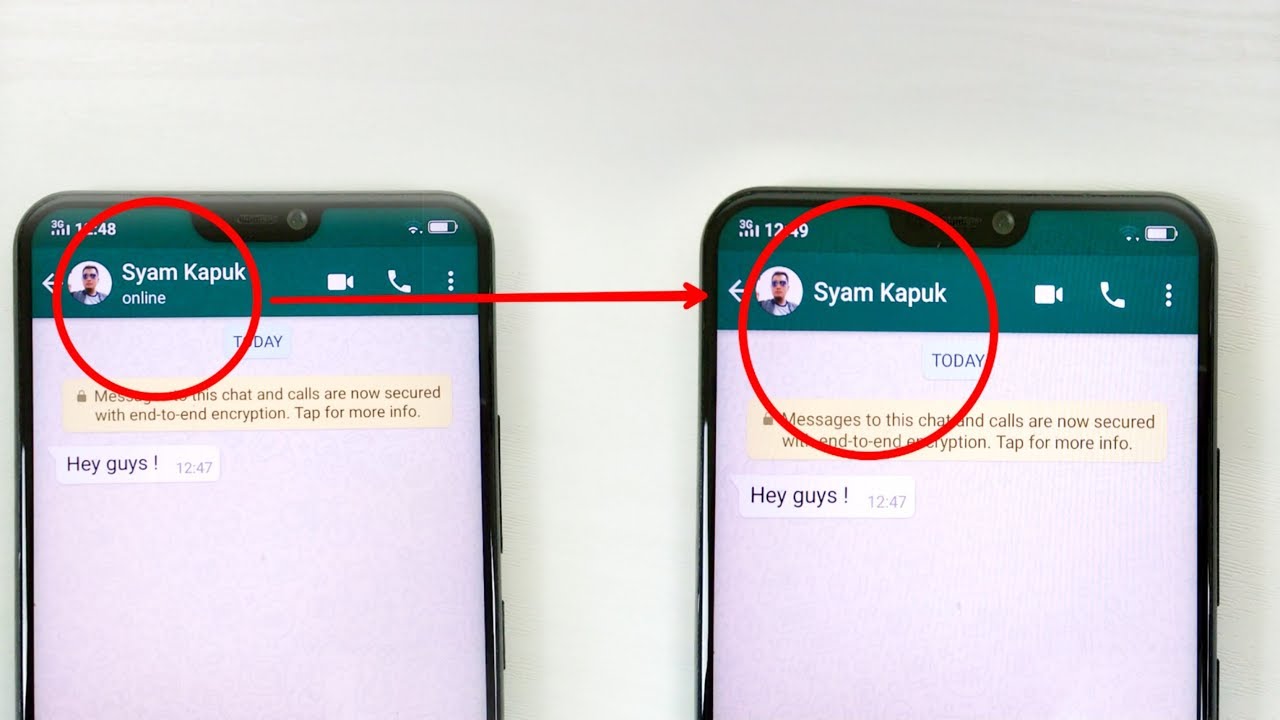
Anyhow, privacy is another big concern while using social media platforms and WhatsApp is no less. If you have noticed, sometime when you open your friend’s chat, it shows his/her last seen date and time which means the last time when he/she was active and using WhatsApp. As useful as this may be, it can hamper your privacy because people might think that you are online and available to chat but in reality, you are not, and just looking at some documents that your office friend sent you. That does not give a good impression to others who can see that you are online.

What you can do in this scenario is to hide your Last Seen status from WhatsApp and no one will ever know when and at what time you were last available on the chatting platform.

How to hide online status on WhatsApp?

Follow these below mentioned steps to disable Online Status from WhatsApp:

  1. Unlock your smartphone and launch WhatsApp
  2. Go to Settings on WhatsApp
  3. Click on Accounts
  4. Go to Privacy
  5. Click on Last Seen > the status would be automatically set to ‘Everyone’.
  6. When you click on it, you get to choose from ‘Everyone’, ‘My Contacts’ and ‘Nobody’.
  7. Click on ‘Nobody’.
  8. Go Back and Done!

This is all you need to hide online status on WhatsApp. Nobody will now be able to see that you were online sometime back. Please note that since you have disabled this feature for your privacy, you will now not be able to see other’s Last Seen status as well!

 

Tags: last seenOnline statuswhatsapp
Tweet54SendShare15
Previous Post

How to take burst photos on iPhone 12?

Next Post

How to catch a scorpion in Animal Crossing?

Chhavideep Singh

Hi! I'm Chhavideep, If you like reading about technology, business and start-ups, you've come to the right place. Catch me: chhavideep@connasys.com

Recommended For You

How to recover a lost crypto wallet?

by Afeefa Ansari
June 19, 2026
0
Crypto wallet

Have you lost your crypto wallet and need it back? Calm yourself down. It is still rescuable. Let us see how one can take care of the immediate...

Read more

How to build an AI agent without coding?

by Afeefa Ansari
June 19, 2026
0
AI agent

Do you find AI agents cool? It is now possible to create one without writing code. So, let's get started and see if it's really possible and how...

Read more

How To Use Discord On Xbox

by Khilav Jadav
June 19, 2026
0
How to Fix Discord Awaiting Endpoint 

Discord is one of the most popular communication platforms for gamers. Thanks to official support from Microsoft, Xbox players can now use Discord voice chat while playing their...

Read more
Next Post
Animal Crossing

How to catch a scorpion in Animal Crossing?

Please login to join discussion

Techstory

Tech and Business News from around the world. Follow along for latest in the world of Tech, AI, Crypto, EVs, Business Personalities and more.
reach us at info@techstory.in

Advertise With Us

Reach out at - info@techstory.in

Aviator Game India 2026

BROWSE BY TAG

#Crypto #howto 2024 acquisition AI amazon Apple Artificial Intelligence bitcoin Business China cryptocurrency e-commerce electric vehicles Elon Musk Ethereum facebook funding Gaming Google India Instagram Investment ios iPhone IPO Market Markets Meta Microsoft News OpenAI samsung Social Media SpaceX startup startups tech technology Tesla TikTok trend trending twitter US

© 2025 Techstory.in

No Result
View All Result
  • News
  • Crypto
  • Gadgets
  • Memes
  • Gaming
  • Cars
  • AI
  • Startups
  • Markets
  • How to

© 2025 Techstory.in

Welcome Back!

Login to your account below

Forgotten Password?

Retrieve your password

Please enter your username or email address to reset your password.

Log In
Are you sure want to unlock this post?
Unlock left : 0
Are you sure want to cancel subscription?
