

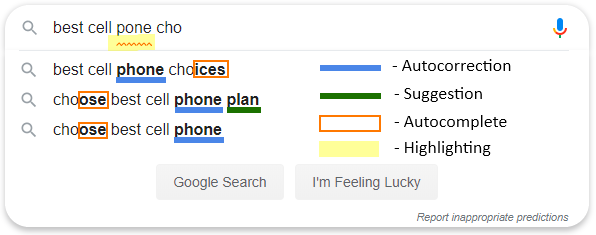
Autocorrection, often known as text replacement, replace-as-you-type, or just autocorrect, is a data validation feature featured in word processors and text editing interfaces for smartphones and tablets. Its primary function is to fix frequent spelling and typing errors as part of the spell checker, saving the user time. It may also be used to automatically format text or insert special characters by identifying certain character use, allowing the user to avoid using more time-consuming operations. Text messaging and SMS, as well as apps like Microsoft Word, employ autocorrection.
In the realm of computers and smartphones, autocorrect jokes are widespread; any strange error or insensible term is frequently referred to as an auto correct. On a computer, autocorrect is a godsend when typing large papers, but it’s a nightmare on a smartphone, especially if you’re writing in Hinglish or another language.
In many schools and companies, misusing text replacement software is a common practical joke. The prankster usually modifies the victim’s word processing software to substitute a commonly used term with a hilarious absurdity or an improperly written variant of the original phrase. Because of the increased usage of autocorrection on smartphones, at least one website, Damn You Auto Correct, has sprung up where individuals can submit and discuss amusing or humiliating examples of bad autocorrection. Jillian Madison founded Damn You Auto Correct in 2010. It’s also the title of a book written by Madison and released by Hyperion Books in 2011.
It’s a computer, and like other machine slaves, it allows you to permanently off autocorrect. As a result, if you’ve recently upgraded to an Android or iPhone and are having trouble typing multilingual texts, here’s how you may make things simpler. On your Android and iOS devices, turn off the auto-correction feature in a few simple steps.
On Android, disable autocorrect by following the steps below.
- Only if you use the Google GBoard as your preferred keyboard will this function. Those using the Facemoji keyboard or Swiftkey will need to contact the developers for the same procedure.
- By pressing on the Google Search bar or any text field, the Gboard keyboard will appear.
- Then, from the top bar of the keyboard, click the Settings option (the gear icon).
- Go to the “Text Correction” option after the settings menu has opened.
- The Auto-correction option will be switched on by default. Simply touch on it, and you’re ready to go.
- Suggestions will continue to appear on your keyboard, but they will not automatically replace the text.
On the iPhone, turn off autocorrect by following the steps below.
- These instructions are only applicable if you use the default iOS keyboard.
- Navigate to the Settings menu.
- Go to the General section of the menu.
- After that, scroll down and choose Keyboard.
- The Auto correction choices will be switched on under this. To turn it off, tap the toggle.




