• Send Us A Tip
  • Calling all Tech Writers
  • Advertise
Monday, July 13, 2026
  • Login
TechStory
  • News
  • Crypto
  • Gadgets
  • Memes
  • Gaming
  • Cars
  • AI
  • Startups
  • Markets
  • How to
No Result
View All Result
  • News
  • Crypto
  • Gadgets
  • Memes
  • Gaming
  • Cars
  • AI
  • Startups
  • Markets
  • How to
No Result
View All Result
TechStory
No Result
View All Result
Home How to

How to update company details on Internshala

by Khushi Sethi
March 25, 2022 - Updated On March 27, 2022
in How to, Tech
Reading Time: 2 mins read
0
How to update company details on Internshala
TwitterWhatsappLinkedin

Internships are gaining popularity in India and moving at a rapid pace. Internshala is a key player in making internships available online in India. It’s a free resource for both interns and employers. Internshala currently has over 3000000 student visits and more than 80000 companies registered on its website. Internshala also provides online education in a variety of fields.

You might also like

Meta Challenges Landmark Jury Verdict Holding Company Liable for Social Media Addiction

How to check which websites are tracking you?

How to free up storage without deleting important files?

Internshala is a web-based platform that connects students and employers with internship opportunities and career services.
Students can use the platform to find and post internships, as well as other career services like counselling, cover letter writing, resume building, and training programmes.
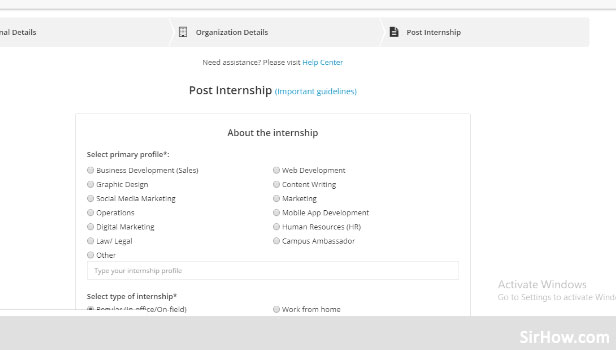
How to Post Job in Internshala: 9 Steps (with Pictures)
Source: Sirihow

One can easily update their company details through the following steps:-


  1. Log in to your company account on Internshala
  2. Select the profile logo on the top right corner
  3. Click on organisation Details


The various things you can edit are:

  • You can edit your company name
  • You can edit your Company description to keep the possible employees updated about your company achievements.
  • You can edit your company logo and upload a new one.


But you can altogether be an attractive employer by keeping some of the following tips to keep your company updated.


Before you hire an intern, you should:

  1. Write an internship job role (JD) – Be as specific as possible when describing the roles and responsibilities. It assists candidates in determining whether they are a good fit for the internship and, more importantly, it assists you in avoiding those who aren’t. Here’s an illustration.

– You should create separate posts if you plan to hire interns for different roles (web development, content writing, etc.). It saves you the trouble of separating applications for various profiles.

You can also use Internshala to create custom questions that students must answer before submitting their applications. Through these questions, you can learn about the candidate’s expectations and assess her fit.


When you hired:

  1. Set the application status to ‘Hired’ at all times: This initiates an automated process that notifies the student’s college authorities and requests that they issue an online No Objection Certificate. This step ensures that the candidate is more accountable.
  2. Send a formal offer letter to the candidate, requesting that he or she sign and return a scanned copy of the letter as formal acceptance. It isn’t a match until both parties agree to it. A Sample Offer Letter is available for download.

Keep a few backup candidates on hand as well. If the chosen intern declines, you may extend the offer to the next best candidate.


Tags: EmployerInternshipIntershalatechtechnology
Tweet55SendShare15
Previous Post

How to read deleted WhatsApp messages

Next Post

Billionaire Carl Icahn says a recession is coming

Khushi Sethi

Recommended For You

Meta Challenges Landmark Jury Verdict Holding Company Liable for Social Media Addiction

by Sneha Singh
July 13, 2026
0
Meta Challenges Landmark Jury Verdict Holding Company Liable for Social Media Addiction

Meta has appealed a landmark court verdict that found the company responsible for contributing to a young woman's social media addiction and mental health struggles. The appeal marks...

Read more

How to check which websites are tracking you?

by Afeefa Ansari
July 13, 2026
0
tracking websites

You don't just track websites; websites track you. Here is all you must know about it, and be aware just in case the need arises. Follow the guide...

Read more

How to free up storage without deleting important files?

by Afeefa Ansari
July 13, 2026
0
Storage

If you want to make room on your device storage without deleting files, it can seem like a daunting task. But to an extent, it is still doable....

Read more
Next Post
Carl Icahn says a recession is coming

Billionaire Carl Icahn says a recession is coming

Please login to join discussion

Techstory

Tech and Business News from around the world. Follow along for latest in the world of Tech, AI, Crypto, EVs, Business Personalities and more.
reach us at info@techstory.in

Advertise With Us

Reach out at - info@techstory.in

Aviator Game India 2026

BROWSE BY TAG

#Crypto #howto 2024 acquisition AI amazon Apple Artificial Intelligence bitcoin Business China cryptocurrency e-commerce electric vehicles Elon Musk Ethereum facebook funding Gaming Google India Instagram Investment ios iPhone IPO Market Markets Meta Microsoft News OpenAI samsung Social Media SpaceX startup startups tech technology Tesla TikTok trend trending twitter US

© 2025 Techstory.in

No Result
View All Result
  • News
  • Crypto
  • Gadgets
  • Memes
  • Gaming
  • Cars
  • AI
  • Startups
  • Markets
  • How to

© 2025 Techstory.in

Welcome Back!

Login to your account below

Forgotten Password?

Retrieve your password

Please enter your username or email address to reset your password.

Log In
Are you sure want to unlock this post?
Unlock left : 0
Are you sure want to cancel subscription?