


• Send Us A Tip
  • Calling all Tech Writers
  • Advertise
Wednesday, July 8, 2026
  • Login
TechStory
  • News
  • Crypto
  • Gadgets
  • Memes
  • Gaming
  • Cars
  • AI
  • Startups
  • Markets
  • How to
No Result
View All Result
  • News
  • Crypto
  • Gadgets
  • Memes
  • Gaming
  • Cars
  • AI
  • Startups
  • Markets
  • How to
No Result
View All Result
TechStory
No Result
View All Result
Home How to

How to save posts on Instagram to watch later

by Amandeep Suter
January 29, 2021 - Updated On February 1, 2021
in How to, Popular, Tech, Trending
Reading Time: 3 mins read
0
How to save posts on Instagram to watch later
TwitterWhatsappLinkedin

The photo and video sharing app are one of the most popular social media apps. Instagram has nearly 1 billion users all around the world. Take a look at the users based on nationality. The USA currently has the most number of users, followed by India and Brazil. (No it’s not the coronavirus stats, it is Instagram’s current users).Save instagram post

You might also like

Scotland’s SNP Votes To Freeze All New Datacentres, Threatening The Heart Of Britain’s AI Infrastructure Plans

Cult.fit Files DRHP With SEBI For ₹950 Crore Fresh Issue, Total IPO Could Touch ₹4,000 Crore

How to forward mail to a new address?

Based on Instagram’s growth and popularity, it is the only social media app close enough to dethrone the Social Media kind, Facebook. Well, since Instagram is also owned by Facebook, Mark Zuckerberg probably won’t mind.

Over the years, Instagram has had several updates and features. What started a decade ago, as just a photo-sharing app, is today among the most influential social media networks.

Instagram - Logo De Instagram - 1920x1080 - Download HD Wallpaper - WallpaperTip

Based on a report, most people use social media networks while commuting. A lot of times it happens that we come across a post we really like, but don’t have the time to check it out. Thankfully, Instagram has given us a solution to that.

Follow these steps to know how can you save a post on Instagram to watch or read it later –

a). Open Instagram and select the post you want to save.

b). Below the post on the right-hand side, you will see a “bookmark” symbol.

 

c), Tap on it. You will get a message saying saved to the collection. You can also create multiple tabs where you can save different types of posts. Save instagram post

 

d). Now to watch the posts later, what you need to do is tap on your Dp below. It will be located on the right side of the screen.

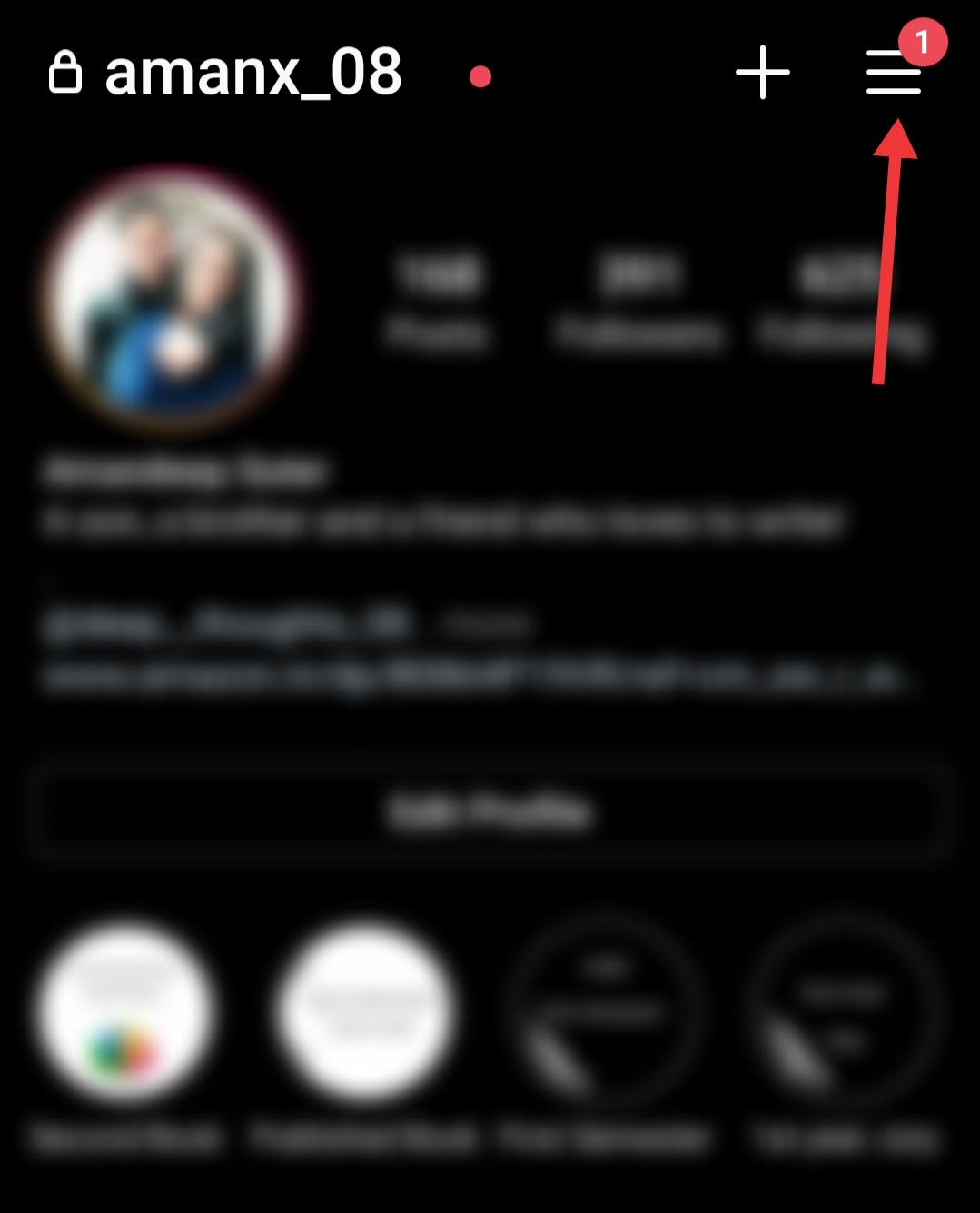
e). You will then be transferred to your profile Save instagram post

f). Click on the 3 horizontal lines or the Hamburger symbol. It will be located on the top-right of the screen.
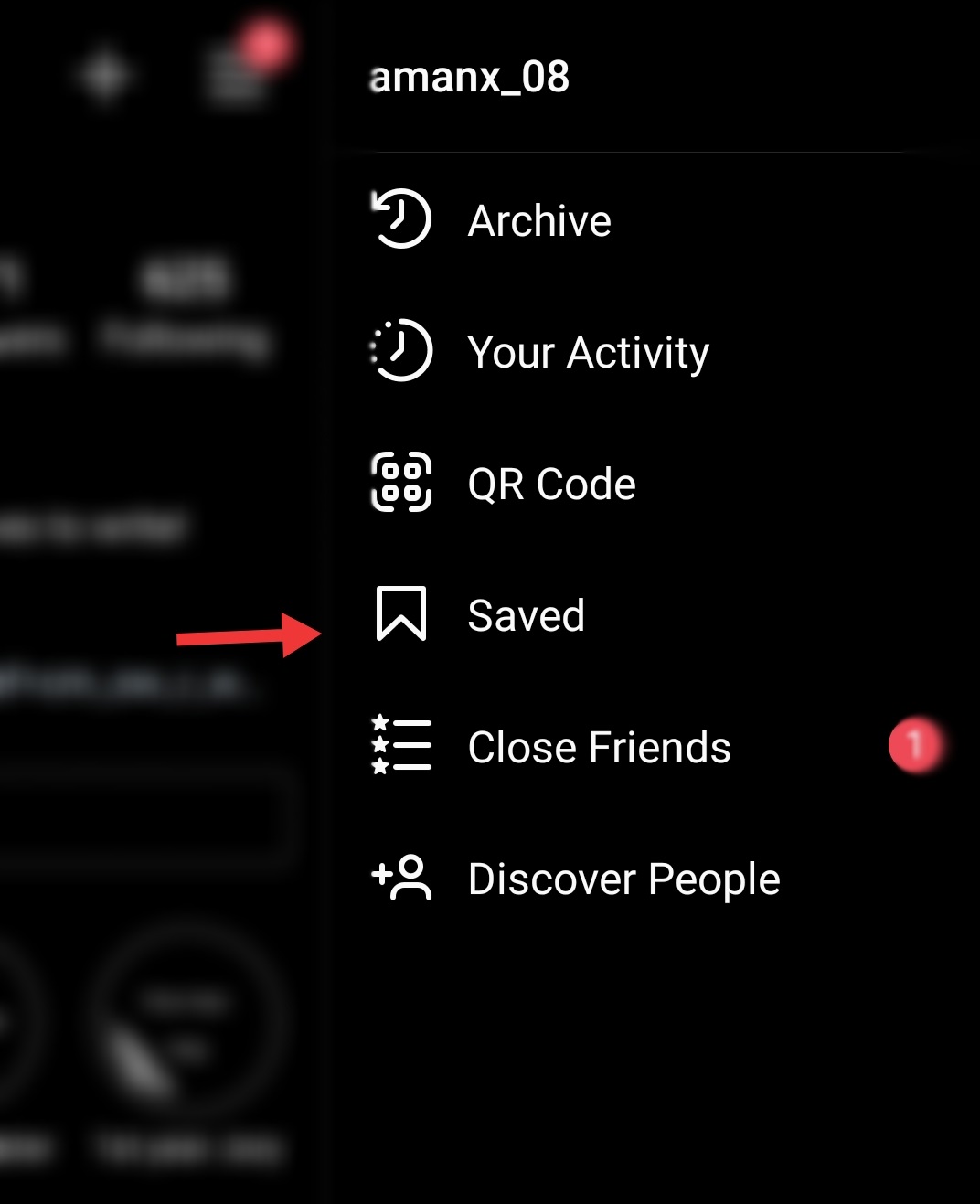
g). You will see multiple options like archive, your activity, saved, and others. Tap on the Saved option.
h). Then you will look at all your saved posts. You can create multiple files to save different posts. Click on the file you saved your post in.

i). Then click on the saved post you want to read.

This is how you can save the posts and read or watch them later based on your convenience. This also allows you to revisit the posts you enjoy. In fact, if you can also use this feature to help you with your professional front. For example, if you’re a designer or a writer, you can save important posts or tips.

Save instagram post

Quite a useful feature, isn’t it?

If you want to get more free Instagram followers to promote your business or your brand, you can try to use GetInsta, the best tool to get free Instagram followers & likes.

 

Tags: InstagramPostSaved postSocial Media
Tweet57SendShare16
Previous Post

How to Export chats from WhatsApp to Telegram

Next Post

How to use Signal app on desktop – The Ultimate Guide

Amandeep Suter

A son, a brother and a friend who loves to write!

Recommended For You

Scotland’s SNP Votes To Freeze All New Datacentres, Threatening The Heart Of Britain’s AI Infrastructure Plans

by Rounak Majumdar
July 8, 2026
0
Scotland's SNP Votes To Freeze All New Datacentres, Threatening The Heart Of Britain's AI Infrastructure Plans

A vote inside Scotland's ruling party has placed the UK's artificial intelligence agenda in serious risk. The Scottish National Party's national council voted a motion last Sunday to...

Read more

Cult.fit Files DRHP With SEBI For ₹950 Crore Fresh Issue, Total IPO Could Touch ₹4,000 Crore

by Rounak Majumdar
July 8, 2026
0
Cult.fit Files DRHP With SEBI For ₹950 Crore Fresh Issue, Total IPO Could Touch ₹4,000 Crore

India's largest organised fitness network has taken its most concrete step yet toward a public listing. Cult.fit Healthcare Limited filed its Draft Red Herring Prospectus with the Securities...

Read more

How to forward mail to a new address?

by Afeefa Ansari
July 8, 2026
0
Mail

Forwarding an email is a simple process and is helpful all the same. Follow the guide to know how you can forward the mail to a new address!...

Read more
Next Post
Signal Desktop

How to use Signal app on desktop - The Ultimate Guide

Please login to join discussion

Techstory

Tech and Business News from around the world. Follow along for latest in the world of Tech, AI, Crypto, EVs, Business Personalities and more.
reach us at info@techstory.in

Advertise With Us

Reach out at - info@techstory.in

Aviator Game India 2026

BROWSE BY TAG

#Crypto #howto 2024 acquisition AI amazon Apple Artificial Intelligence bitcoin Business China cryptocurrency e-commerce electric vehicles Elon Musk Ethereum facebook funding Gaming Google India Instagram Investment ios iPhone IPO Market Markets Meta Microsoft News OpenAI samsung Social Media SpaceX startup startups tech technology Tesla TikTok trend trending twitter US

© 2025 Techstory.in

No Result
View All Result
  • News
  • Crypto
  • Gadgets
  • Memes
  • Gaming
  • Cars
  • AI
  • Startups
  • Markets
  • How to

© 2025 Techstory.in

Welcome Back!

Login to your account below

Forgotten Password?

Retrieve your password

Please enter your username or email address to reset your password.

Log In
Are you sure want to unlock this post?
Unlock left : 0
Are you sure want to cancel subscription?