

• Send Us A Tip
  • Calling all Tech Writers
  • Advertise
Friday, August 28, 2026
  • Login
TechStory
  • News
  • Crypto
  • Gadgets
  • Memes
  • Gaming
  • Cars
  • AI
  • Startups
  • Markets
  • How to
No Result
View All Result
  • News
  • Crypto
  • Gadgets
  • Memes
  • Gaming
  • Cars
  • AI
  • Startups
  • Markets
  • How to
No Result
View All Result
TechStory
No Result
View All Result
Home How to

Here’s how to export all your Facebook posts to Google Drive

by Bhumika Paliwal
April 21, 2021
in How to
Reading Time: 2 mins read
0
facebook
TwitterWhatsappLinkedin
Facebook warns you that you are not ‘moving’ or ‘deleting’ old posts. You are just copying them to another location. To delete all your posts, you need to do them all manually, or you can delete your entire Facebook account.
Pixabay

Wanting to leave Facebook? Or then again simply need to save temporary posts you’ve made on the platform? You would now be able to move them all to a Google Doc, Blogger, or WordPress.

You might also like

How to Get the Klombo Sprite in Fortnite

How to Get Crash Bandicoot in Fortnite

How to Play Co-Op MyCAREER in NBA 2K27

Facebook is presently permitting you to swap your presents on Google Drive, and here’s a guide on how you can do it. However, what does one do after you have sent out every one of these posts?

Certainly, you can download everything on your PC and protect it sponsored up and, you know, if you need to look back at 10 years or so of awkward things you’ve posted. This is additionally something to be thankful for to do if you are anticipating leaving the platform completely.

How to export your Facebook posts:

– Start Facebook and head over to Settings.

– Go to the Your Facebook Information segment. Click on ‘View’ and then on the ‘Transfer a Copy of Your Information’ line.
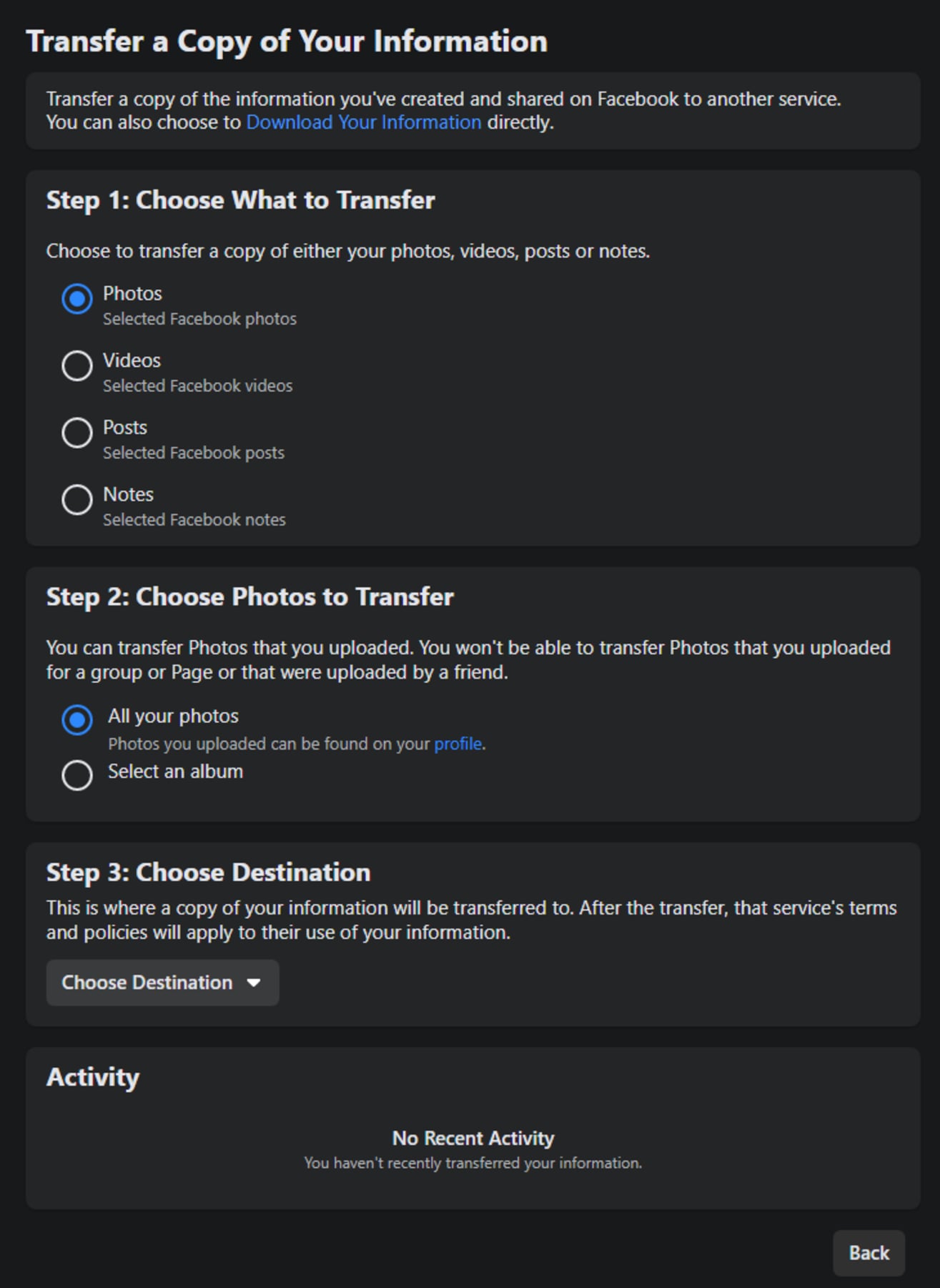
You can just save posts from your profile, the ones you have made. Not those you've made on groups or other pages, and also not the ones your friends have made on your wall. 

– Please note, as Facebook warns you that you are not ‘‘moving’ or ‘deleting’ old posts. You are simply copying them to another area. To erase every one of your posts, you need to do them all physically, or you can erase your whole Facebook account.

– Now, on the screen that surfaces, you can choose whether you need to save Posts, or Notes, or Photos, anything you desire to move. Kindly note, these posts you are saving are just from your profile.

Posts you have made on different gatherings and pages won’t be duplicated. Furthermore, this component saves your posts just, not posts friends have made on your Facebook divider.

Tweet54SendShare15
Previous Post

Logitech Announced A Cheaper Alternative To Apple iPad Pro’s Magic Keyboard, Here Is What You Should Know

Next Post

Amazon Announced Fire TV Cube 4K Streaming Box In India – Great Competitor Call for Apple TV 4K

Bhumika Paliwal

Hi! I'm Bhumika, Currently pursuing my master's in broadcast Journalism. I write articles about trending news and how-to topics here at Techstory.

Recommended For You

How to Get the Klombo Sprite in Fortnite

by Khilav Jadav
August 28, 2026
0
How To Install Fornite v24.20 Update

The Klombo Sprite is one of the rarest collectibles in Fortnite Chapter 7 Season 4, also known as Fortnite: Override. It is a Mythic Sprite based on the...

Read more

How to Get Crash Bandicoot in Fortnite

by Khilav Jadav
August 28, 2026
0
How to Get the Free De-Rezz De-Stroyer Pickaxe in Fortnite

Crash Bandicoot is finally making his way into Fortnite, giving fans of the classic platforming series a chance to play as the famous orange marsupial. The character is...

Read more

How to Play Co-Op MyCAREER in NBA 2K27

by Khilav Jadav
August 27, 2026
0
How to Invite Friends to MyCourt in NBA 2K26

NBA 2K27 finally lets players share the MyCAREER experience with a friend. For the first time in the series, you can bring another player into your career and...

Read more
Next Post
Amazon Announced Fire TV Cube 4K Streaming Box In India – Great Competitor Call for Apple TV 4K

Amazon Announced Fire TV Cube 4K Streaming Box In India – Great Competitor Call for Apple TV 4K

Please login to join discussion

Techstory

Tech and Business News from around the world. Follow along for latest in the world of Tech, AI, Crypto, EVs, Business Personalities and more.
reach us at info@techstory.in

Advertise With Us

Reach out at - info@techstory.in

Aviator Game India 2026

BROWSE BY TAG

#Crypto #howto 2024 acquisition AI amazon Apple Artificial Intelligence bitcoin Business China cryptocurrency e-commerce electric vehicles Elon Musk Ethereum facebook funding Gaming Google India Instagram Investment ios iPhone IPO Market Markets Meta Microsoft News OpenAI samsung Social Media SpaceX startup startups tech technology Tesla TikTok trend trending twitter US

© 2025 Techstory.in

No Result
View All Result
  • News
  • Crypto
  • Gadgets
  • Memes
  • Gaming
  • Cars
  • AI
  • Startups
  • Markets
  • How to

© 2025 Techstory.in

Welcome Back!

Login to your account below

Forgotten Password?

Retrieve your password

Please enter your username or email address to reset your password.

Log In
Are you sure want to unlock this post?
Unlock left : 0
Are you sure want to cancel subscription?