• Send Us A Tip
  • Calling all Tech Writers
  • Advertise
Friday, September 4, 2026
  • Login
TechStory
  • News
  • Crypto
  • Gadgets
  • Memes
  • Gaming
  • Cars
  • AI
  • Startups
  • Markets
  • How to
No Result
View All Result
  • News
  • Crypto
  • Gadgets
  • Memes
  • Gaming
  • Cars
  • AI
  • Startups
  • Markets
  • How to
No Result
View All Result
TechStory
No Result
View All Result
Home How to

How to recharge your Reliance Jio on WhatsApp

by Arya Roy
June 12, 2021
in How to, Tech
Reading Time: 2 mins read
0
How to recharge your Reliance Jio on WhatsApp

Source: https://www.financialexpress.com/industry/reliance-jio-seeks-dots-permission-to-do-5g-lab-testing/1992508/

TwitterWhatsappLinkedin

With the introduction of a new WhatsApp bot, recharging your Reliance Jio number is now much easier than before. You can initiate the recharge of your Jio SIM by sending a ‘hi’ on WhatsApp. In order to start, you have to first save the JioCare Contact ‘70007 70007’ on your phone and send them a ‘hi’.

You might also like

How to Get the Onigiri Sprite in Fortnite

How To Claim Pokemon Go Twitch Drops

How to Get Mega Man Sprite in Fortnite

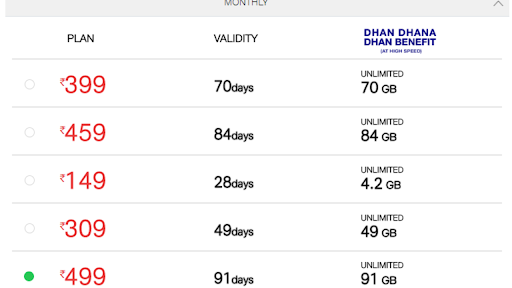
When you send a ‘hi’ message to JioCare on WhatsApp, Jio will share a catalogue of its services that includes ‘Jio SIM Recharge’, ‘New Jio SIM/Port-in (MNP)’, ‘Support for Jio SIM’, Support for ‘Jio Fiber’, ‘Support for Intl Roaming’, and ‘Support for JioMart’. Once you have chosen the option for ‘Jio SIM Recharge’, the bot will send a message with many recharge plans.
Source: http://telecomgyaan.com/jio-499-plan-499-91-days-91-gb-unlimited-calls-jio-prepaid/

You can make the choice to ‘View All Plans’ or you can ‘Recharge for Friend’. Also, you may buy International Roaming Packs and raise Recharge Issues by using this option. Once you choose ‘View All Plans’, you will receive the popular plans as images where you can see the benefits and costs of the plan. You also have an option to explore and go through the details of other plans.

After you have chosen your plan by responding to the message, you will be directed to the Jio website, where you can pay for the selected plan. Jio accepts payments through all digital methods. This includes debit cards, credit cards, UPI, and e-Wallets.

With the JioCare WhatsApp bot, you can manage all of your Jio accounts in one place, making the process more convenient for you. You can check the balance and status of your plan, and raise complaints by using the bot. The recharge services for JioFiber and Jio SIM are also available on the MyJio App on your mobile device.

The JioCare bot also has the option to check any Covid vaccine-related information and find the location of nearby vaccination centres. The default language for communication used by the bot is English, but you have the option to switch the preferred language to Hindi. Currently, it is only available only in two languages.


Tags: Reliance Jiowhatsapp
Tweet54SendShare15
Previous Post

How to use Zelle

Next Post

Tesla Model S Plaid Has 12V Lithium-ion Battery

Arya Roy

Hi, this is Arya! Writing has always been a passion of mine, regardless of the topic I choose. Besides that, I am a huge foodie and music lover, whose interests range from world politics to horror films to everything in between.

Recommended For You

How to Get the Onigiri Sprite in Fortnite

by Khilav Jadav
September 3, 2026
0
How to Turn on Cross-Platform Play for Fortnite on Xbox

The Onigiri Sprite is one of the newest collectibles in Fortnite Chapter 7 Season 4: Override. Added with the September 3, 2026 update, this small Sprite is shaped...

Read more

How To Claim Pokemon Go Twitch Drops

by Khilav Jadav
September 3, 2026
0
How to Evolve Floette Pokémon GO

Pokémon GO Twitch Drops let you earn special rewards by watching Pokémon broadcasts on Twitch. The broadcast must have an active Drop campaign, and you must complete its...

Read more

How to Get Mega Man Sprite in Fortnite

by Khilav Jadav
September 3, 2026
0
How To Archive Items in Fortnite

The Mega Man Sprite is a new collectible added to Fortnite Chapter 7 Season 4. It arrived with the v42.10 update on September 3, 2026, alongside X-Ray, Onigiri,...

Read more
Next Post
Tesla Model S Plaid Has 12V Lithium-ion Battery

Tesla Model S Plaid Has 12V Lithium-ion Battery

Please login to join discussion

Techstory

Tech and Business News from around the world. Follow along for latest in the world of Tech, AI, Crypto, EVs, Business Personalities and more.
reach us at info@techstory.in

Advertise With Us

Reach out at - info@techstory.in

Aviator Game India 2026

BROWSE BY TAG

#Crypto #howto 2024 acquisition AI amazon Apple Artificial Intelligence bitcoin Business China cryptocurrency e-commerce electric vehicles Elon Musk Ethereum facebook funding Gaming Google India Instagram Investment ios iPhone IPO Market Markets Meta Microsoft News OpenAI samsung Social Media SpaceX startup startups tech technology Tesla TikTok trend trending twitter US

© 2025 Techstory.in

No Result
View All Result
  • News
  • Crypto
  • Gadgets
  • Memes
  • Gaming
  • Cars
  • AI
  • Startups
  • Markets
  • How to

© 2025 Techstory.in

Welcome Back!

Login to your account below

Forgotten Password?

Retrieve your password

Please enter your username or email address to reset your password.

Log In
Are you sure want to unlock this post?
Unlock left : 0
Are you sure want to cancel subscription?