• Send Us A Tip
  • Calling all Tech Writers
  • Advertise
Tuesday, September 15, 2026
  • Login
TechStory
  • News
  • Crypto
  • Gadgets
  • Memes
  • Gaming
  • Cars
  • AI
  • Startups
  • Markets
  • How to
No Result
View All Result
  • News
  • Crypto
  • Gadgets
  • Memes
  • Gaming
  • Cars
  • AI
  • Startups
  • Markets
  • How to
No Result
View All Result
TechStory
No Result
View All Result
Home Entertainment

How to use Spotify’s “Only You” feature

by Arya Roy
June 21, 2021
in Entertainment, How to, Music, Tech
Reading Time: 1 min read
0
How to use Spotify’s “Only You” feature

Source: https://www.techradar.com/in/reviews/spotify

TwitterWhatsappLinkedin

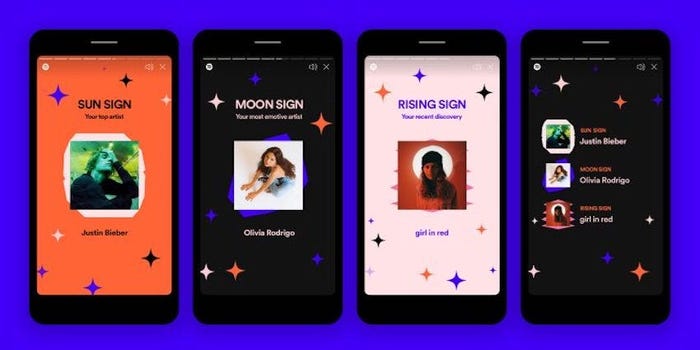
Only You is a personalised feature on Spotify that provides unique relationships between artists, genres, songs that you listen to. It will even bring up your own musical astrology readings.
You might also like

How to Beat Bonemass in Valheim 1.0

How to Get the Wolf Fur Cape in Valheim

How to Remove Your Wanted Level Without Using Cheats in GTA 5

Source: https://www.businessinsider.in/tech/how-to/how-to-find-and-use-spotifys-new-only-you-feature-to-get-a-musical-astrology-reading-and-see-your-unique-tastes/articleshow/83184945.cms

To use this feature, open your Spotify app and log in to your account if you have not done so already. If you have not seen Only You before, it might pop automatically or can be seen on your Home tab. Otherwise, tap on “Search” at the bottom of your screen. Underneath the search bar, you should be able to see a section labelled “Find out how you listen.” Tap on this.

Your Only You list will start playing. Either wait for each page to pass or tap on the right side of your screen to progress to the next page.

On the last page, you will be asked to plan your dream dinner party and you can choose three artists that you like. Spotify will automatically make you a playlist of their most popular songs, as well as songs by artists like them. Tap on “Add mixes to your library” to save these provided playlists.

When you are done, you will be shown every page in the Only You slideshow. Tap on “Share” under any page, and you can send it to a friend or another app.

Once you have gone through your Only You slideshow once, you will gain access to the full Only You hub. You can open the Only You hub by searching the phrase “Only You” and selecting it when it appears as a standalone genre. In the Only You hub, you can listen to all your dinner party playlists, playlists based on your favourite genres, and mixes with songs from every decade that you listen to.

Tags: Spotify
Tweet55SendShare15
Previous Post

MicroStrategy buys an additional 13,005 bitcoins for $489 mln

Next Post

Tesla, its Business strategy, Stocks and its Challenges

Arya Roy

Hi, this is Arya! Writing has always been a passion of mine, regardless of the topic I choose. Besides that, I am a huge foodie and music lover, whose interests range from world politics to horror films to everything in between.

Recommended For You

How to Beat Bonemass in Valheim 1.0

by Khilav Jadav
September 14, 2026
0
How To Get More XP in Assassin’s Creed Valhalla

Bonemass is the third Forsaken boss in Valheim. With the right food, armor, weapon, and strategy, however, the fight becomes much more manageable. The key is not raw...

Read more

How to Get the Wolf Fur Cape in Valheim

by Khilav Jadav
September 14, 2026
0
How To Get More XP in Assassin’s Creed Valhalla

The Wolf Fur Cape is one of the most useful early Mountain items in Valheim. It gives your Viking protection against frost, allowing you to explore the Mountain...

Read more

How to Remove Your Wanted Level Without Using Cheats in GTA 5

by Khilav Jadav
September 14, 2026
0
How To Stealth Kill in GTA 5

Getting a wanted level is easy in Grand Theft Auto V, but escaping the police without cheats takes a little practice. Whether you have one star or the...

Read more
Next Post
Tesla India

Tesla, its Business strategy, Stocks and its Challenges

Please login to join discussion

Techstory

Tech and Business News from around the world. Follow along for latest in the world of Tech, AI, Crypto, EVs, Business Personalities and more.
reach us at info@techstory.in

Advertise With Us

Reach out at - info@techstory.in

Aviator Game India 2026

BROWSE BY TAG

#Crypto #howto 2024 acquisition AI amazon Apple Artificial Intelligence bitcoin Business China cryptocurrency e-commerce electric vehicles Elon Musk Ethereum facebook funding Gaming Google India Instagram Investment iPhone IPO Market Markets Meta Microsoft News OpenAI samsung Social Media SpaceX startup startups tech Tech news technology Tesla TikTok trend trending twitter US

© 2025 Techstory.in

No Result
View All Result
  • News
  • Crypto
  • Gadgets
  • Memes
  • Gaming
  • Cars
  • AI
  • Startups
  • Markets
  • How to

© 2025 Techstory.in

Welcome Back!

Login to your account below

Forgotten Password?

Retrieve your password

Please enter your username or email address to reset your password.

Log In
Are you sure want to unlock this post?
Unlock left : 0
Are you sure want to cancel subscription?