• Send Us A Tip
  • Calling all Tech Writers
  • Advertise
Sunday, July 5, 2026
  • Login
TechStory
  • News
  • Crypto
  • Gadgets
  • Memes
  • Gaming
  • Cars
  • AI
  • Startups
  • Markets
  • How to
No Result
View All Result
  • News
  • Crypto
  • Gadgets
  • Memes
  • Gaming
  • Cars
  • AI
  • Startups
  • Markets
  • How to
No Result
View All Result
TechStory
No Result
View All Result
Home How to

How to use Lyft

by Arya Roy
July 17, 2021
in How to, Tech
Reading Time: 2 mins read
0
How to use Lyft

Source: https://www.interviewquery.com/blog-lyft-data-scientist-interview

TwitterWhatsappLinkedin

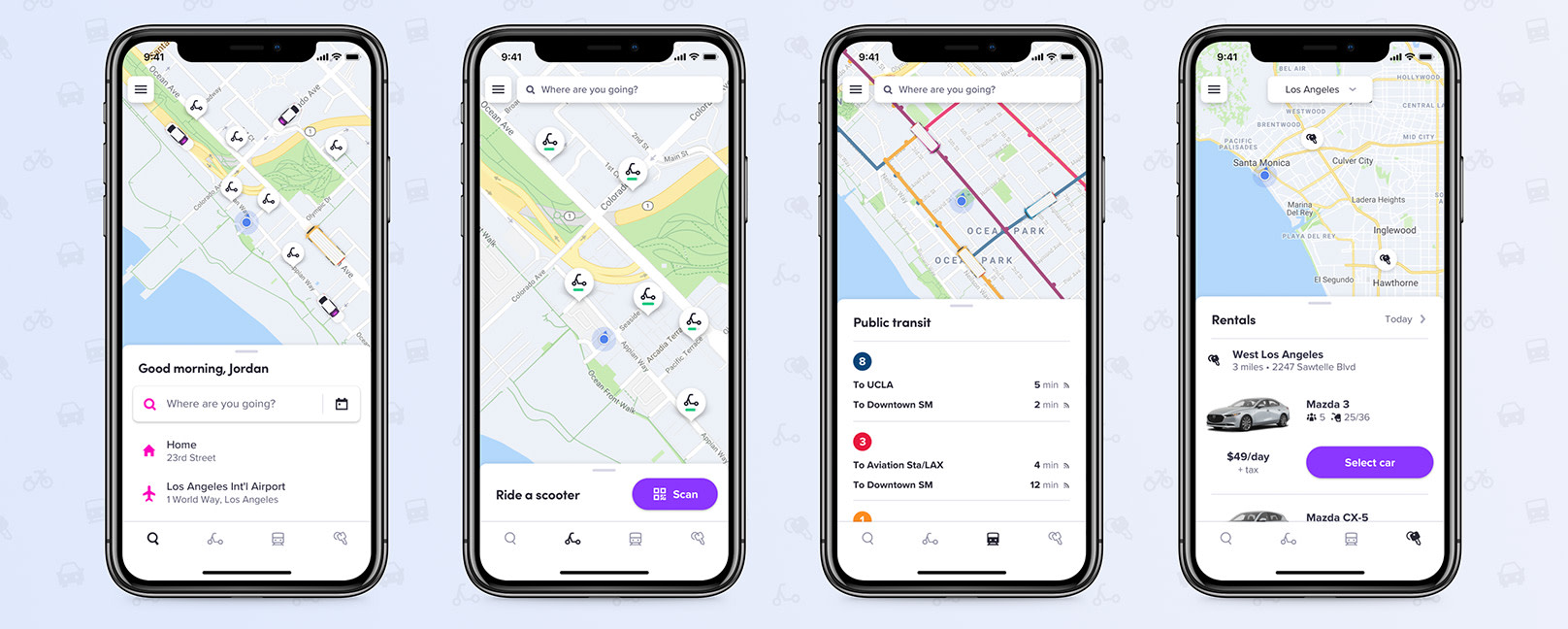
Lyft can be incredibly useful when trying to book a ride. Here is a guide on you can do so while using the different features provided by the app.
You might also like

Why EV Charging Slows Above 80%: The Science Behind the Wait

How Passkeys Work Across Devices: A Simple Guide to Password-Free Sign-Ins

Project Aion Discovered Leaked Microsoft Experiment Reveals Web-Based Agentic OS Built Around Copilot

Source: https://www.lyft.com/blog/posts/lyft-multimodal-app

Adding a payment method 

Before you book a ride, make sure that you have entered a payment method into the app.

  1. To do this, tap on the menu icon in the top right corner of your screen. The icon looks like three horizontal lines inside a white box.
  2. Tap on “Payment.”
  3. Locate the “Payment methods” section and tap on “Add payment method” to enter your payment details.

Booking a ride 

  1. To book a ride, start by tapping on the “Search destination” field.
  2. Then, in the destination field, you can type in the address of where you want to go. Once you have your destination selected, tap on “Set destination.”
  3. Lyft will offer you several different car options, each that fit a different number of people and come with a different price tag. The typical options are Lyft, Lyft XL, Lux Black, Lux Black XL. Lyft is usually the cheapest option. Lyft XL is usually more expensive because these are bigger cars that can fit more passengers or extra luggage. Lux Black is the same size car as a standard Lyft, but in a luxury vehicle. Similarly, Lux Black XL is a bigger car,  just like a Lyft XL, but is a luxury vehicle.
  4. Within each option, you can see the number of passengers that each car can fit, as well as your estimated arrival time at your destination and the time it will take for the car to pick you up.
  5. Under the Lyft option, you may see a drop-down menu where the pickup time is located. If you tap on this drop-down menu, you will see that if you are willing to wait a little longer for your ride, you can get it for a cheaper price.
  6. Once you have selected your option, tap on “Select Lyft.” Lyft may ask you to confirm your pickup spot again, so the driver is clear on where to find you.
  7. Once your pickup spot is set, tap on “Confirm and request.” Lyft will then match you to a driver and will show you their live location as they make their way to the pickup spot provided by you. If you ever need to contact the driver as they are navigating to your pickup spot, you can tap on the phone icon.

Riding in the Lyft

As the Lyft is arriving, you can confirm if it is the right car by making sure that the license plate and model of the approaching car matches the information given to you in the app. Once you are riding in the Lyft, you can follow your location love on the map and also see your live estimated arrival time.

If you need to make any changes to the ride, you can tap on “Edit ride.” You can cancel the ride, add a stop, or edit a drop-off. You can also tap on “Safety tools” to access various safety tools that Lyft offers during the ride and also share your ride location with others. After the ride is over, you can give your driver a rating or a tip.

Tags: Lyft
Tweet55SendShare15
Previous Post

How to be shown as offline on Xbox

Next Post

Twitter Chimes in “Delete Facebook” with a long chain of Memes.

Arya Roy

Hi, this is Arya! Writing has always been a passion of mine, regardless of the topic I choose. Besides that, I am a huge foodie and music lover, whose interests range from world politics to horror films to everything in between.

Recommended For You

Why EV Charging Slows Above 80%: The Science Behind the Wait

by Samir Gautam
July 5, 2026
0
Why EV Charging Slows Above 80%: The Science Behind the Wait

The promise of electric vehicles is simple: plug in, recharge, and get back on the road. Over the past few years, charging technology has advanced at an impressive...

Read more

How Passkeys Work Across Devices: A Simple Guide to Password-Free Sign-Ins

by Sneha Singh
July 5, 2026
0
How Passkeys Work Across Devices: A Simple Guide to Password-Free Sign-Ins

Internet security is more relevant now than ever before. People access their emails, bank apps, online shopping stores, and social media sites on a daily basis. In most...

Read more

Project Aion Discovered Leaked Microsoft Experiment Reveals Web-Based Agentic OS Built Around Copilot

by Anochie Esther
July 5, 2026
0
agentic AI operating system

The multi-billion-dollar corporate push toward generative artificial intelligence is moving past standalone companion widgets and plunging straight into the core architecture of desktop computing. For years, major operating...

Read more
Next Post
Twitter Chimes in “Delete Facebook” with a long chain of Memes.

Twitter Chimes in "Delete Facebook" with a long chain of Memes.

Please login to join discussion

Techstory

Tech and Business News from around the world. Follow along for latest in the world of Tech, AI, Crypto, EVs, Business Personalities and more.
reach us at info@techstory.in

Advertise With Us

Reach out at - info@techstory.in

Aviator Game India 2026

BROWSE BY TAG

#Crypto #howto 2024 acquisition AI amazon Apple Artificial Intelligence bitcoin Business China cryptocurrency e-commerce electric vehicles Elon Musk Ethereum facebook funding Gaming Google India Instagram Investment ios iPhone IPO Market Markets Meta Microsoft News OpenAI samsung Social Media SpaceX startup startups tech technology Tesla TikTok trend trending twitter US

© 2025 Techstory.in

No Result
View All Result
  • News
  • Crypto
  • Gadgets
  • Memes
  • Gaming
  • Cars
  • AI
  • Startups
  • Markets
  • How to

© 2025 Techstory.in

Welcome Back!

Login to your account below

Forgotten Password?

Retrieve your password

Please enter your username or email address to reset your password.

Log In
Are you sure want to unlock this post?
Unlock left : 0
Are you sure want to cancel subscription?