• Send Us A Tip
  • Calling all Tech Writers
  • Advertise
Wednesday, September 9, 2026
  • Login
TechStory
  • News
  • Crypto
  • Gadgets
  • Memes
  • Gaming
  • Cars
  • AI
  • Startups
  • Markets
  • How to
No Result
View All Result
  • News
  • Crypto
  • Gadgets
  • Memes
  • Gaming
  • Cars
  • AI
  • Startups
  • Markets
  • How to
No Result
View All Result
TechStory
No Result
View All Result
Home Gadgets

How to stream on Twitch with OBS

by Arya Roy
July 18, 2021
in Gadgets, Gaming, How to, Popular, Tech
Reading Time: 2 mins read
0
How to stream on Twitch with OBS

Source: https://techcrunch.com/2020/02/20/twitch-to-top-40-million-u-s-viewers-next-year-forecast-says/

TwitterWhatsappLinkedin

OBS is a free and easy software that will help you manage a live stream. In this guide, we will give steps on how you can set up a main gaming screen and connect OBS to Twitch.

You might also like

Sugar Cosmetics Raises Rs 144.5 Crore as Valuation Falls 75% From Peak

Anthropic Walks Away From Proposed $6 Bn Decart AI Acquisition

Nua Raises $50 Mn in Series C to Scale Women’s Wellness Business Across India

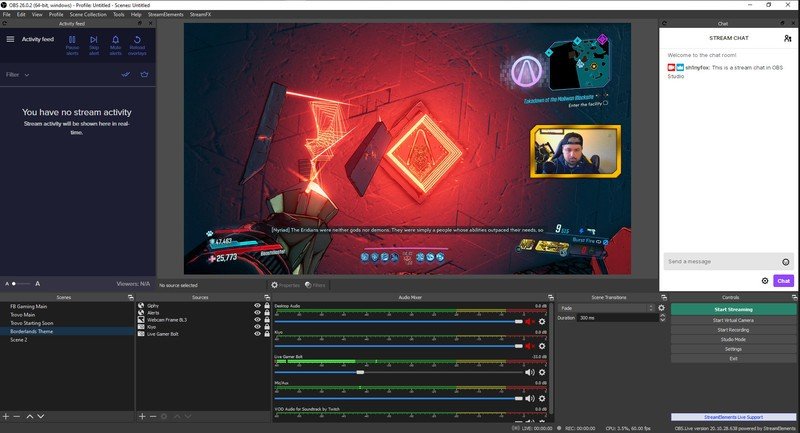
Setting up a main gaming screen

  1. Open OBS.
  2. Click on the + icon to create a new scene and label it as “Gaming scene.”
  3. You will now need to add sources to this scene. Inside the “Sources” box, click on the + icon > Display capture.
  4. Make sure that “Create new” is selected. Label it and click on “OK.”
  5. If you are using dual monitors, make sure to choose the one that you are actually gaming on. Click on “OK.”
  6. Now, you need to connect your mic. In the “Sources” box, click on the + icon.
  7. Click on “Audio input capture.” Make sure that “Create new” is selected and click on “OK.”
  8. Select your device and click on “OK.”
  9. In your Audio Mixer window, you can see both a mic level and an audio desktop level. Under each one is a slider. You can use it to adjust the volume according to your preferences.
  10. To add a webcam, go to the “Sources” box and click on the + icon > Video capture device.
  11. Select your webcam source and click on “OK.” You can adjust the size and placement of the webcam right on the screen.
Source: https://www.windowscentral.com/beginners-guide-obs

Now that your basic gaming screen has been set up, you can connect OBS to Twitch. to start streaming.

  1. Click on Settings > Stream, where you will enter your stream key from Twitch. It is important for you to note that you should not share your stream key with anyone.
  2. To obtain your stream key, go to twitch.tv, click on your profile in the top-right corner of the screen.
  3. Go to Creator Dashboard.
  4. On the left, click on Settings > Stream, from where you can copy your stream key.
  5. Paste the key into OBS and click on “OK.”

Tags: OBSTwitch
Tweet55SendShare15
Previous Post

Netizens unleash a meme fest following the news of WhatsApp banning 2 million Indian accounts.

Next Post

FedEx to inject $100Mn in Delhivery to promote cross-border operations in India

Arya Roy

Hi, this is Arya! Writing has always been a passion of mine, regardless of the topic I choose. Besides that, I am a huge foodie and music lover, whose interests range from world politics to horror films to everything in between.

Recommended For You

Sugar Cosmetics Raises Rs 144.5 Crore as Valuation Falls 75% From Peak

by Ishaan Negi
September 9, 2026
0
Sugar Cosmetics Raises Rs 144.5 Crore as Valuation Falls 75% From Peak

Sugar Cosmetics has raised Rs 144.5 crore from existing investor A91 Partners, giving the direct-to-consumer beauty brand a fresh capital infusion at a dramatically lower valuation than the...

Read more

Anthropic Walks Away From Proposed $6 Bn Decart AI Acquisition

by Ishaan Negi
September 9, 2026
0
Anthropic Walks Away From Proposed $6 Bn Decart AI Acquisition

Anthropic has decided not to acquire artificial intelligence startup Decart AI, despite exploring a potential deal and conducting due diligence on the company, according to people familiar with...

Read more

Nua Raises $50 Mn in Series C to Scale Women’s Wellness Business Across India

by Ishaan Negi
September 9, 2026
0
Nua Raises $50 Mn in Series C to Scale Women’s Wellness Business Across India

Nua, the digital-first, omnichannel women’s wellness brand, has raised $50 million in a Series C funding round as it looks to accelerate growth, expand its product portfolio and...

Read more
Next Post
Logo of FedEx Express and Delhivery on a gradient background

FedEx to inject $100Mn in Delhivery to promote cross-border operations in India

Please login to join discussion

Techstory

Tech and Business News from around the world. Follow along for latest in the world of Tech, AI, Crypto, EVs, Business Personalities and more.
reach us at info@techstory.in

Advertise With Us

Reach out at - info@techstory.in

Aviator Game India 2026

BROWSE BY TAG

#Crypto #howto 2024 acquisition AI amazon Apple Artificial Intelligence bitcoin Business China cryptocurrency e-commerce electric vehicles Elon Musk Ethereum facebook funding Gaming Google India Instagram Investment ios iPhone IPO Market Markets Meta Microsoft News OpenAI samsung Social Media SpaceX startup startups tech technology Tesla TikTok trend trending twitter US

© 2025 Techstory.in

No Result
View All Result
  • News
  • Crypto
  • Gadgets
  • Memes
  • Gaming
  • Cars
  • AI
  • Startups
  • Markets
  • How to

© 2025 Techstory.in

Welcome Back!

Login to your account below

Forgotten Password?

Retrieve your password

Please enter your username or email address to reset your password.

Log In
Are you sure want to unlock this post?
Unlock left : 0
Are you sure want to cancel subscription?