• Send Us A Tip
  • Calling all Tech Writers
  • Advertise
Thursday, July 2, 2026
  • Login
TechStory
  • News
  • Crypto
  • Gadgets
  • Memes
  • Gaming
  • Cars
  • AI
  • Startups
  • Markets
  • How to
No Result
View All Result
  • News
  • Crypto
  • Gadgets
  • Memes
  • Gaming
  • Cars
  • AI
  • Startups
  • Markets
  • How to
No Result
View All Result
TechStory
No Result
View All Result
Home Tech

Forgot iPhone Passcode? Learn How to Unlock iPhone without Password

by Rohan Mathawan
May 12, 2022
in Tech
Reading Time: 5 mins read
0
Forgot iPhone Passcode? Learn How to Unlock iPhone without Password
TwitterWhatsappLinkedin

Introduction

In a busy schedule, you may forget the new passcode you had set for your iPhone the previous night. When you enter a wrong passcode many times on your iPhone lock screen, you receive an alert notification. Your iPhone is disabled after that. Even after trying again, if you put a wrong passcode, you have no option other than checking how to unlock iPhone through different modes.

You might also like

2027 Chevrolet Corvette Stingray Becomes the Most Affordable 200 MPH Sports Car

Automakers Turn to Aluminium Wiring as Rising Copper Costs Reshape EV Production

Why Public Wi-Fi Is More Dangerous Than You Think

In this article, we will discuss different methods of how to unlock iPhone without passcode.

Fix 1: [Easiest Way] Unlock iPhone without Password/Passcode via Dr.Fone – Screen Unlock

Dr.Fone is a trusted software for Android and iOS systems. It is equipped with powerful toolkits for unlocking the screen, data recovery, transfer, system repair, data repair, and many more issues. The software keeps users’ privacy by protecting all resources from data encryption. Dr.Fone – Screen Unlock can remove all types of screen lock for all types of lock screens without losing all data. It can bypass 4 digit passcode, 6 digit passcode, Touch ID, screen time password, and face ID. 

 After restoring your device, you may not remember your iCloud passcode while activating it back. This software can even bypass your iCloud lock activation smoothly and help you access your phone.

Features:

  • Can remove iPhone lock screen passcodes, Touch ID, and Face ID.
  • Can bypass Apple ID and iCloud activation lock.
  • No extra technical knowledge is necessary
  • Has ‘Remove MDM’ feature that keeps all your data safe.

How to unlock iPhone without a passcode via Dr.Fone?

Steps to unlock your iPhone without a passcode:

Step 1: Connect your iPhone. 

On your PC or laptop, launch Dr.Fone. Choose “Screen unlock” on the main screen. 
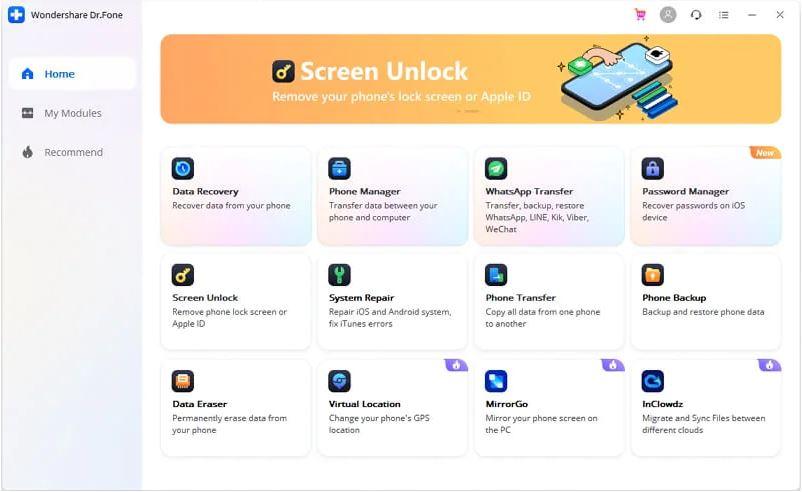
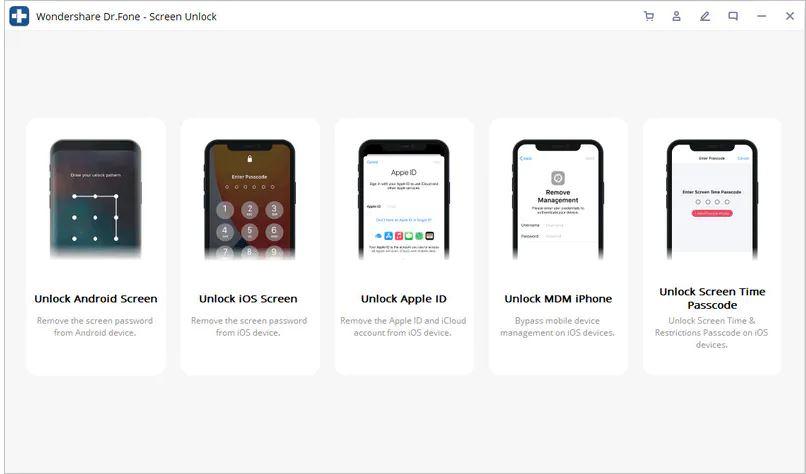
Use a data cable to connect your Apple device with your PC. Then go to the program and click on “Unlock iOS Screen”.
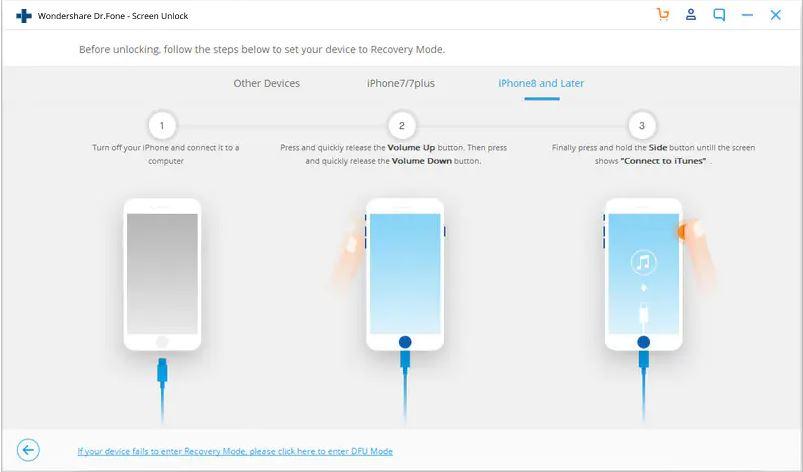
Step 2: Recovery or DFU mode

Before bypassing the iPhone lock screen, the phone has to be boot in DFU or recovery mode as per the on-screen protocols. To remove theiOS lock screen by default, we suggest the recovery mode.
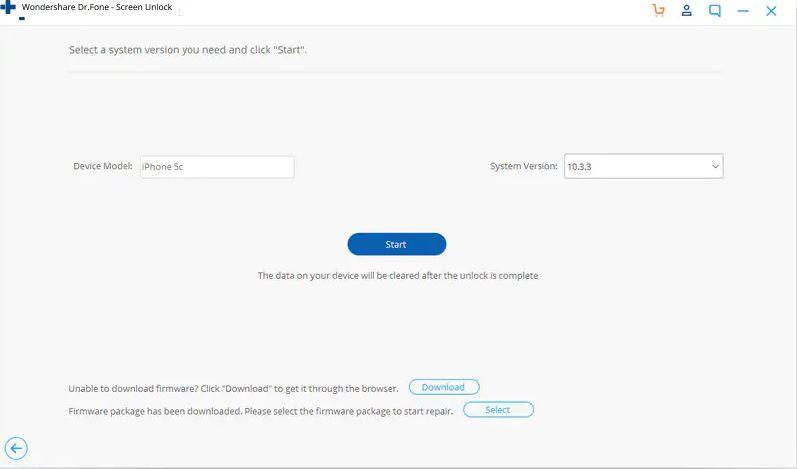
Step 3: Confirm iOS device information

Dr.Fone – Screen Unlock (iOS) will display all your device information, for example, system version, device model, etc. If the information does not match, you can choose the correct one from the given dropdown lists. Then press on “Download”. The firmware for your device will start downloading. 
Step 4: Unlock your iPhone lock screen

After the download gets finished properly, click on “Unlock Now”. This will start unlocking your Apple device. 
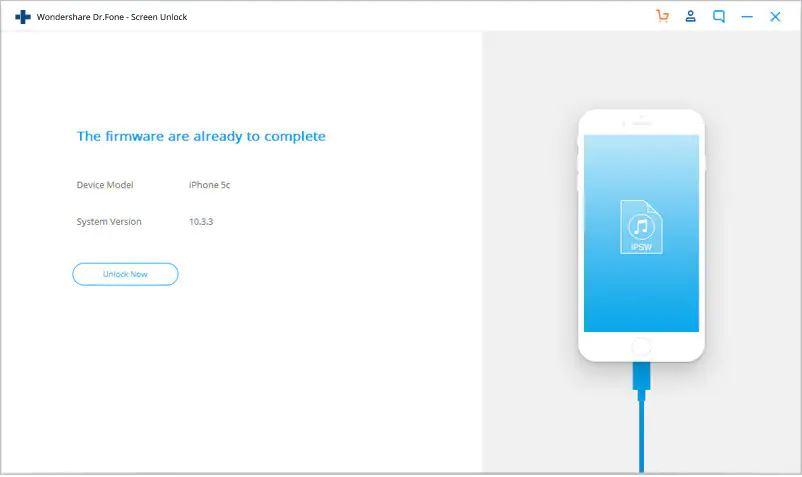
Fix 2: Unlock iPhone Passcode/Password via Recovery mode

You can bypass your iPhone passcode or password with the help of recovery mode. The method is easy and is performed by connecting your device to a desktop.

How to get into a locked iPhone without the password via recovery mode?

Step 1: Connect your device

Your PC must be Windows 8 or above that. Install iTunes on your PC. Using a data cable, you need to connect your iPhone with your PC.

Step 2: Turn off your device

Before you connect it with your PC, turn it off. Make sure to do this using the specific model method. For iPhone X or later, iPhone SE (2nd generation), iPhone 8, and iPhone 8 Plus: Press and hold the Volume down button and both the Side button until the power off screen appears. Drag the power off slider to turn your phone off. Wait for a minute.
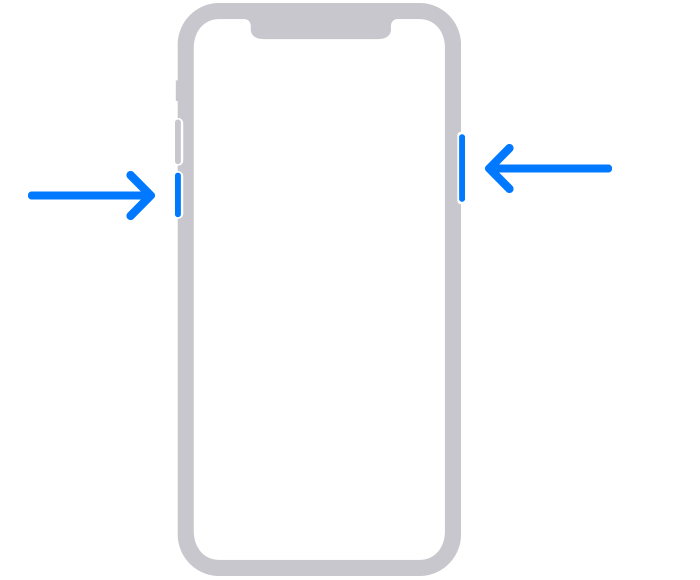
Step 3: Put your iPhone in recovery mode

For iPhone SE (2nd generation), iPhone 8, and iPhone 8 Plus iPhone X or later, use the Side button.
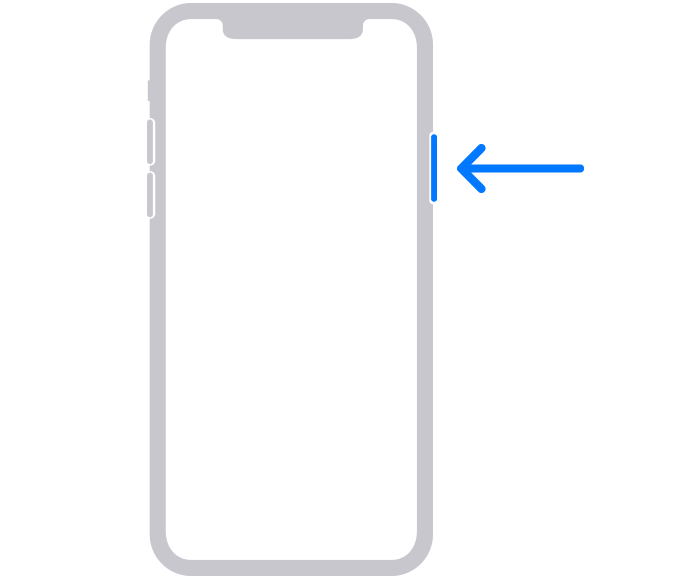
Press and hold the button for your iPhone and connect the iPhone to the computer as fast as possible. Don’t let go of the button.

Until the recovery mode screen on your iPhone appears, keep holding the button, then let go.
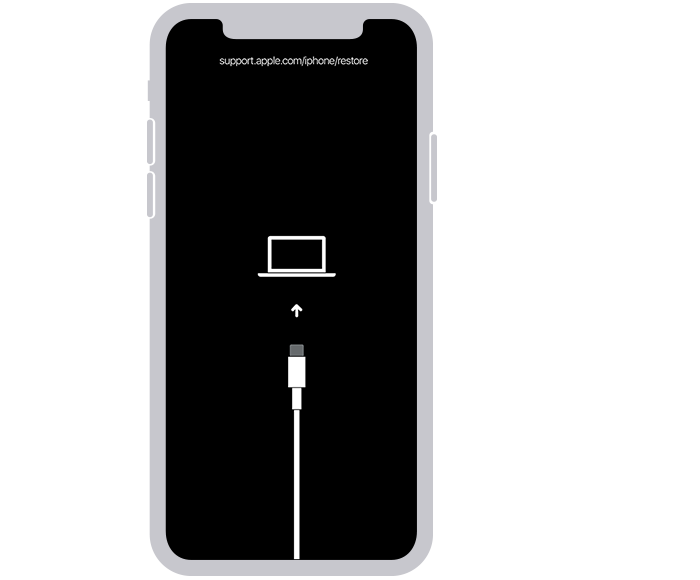
If you see the lock screen appearing, you need to shut your phone again.

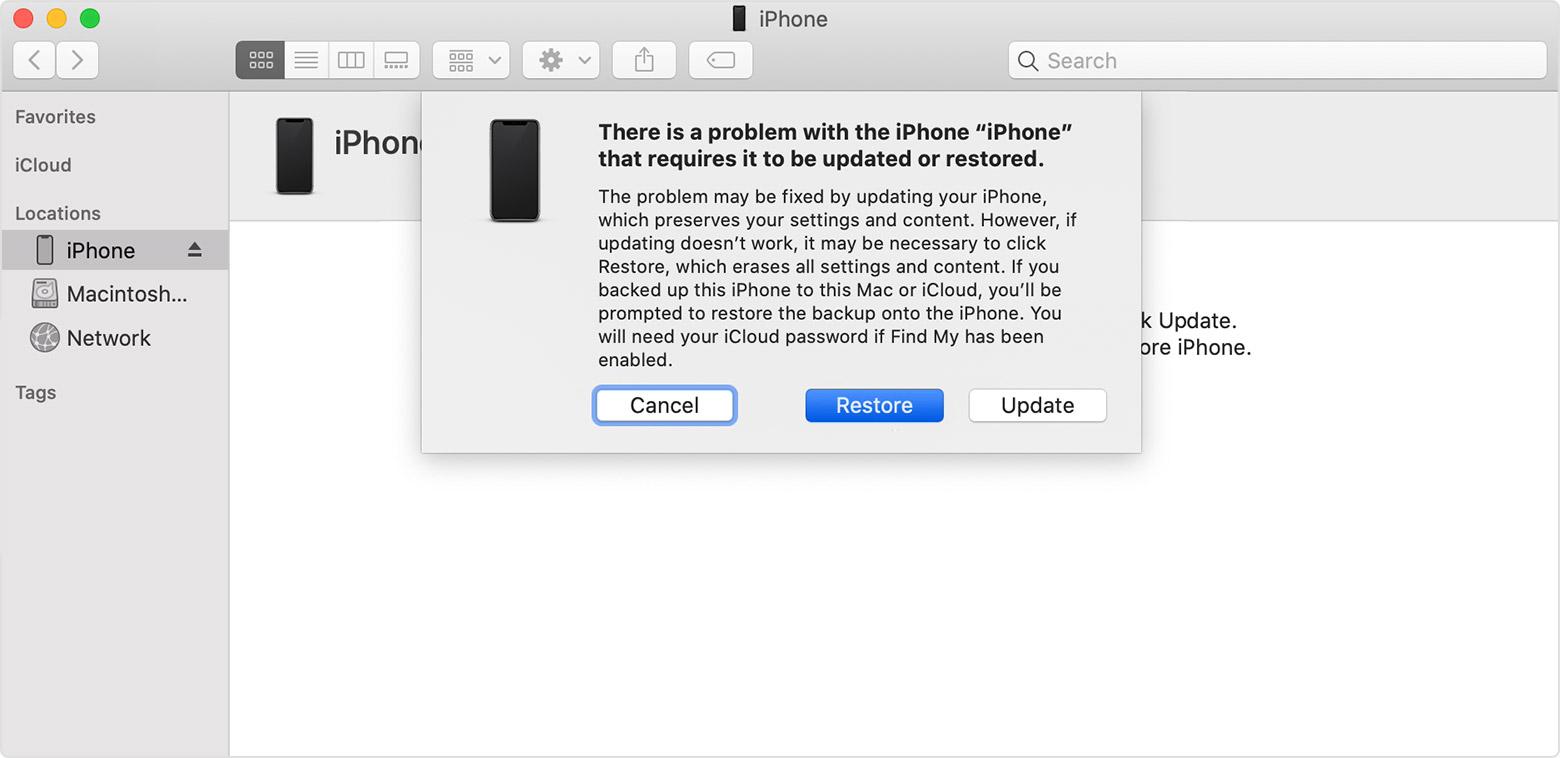
Step 4: Restore your iPhone

On your desktop, go to iTunes. In the Finder, locate your iPhone. When you see the options for restoring and updating, click on “Restore”. The software will be downloaded and the restore begins. If you notice that the taken time is been longer than fifteen minutes and your phone exits the recovery mode, shut down your phone and restart. Wait for the procedure to finish. Disconnect and set up. 
Fix 3: Get into Locked iPhone without Passcode via Find My iPhone

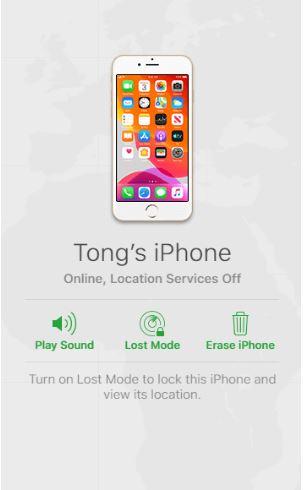
The Find My iPhone feature in Apple helps to clean out everything even your passcode from the device remotely. This is a really easy method. All you need to have is the feature enabled beforehand and an internet connection.

Follow the steps unlock via Find My iPhone:

Step 1: On your desktop, go to iCloud.com

Step 2: Use your Apple ID and password of your locked device and log into the iCloud website. 

Step 3: Click on “Find My”, then click on the “All devices” option. This will view all linked devices with your Apple ID. 

Step 4: Select your locked iPhone 

Step 5: You will find multiple options. Click on “Erase iPhone”. 

Step 6: Your iPhone will be erased including your passcode. 
Closing Words

Forgetting your new iPhone passcode under stress, work pressure is common. In recent times, unlocking the locked iPhone even after losing the passcode is no more a big deal. There are several methods on how to unlock iPhone passcode. You can easily know more about how to unlock the iPhone without a passcode from this article and do it yourself. Dr.Fone is a very preferred software for bypassing the iPhone lock screen passcode. You can make use of it when hassle-free bypassing any type of iPhone lock screen is your concern.


Tweet54SendShare15
Previous Post

Stake.com to Partner with Pragmatic Play to Create a Dedicated Live Studio

Next Post

iPhone Error 4013? Here is How to Fix

Rohan Mathawan

Content Editor at Techstory Media | Technology | Gadgets | Written more than 5000+ articles about different niches from Tech to online real money gaming for reputed brands and companies. Get in touch Email: rohan@techstory.in For Business Enquires related to TechStory Info@techstory.in

Recommended For You

2027 Chevrolet Corvette Stingray Becomes the Most Affordable 200 MPH Sports Car

by Samir Gautam
July 2, 2026
0
2027 Chevrolet Corvette Stingray Hits 200 MPH

The Chevrolet Corvette has reached another landmark in its seven-decade history. Marking National Corvette Day, General Motors announced that the 2027 Chevrolet Corvette Stingray can now achieve a...

Read more

Automakers Turn to Aluminium Wiring as Rising Copper Costs Reshape EV Production

by Samir Gautam
July 1, 2026
0
The automotive industry is quietly undergoing one of its biggest material changes in decades. As copper prices continue to climb and supply constraints intensify, leading automakers are increasingly replacing traditional copper wiring with aluminium in electric and hybrid vehicles. Luxury brands such as Ferrari and BMW are expanding the use of aluminium wiring across their latest models, joining companies like Tesla and several Chinese electric vehicle manufacturers that adopted the technology earlier. The shift signals more than just a cost-saving exercise. It reflects a broader effort to build lighter, more efficient vehicles while preparing for long-term pressure on global copper supplies. Copper's Cost Challenge Is Driving Change Copper has been the preferred material for automotive electrical systems for generations because of its excellent conductivity and durability. However, growing demand from renewable energy projects, artificial intelligence infrastructure, and expanding data centres has significantly increased pressure on global copper supplies. Industry analysts expect this imbalance between demand and supply to persist for years, pushing manufacturers to explore alternative materials that can deliver similar performance at a lower cost. Aluminium has emerged as the strongest candidate. It currently costs roughly one-quarter as much as copper while offering significant weight savings, making it particularly attractive for electric vehicles where every kilogram affects battery efficiency and driving range. Ferrari and BMW Expand Aluminium Use Ferrari introduced aluminium power cables in its 296 hybrid sports car and has since expanded the technology into additional models, including its newly launched fully electric vehicle. According to the company, switching to aluminium reduces the overall weight of wiring systems by as much as 20 percent. BMW has been using aluminium conductors for more than a decade, beginning with its compact models before gradually integrating them into hybrid and electric vehicles. The company's latest eDrive platform now incorporates aluminium extensively across both high-voltage and low-voltage electrical systems. While aluminium's lower price offers a financial advantage, both manufacturers emphasize that performance, efficiency and weight reduction remain the primary reasons behind the transition. Chinese EV Makers Push Adoption Further China's electric vehicle sector is accelerating the industry's move toward aluminium wiring. Manufacturers including XPeng, Xiaomi and AVATR have adopted the material as competition in the domestic EV market continues to squeeze profit margins. The Chinese government has also encouraged manufacturers to increase aluminium substitution across multiple industries, including automotive, power equipment and household appliances. Engineering experts believe aluminium has substantial room to replace copper, particularly in battery busbars and electrical distribution systems where copper still dominates today's vehicles. Industry-Wide Shift Expected to Continue Consultants and investment analysts expect aluminium adoption to grow steadily over the remainder of the decade. Estimates suggest that around two percent of global copper demand could be replaced by aluminium this year, with that figure potentially reaching six percent by 2030 if copper prices remain elevated. The transition is not without challenges. Aluminium requires greater volume than copper to carry the same electrical current and its production is more energy intensive. Manufacturers must also redesign certain components to accommodate its different physical properties. Despite these engineering considerations, the combination of lower material costs, lighter vehicle weight and long-term supply security is making aluminium an increasingly attractive choice for automakers worldwide. As electric vehicle production expands and pressure on critical raw materials continues to grow, aluminium wiring is rapidly moving from an alternative solution to a mainstream automotive technology. The shift highlights how material innovation is becoming just as important as battery development in shaping the next generation of mobility.

The automotive industry is quietly undergoing one of its biggest material changes in decades. As copper prices continue to climb and supply constraints intensify, leading automakers are increasingly...

Read more

Why Public Wi-Fi Is More Dangerous Than You Think

by Ishaan Negi
July 1, 2026
0
Why Public Wi-Fi Is More Dangerous Than You Think

Picture this: you're waiting for your flight at an airport, sipping coffee at your favorite café, or relaxing in a hotel lobby. You notice a sign that reads...

Read more
Next Post
iPhone Error 4013? Here is How to Fix

iPhone Error 4013? Here is How to Fix

Please login to join discussion

Techstory

Tech and Business News from around the world. Follow along for latest in the world of Tech, AI, Crypto, EVs, Business Personalities and more.
reach us at info@techstory.in

Advertise With Us

Reach out at - info@techstory.in

Aviator Game India 2026

BROWSE BY TAG

#Crypto #howto 2024 acquisition AI amazon Apple Artificial Intelligence bitcoin Business China cryptocurrency e-commerce electric vehicles Elon Musk Ethereum facebook funding Gaming Google India Instagram Investment ios iPhone IPO Market Markets Meta Microsoft News OpenAI samsung Social Media SpaceX startup startups tech technology Tesla TikTok trend trending twitter US

© 2025 Techstory.in

No Result
View All Result
  • News
  • Crypto
  • Gadgets
  • Memes
  • Gaming
  • Cars
  • AI
  • Startups
  • Markets
  • How to

© 2025 Techstory.in

Welcome Back!

Login to your account below

Forgotten Password?

Retrieve your password

Please enter your username or email address to reset your password.

Log In
Are you sure want to unlock this post?
Unlock left : 0
Are you sure want to cancel subscription?