• Send Us A Tip
  • Calling all Tech Writers
  • Advertise
Sunday, July 5, 2026
  • Login
TechStory
  • News
  • Crypto
  • Gadgets
  • Memes
  • Gaming
  • Cars
  • AI
  • Startups
  • Markets
  • How to
No Result
View All Result
  • News
  • Crypto
  • Gadgets
  • Memes
  • Gaming
  • Cars
  • AI
  • Startups
  • Markets
  • How to
No Result
View All Result
TechStory
No Result
View All Result
Home How to

How to force stop an app on iPhone?

by Chhavideep Singh
July 25, 2022
in How to
Reading Time: 2 mins read
0
iPhone

Credits: iOS Gadget Hacks

TwitterWhatsappLinkedin
iPhone
Credits:
iOS Gadget Hacks

Smartphones are great and having those boxes on them, often called as applications or apps are a great way to begin doing various tasks on your smartphones, from listening to music to calling people around. Apps are everything on your smartphone and the best overall experience of using a smartphone is delivered by Apple in their famous iPhones.

You might also like

How To Reach Outer Space In Genshin Impact

How To Unlock Golden Hall Teleport Waypoint In Genshin Impact

How To Play Unhinged On Netflix

Initially when Android phones were launched, they used to hang a lot and iPhone came up with this marketing strategy that iPhones never hang in the middle of the task. The software is clean, and it is closed source unlike Android OS.

This is true but iPhone applications also do hang because it is a gadget and technical bugs, and glitches can happen for various reasons and it is somewhat normal now. You know, even having low storage on your device can cause a bit of a lag sometimes.

Anyhow, coming back to the main point, can you force stop apps on iPhone if they start to lag or not respond?

The answer to this question is ‘Yes’, definitely there is a way that restarts your application from scratch, and it is very effective when any of your iPhone apps is non-responsive due to any XYZ reason.

How to force stop an app on iPhone?

If you have an iPhone X or later which I am assuming most of you do, the process is pretty simple and for those having old Home Button iPhones or the new iPhone SE, the process remains the same but the way of opening that option is different. Let me tell you.

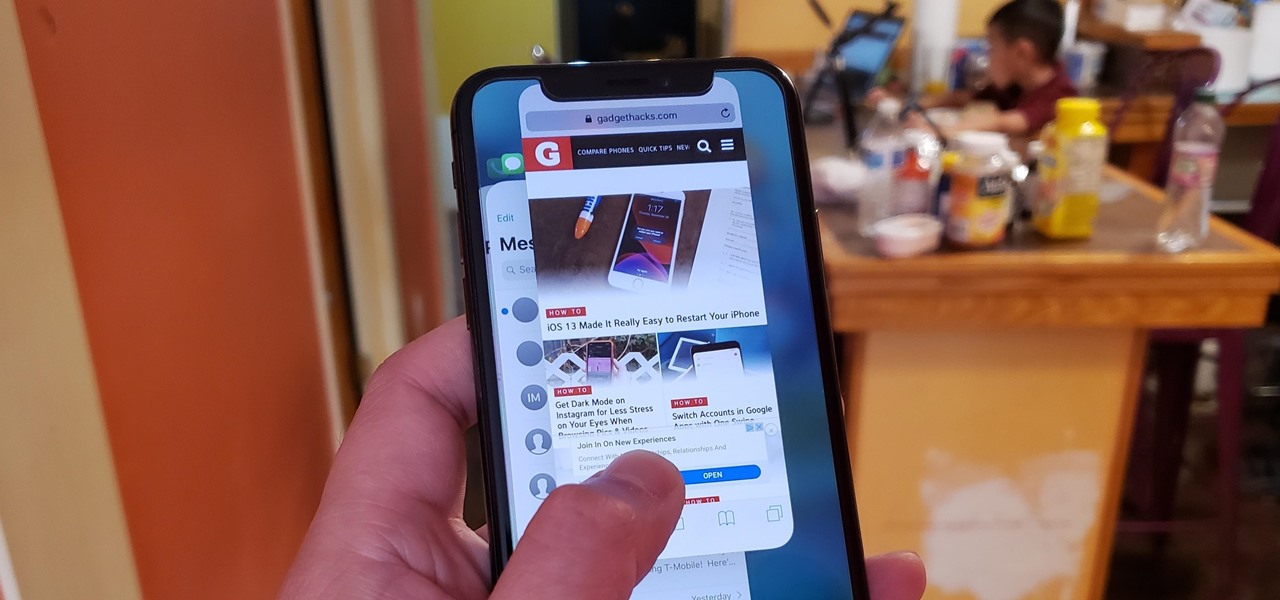
  1. On the Face ID enabled iPhones, swipe up from the bottom of your screen and hold your finger in the middle of the screen, it will show you all your recently opened apps in a horizontal tray like display from where you can force close your applications.
  2. If you have an older iPhone, just double click on the Home Button and the same horizontal list of recently opened apps will appear.
  3. Now, simply swipe up on each application to force close it.
  4. There might be a couple of apps opened from a very long time, just swipe up on the apps that you want to force close.
  5. Once you have dragged your application up and force closed it. Now, go back to that app on the menu screen and launch it.

Voila! You are good to go! If your application froze in the middle of the task and you force closed it, it will launch again and properly this time.

Try it and let us know if it worked for you.

 

Tags: AppsiPhone
Tweet54SendShare15
Previous Post

 How to pair FireStick remote to TV?

Next Post

How to make money on YouTube without making videos?

Chhavideep Singh

Hi! I'm Chhavideep, If you like reading about technology, business and start-ups, you've come to the right place. Catch me: chhavideep@connasys.com

Recommended For You

How To Reach Outer Space In Genshin Impact

by Khilav Jadav
July 5, 2026
0
How to Verify Age on Genshin Impact

Exploring the Moon is one of the biggest additions to Genshin Impact, and many players are surprised to learn that the adventure does not end after arriving there....

Read more

How To Unlock Golden Hall Teleport Waypoint In Genshin Impact

by Khilav Jadav
July 5, 2026
0
How to Get Sunspray Spirit in Genshin Impact

Genshin Impact continues to reward exploration with hidden locations, challenging puzzles, and valuable Teleport Waypoints scattered across its ever-growing world. One of the more confusing waypoints for many...

Read more

How To Play Unhinged On Netflix

by Khilav Jadav
July 5, 2026
0
How To Keep Sharing Passwords on Netflix

Netflix continues to expand beyond movies and TV shows with unique gaming experiences, and Unhinged is one of its most creative releases yet. Developed by Night School Studio,...

Read more
Next Post
YouTube

How to make money on YouTube without making videos?

Please login to join discussion

Techstory

Tech and Business News from around the world. Follow along for latest in the world of Tech, AI, Crypto, EVs, Business Personalities and more.
reach us at info@techstory.in

Advertise With Us

Reach out at - info@techstory.in

Aviator Game India 2026

BROWSE BY TAG

#Crypto #howto 2024 acquisition AI amazon Apple Artificial Intelligence bitcoin Business China cryptocurrency e-commerce electric vehicles Elon Musk Ethereum facebook funding Gaming Google India Instagram Investment ios iPhone IPO Market Markets Meta Microsoft News OpenAI samsung Social Media SpaceX startup startups tech technology Tesla TikTok trend trending twitter US

© 2025 Techstory.in

No Result
View All Result
  • News
  • Crypto
  • Gadgets
  • Memes
  • Gaming
  • Cars
  • AI
  • Startups
  • Markets
  • How to

© 2025 Techstory.in

Welcome Back!

Login to your account below

Forgotten Password?

Retrieve your password

Please enter your username or email address to reset your password.

Log In
Are you sure want to unlock this post?
Unlock left : 0
Are you sure want to cancel subscription?