

• Send Us A Tip
  • Calling all Tech Writers
  • Advertise
Wednesday, June 17, 2026
  • Login
TechStory
  • News
  • Crypto
  • Gadgets
  • Memes
  • Gaming
  • Cars
  • AI
  • Startups
  • Markets
  • How to
No Result
View All Result
  • News
  • Crypto
  • Gadgets
  • Memes
  • Gaming
  • Cars
  • AI
  • Startups
  • Markets
  • How to
No Result
View All Result
TechStory
No Result
View All Result
Home Entertainment

How to download Instagram Reels

by Thomas Babychan
June 7, 2022 - Updated On August 16, 2022
in Entertainment, How to
Reading Time: 3 mins read
0
Instagram Reels Window
TwitterWhatsappLinkedin

If you are using Instagram daily, you know that the Instagram Reels feature is one of the classiest and funniest in the application, right? Instagram Reels make it so easy to make dance videos, informative videos, comedy videos or anything for a 60 sec or less duration and add music and effects and upload it. 

You might also like

How does Reddit make money?

How To Upgrade Crafted Weapons To Tier 5 In Destiny 2

How To Get Chronologs In Destiny 2

Reels are also an efficient marketing technique because the Instagram algorithm gives more reach and traffic using reels rather than posts or IGTV. Its short duration is so helpful for users to just watch most necessary stuff.

 At a time when an individual’s attention span is so low, the Instagram reel is a perfect fit for the younger generation. 

So one fine day you are going through IG Reels and you come across a superb music reel. You are so in love with the reel that you want to download it, but do not find any specific option for that in the Instagram app. What will you do? 

We will help you with that. 

Mainly, you can download your favourite Instagram Reel using two techniques. Keep in mind that Instagram doesn’t have a built-in option to download Reel. So, these ways are to: – 

  1. Screen Record the Reel
  2. Download using a third-party application or software

Both have different procedures on iOS and Android. 

Screen Recording Reel in iOS – 

Open your settings on your iPhone and navigate to Control Centre. There you can add Screen Recording into the Controls screen (the one you get when you slide down your finger from the top right corner) which will make it easily accessible for you to use. 
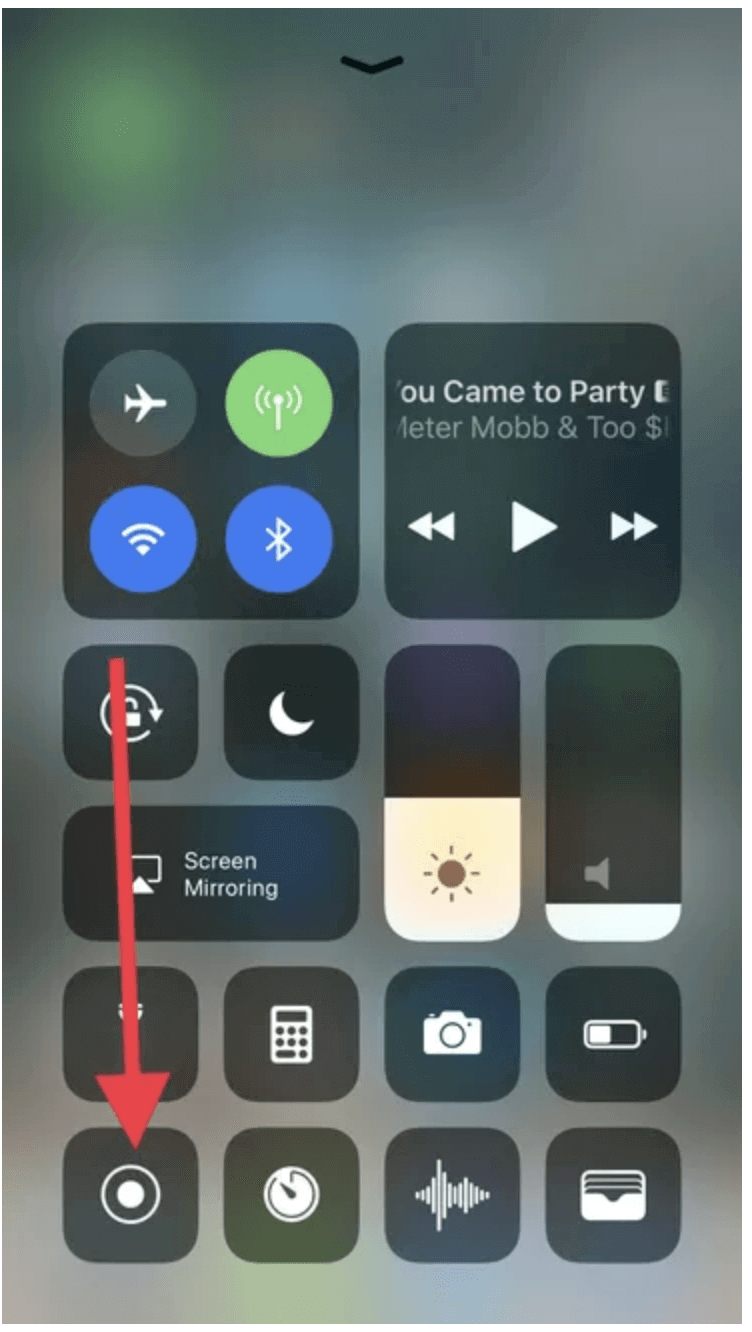
Screen record option in iOS can be accessed from Control Screen
The screen record option in iOS can be accessed from Control Screen

Now you open the Instagram app and select the Reel you want to save. Side down the screen from the top and click on the screen record option. After recording, your high-quality screen recorded video will be available in your camera roll automatically, which you can trim according to your needs.

Using third-party apps on iOS

Recording the reel from the screen and trimming is a little too much task these days. So the other, easier option is to use third-party apps to download reels. It can be done in a jiffy with a good internet connection. The most popular options for downloading IG Reels on iOS are InstDown and InSaver.

We have seen how to download or record reels on iOS, now let’s see how to do it on Android Phones. 

Screen Recording on Android – 

Screen recording is so easy on android. Just open the Instagram app, select the reel you want to download, swipe down from the top of the screen and press screen recording and your device will do all the work. 

After recording, you can find your video in the Library section of the Gallery, where you can trim your video. 

Using third-party apps to download Instagram Reels on Android –

Just like iOS, you can use third-party applications on android to download reels, which will save your time and effort to trim each video. 

Few best options are 

  1. Reels Video Downloader for Instagram 
  2. AhaSave Video Downloader
  3. ETM Video Downloader

You just need to copy the link of the Reel video from the Instagram app, paste it into these apps and download it. 

BOOM!!! You have your favourite reel video saved in your gallery. 

On android phones you can use instagram downloading apps to download reels on your phone.

Hope you will find the article useful. 

Tags: DownloadInstagramInstagram ReelsReels
Tweet54SendShare15
Previous Post

DeLorean could be preparing for a bigger comeback with an IPO

Next Post

Polestar 3 will be first SUV and first US-made by Polestar

Thomas Babychan

Thomas Babychan is an experienced business and economic journalist with a focus on international trade, stock market, banking, and multilateral organizations. He also has expertise in international relations and diplomacy.

Recommended For You

How does Reddit make money?

by Afeefa Ansari
June 16, 2026
0
Reddit

Are you curious about how Reddit makes money? Here is all you need to know about it! Follow the guide to know how it happens and if you...

Read more

How To Upgrade Crafted Weapons To Tier 5 In Destiny 2

by Khilav Jadav
June 16, 2026
0
How to Get Harsh Language in Destiny 2

Crafted weapons have always been among the most valuable tools in Destiny 2. They allow players to choose their favorite perks and gradually improve their gear over time....

Read more

How To Get Chronologs In Destiny 2

by Khilav Jadav
June 16, 2026
0
How to Get the Ergo Sum in Destiny 2

Chronologs are a special currency in Destiny 2 that allows players to unlock rewards from previous seasons. Bungie introduced this system to help Guardians obtain cosmetics and other...

Read more
Next Post
Polestar 3 SUV With 372-Mile Range Shown In First Undisguised Photo

Polestar 3 will be first SUV and first US-made by Polestar

Please login to join discussion

Techstory

Tech and Business News from around the world. Follow along for latest in the world of Tech, AI, Crypto, EVs, Business Personalities and more.
reach us at info@techstory.in

Advertise With Us

Reach out at - info@techstory.in

Aviator Game India 2026

BROWSE BY TAG

#Crypto #howto 2024 acquisition AI amazon Apple Artificial Intelligence bitcoin Business China cryptocurrency e-commerce electric vehicles Elon Musk Ethereum facebook funding Gaming Google India Instagram Investment ios iPhone IPO Market Markets Meta Microsoft News OpenAI samsung Social Media SpaceX startup startups tech technology Tesla TikTok trend trending twitter US

© 2025 Techstory.in

No Result
View All Result
  • News
  • Crypto
  • Gadgets
  • Memes
  • Gaming
  • Cars
  • AI
  • Startups
  • Markets
  • How to

© 2025 Techstory.in

Welcome Back!

Login to your account below

Forgotten Password?

Retrieve your password

Please enter your username or email address to reset your password.

Log In
Are you sure want to unlock this post?
Unlock left : 0
Are you sure want to cancel subscription?