• Send Us A Tip
  • Calling all Tech Writers
  • Advertise
Monday, June 15, 2026
  • Login
TechStory
  • News
  • Crypto
  • Gadgets
  • Memes
  • Gaming
  • Cars
  • AI
  • Startups
  • Markets
  • How to
No Result
View All Result
  • News
  • Crypto
  • Gadgets
  • Memes
  • Gaming
  • Cars
  • AI
  • Startups
  • Markets
  • How to
No Result
View All Result
TechStory
No Result
View All Result
Home How to

How to enable Snapchat’s dark mode on your iPhone

by Arya Roy
May 15, 2021
in How to, Mobile, Tech, Trending
Reading Time: 2 mins read
0
How to enable Snapchat’s dark mode on your iPhone

Source: https://www.snapchat.com/l/en-gb/

TwitterWhatsappLinkedin

As of late, many social media applications have included a new feature called “dark mode.” This essentially allows users to change the colour of their app’s interface to darker tones instead of bright ones. Many apps, such as YouTube and Twitter, have been using this feature on both their mobile and PC versions. Not only is it slightly easier on the eyes due to the decrease in brightness, it only significantly saves battery life. Some people even find it more aesthetically pleasing.

You might also like

Sarvam Joins the Unicorn Club: Why India’s Biggest AI Bet Comes at the Perfect Time

OpenAI vs Anthropic: Who’s winning the AI supremacy race?

How to find some ChatGPT alternatives for students?

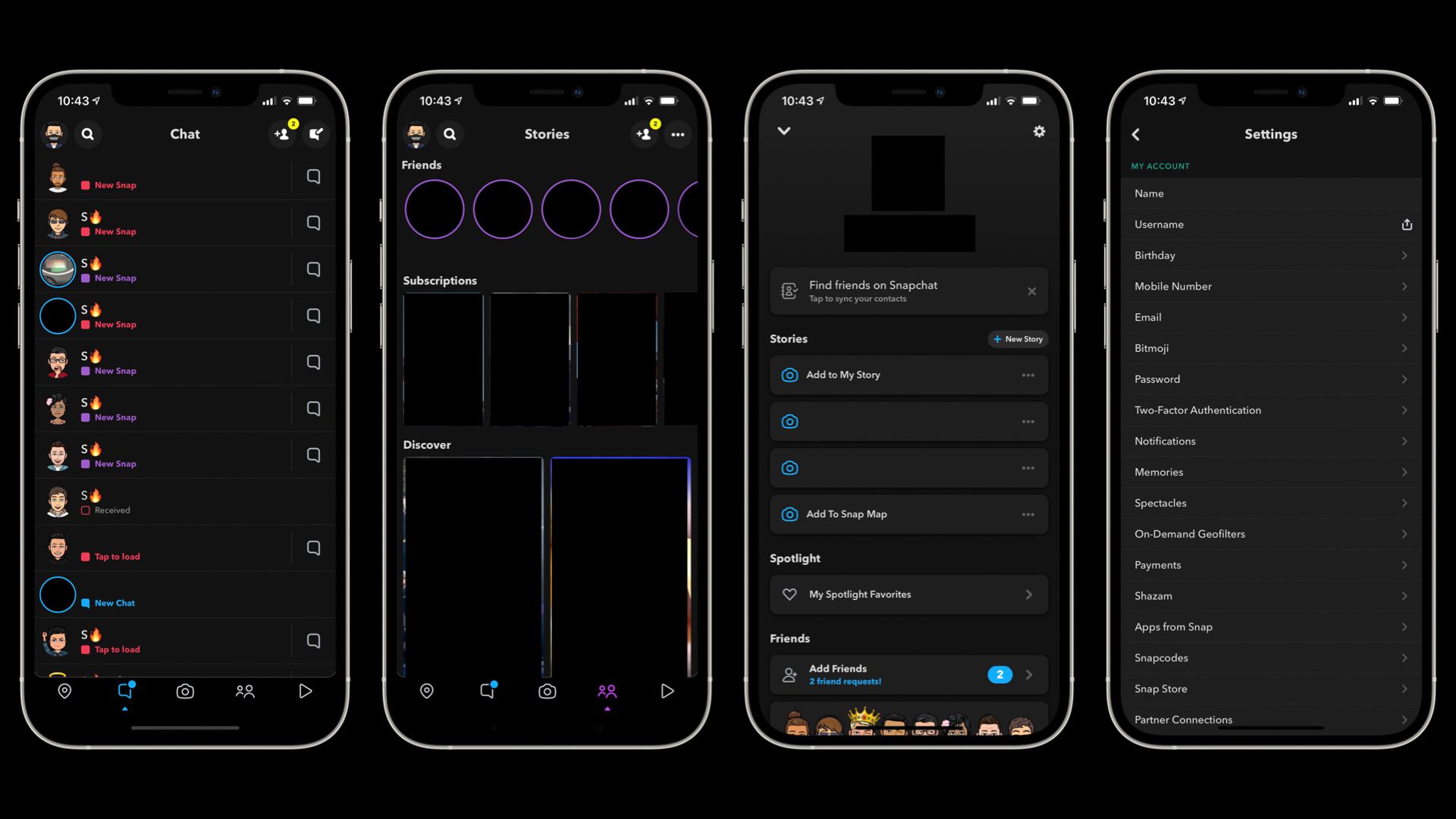
For a long period of time, Snapchat was one of the few mobile apps that lacked the dark mode. However, since last year, they have begun to make it available to iPhone users. Most iPhone users will now be able to apply Snapchat’s dark mode, but unfortunately, it is still not possible for Android users to do so.
Source: https://www.macrumors.com/2021/05/05/snapchat-rolls-out-dark-mode-on-ios/

To check if Snapchat’s dark mode is available on your iPhone and to how to enable it, use the following steps:

  1. Open the Snapchat app on the device you are using and log in if you are asked to do so.
  2. Click on your profile picture, which can be found on the upper-left corner of the screen.
  3. Tap on the ‘Settings’ icon. It is located in the upper-right corner of your profile page, and looks like a gear.
  4. In the “My Account” segment of the Settings menu, scroll down to the option called “App Appearance.” Note that it is possible that you cannot find “App Appearance” listed. If this is the case, then you cannot use dark mode yet.
  5. When you see the “App Appearance” menu, tap on “Always Dark”. You can also select “Match System” to have the app sync with your iPhone’s settings. This means that if your iPhone changes between light and dark automatically throughout the day due to changes in the lighting of your surroundings, Snapchat will do the same.

Gadgets 360 was able to include dark mode on Snapchat for iOS version 11.26.1.35. This is the most recent update that is available for download through the App Store. But as of yet, it is not clear whether users will need to install the latest version on their Apple devices to experience the dark mode, or if it is only a change in the app’s server.

In the near future, it is expected that Snapchat will include this feature for Android users. Until this, users can manually use dark mode by using the developer options on their Android smartphones.

Tags: androidiosSnapchat
Tweet54SendShare15
Previous Post

Twitter Launches New DM Search Bar Option For Android

Next Post

A Mural Outside A Samsung Store Spotted Mentioning The Upcoming Galaxy Note 21 5G

Arya Roy

Hi, this is Arya! Writing has always been a passion of mine, regardless of the topic I choose. Besides that, I am a huge foodie and music lover, whose interests range from world politics to horror films to everything in between.

Recommended For You

Sarvam Joins the Unicorn Club: Why India’s Biggest AI Bet Comes at the Perfect Time

by Ishaan Negi
June 15, 2026
0
Sarvam Joins the Unicorn Club: Why India’s Biggest AI Bet Comes at the Perfect Time

India's artificial intelligence race has found a new champion. Bengaluru-based AI startup Sarvam has officially entered the unicorn club after raising $234 million in the first close of...

Read more

OpenAI vs Anthropic: Who’s winning the AI supremacy race?

by Ishaan Negi
June 15, 2026
0
OpenAI vs Anthropic: Who’s winning the AI supremacy race?

The technological landscape has changed more quickly than nearly anyone anticipated thanks to the generative AI revolution. OpenAI and Anthropic, two businesses engaged in a fierce struggle for...

Read more

How to find some ChatGPT alternatives for students?

by Afeefa Ansari
June 15, 2026
0
AI and students

Bored of using ChatGPT? Here are some other options you can try, especially if you are a student. Let's get you started and see some good alternatives that...

Read more
Next Post
A Mural Outside A Samsung Store Spotted Mentioning The Upcoming Galaxy Note 21 5G

A Mural Outside A Samsung Store Spotted Mentioning The Upcoming Galaxy Note 21 5G

Please login to join discussion

Techstory

Tech and Business News from around the world. Follow along for latest in the world of Tech, AI, Crypto, EVs, Business Personalities and more.
reach us at info@techstory.in

Advertise With Us

Reach out at - info@techstory.in

Aviator Game India 2026

BROWSE BY TAG

#Crypto #howto 2024 acquisition AI amazon Apple Artificial Intelligence bitcoin Business China cryptocurrency e-commerce electric vehicles Elon Musk Ethereum facebook funding Gaming Google India Instagram Investment ios iPhone IPO Market Markets Meta Microsoft News OpenAI samsung Social Media SpaceX startup startups tech technology Tesla TikTok trend trending twitter US

© 2025 Techstory.in

No Result
View All Result
  • News
  • Crypto
  • Gadgets
  • Memes
  • Gaming
  • Cars
  • AI
  • Startups
  • Markets
  • How to

© 2025 Techstory.in

Welcome Back!

Login to your account below

Forgotten Password?

Retrieve your password

Please enter your username or email address to reset your password.

Log In
Are you sure want to unlock this post?
Unlock left : 0
Are you sure want to cancel subscription?