• Send Us A Tip
  • Calling all Tech Writers
  • Advertise
Saturday, June 20, 2026
  • Login
TechStory
  • News
  • Crypto
  • Gadgets
  • Memes
  • Gaming
  • Cars
  • AI
  • Startups
  • Markets
  • How to
No Result
View All Result
  • News
  • Crypto
  • Gadgets
  • Memes
  • Gaming
  • Cars
  • AI
  • Startups
  • Markets
  • How to
No Result
View All Result
TechStory
No Result
View All Result
Home Gaming

How to fix the error code VAL 19?

by Reshab Agarwal
July 21, 2022
in Gaming
Reading Time: 2 mins read
0
How to appear offline on Valorant
TwitterWhatsappLinkedin

Valorant by Riot games is a popular shooter game that has become well-known among gamers. And like any other game, it also has error codes that signify various things. Error codes could be due to a network problem or have something to do with your PC. But the error code that has been popping off the most recently is VAL 19, which has become widespread after the 3.12 update. When VAL 19 error code pops off, the game doesn’t load, and the Riot client also starts to have problems. So, here is a quick guide on how to fix the error code VAL 19?

You might also like

How to pre-order GTA 6?

How To Get Galaxy Sprites In Fortnite

How To Connect AirPods To PS5

Fix the error code VAL 19

The simplest way to get ahead of this problem is by closing all Riot client and reopening it again. If simply shutting down the same doesn’t work, then you will need to close all processes running in the background and then check if the error code is still there by launching Valorant. Here are the steps:
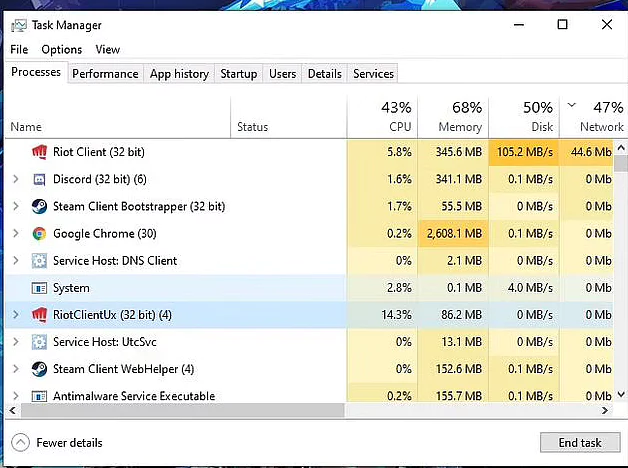
How to fix the error code VAL 19?
Image Source: Riot Games
  1. Open the taskbar
  2. Click on all processes
  3. Locate Riot games client
  4. End task

After this, you need to restart your PC and launch Valorant, and it will most likely fix the error code VAL 19. If not, let’s see what you can do next.

Reinstall Riot client

More often than not, reinstalling a game or app is an easy fix to any errors that might be popping up. That’s because the corrupt files are gone, and new files are installed again. If the Riot client on your PC keeps showing the error code Val 19 and persists even after the first try, then you can reinstall the app. Here are the steps to follow:

  1.  Go to the windows search option
  2.  Search for Riot client and uninstall it
  3.  Open Valorant, and it will reinstall the Riot client automatically
  4.  Restart your PC

It is very likely that the error will be fixed after this. If not, then the final step would be to get in touch with customer care and submit a ticket.


I hope now you know how to fix the error code VAL 19? If you have any queries about this, do let us know in the comments below. Also, share this article with your gamer friends and circle to help them out in case they have been facing the same problem.

Also Read: How to uninstall Riot Client from your PC?

Tags: #error_codeValorant
Tweet54SendShare15
Previous Post

How to uninstall Valorant from your Windows PC?

Next Post

iPhone tricks that will change the way you use iOS

Reshab Agarwal

Reshab is a tech-enthusiast who likes to write about all things crypto. He is a Bitcoin bull and believes in a decentralized future of finance. Follow him on Twitter for more!

Recommended For You

How to pre-order GTA 6?

by Afeefa Ansari
June 20, 2026
0
GTA 6

Waiting for GTA 6? Here is how you can pre-order the game and keep it with you to play as soon as you want! Let us see when's...

Read more

How To Get Galaxy Sprites In Fortnite

by Khilav Jadav
June 19, 2026
0
How To Archive Items in Fortnite

Galaxy Sprites are among the rarest collectibles in Fortnite, and many players are trying to add these cosmic companions to their collection. Introduced during Chapter 7 Season 3,...

Read more

How To Connect AirPods To PS5

by Khilav Jadav
June 19, 2026
0
How To Refund a Game on PS5

Apple AirPods are among the most popular wireless earbuds available today. Many PlayStation 5 owners naturally want to use them while gaming. However, connecting AirPods to the PlayStation...

Read more
Next Post
Photo by Bagus Hernawan on Unsplash

iPhone tricks that will change the way you use iOS

Please login to join discussion

Techstory

Tech and Business News from around the world. Follow along for latest in the world of Tech, AI, Crypto, EVs, Business Personalities and more.
reach us at info@techstory.in

Advertise With Us

Reach out at - info@techstory.in

Aviator Game India 2026

BROWSE BY TAG

#Crypto #howto 2024 acquisition AI amazon Apple Artificial Intelligence bitcoin Business China cryptocurrency e-commerce electric vehicles Elon Musk Ethereum facebook funding Gaming Google India Instagram Investment ios iPhone IPO Market Markets Meta Microsoft News OpenAI samsung Social Media SpaceX startup startups tech technology Tesla TikTok trend trending twitter US

© 2025 Techstory.in

No Result
View All Result
  • News
  • Crypto
  • Gadgets
  • Memes
  • Gaming
  • Cars
  • AI
  • Startups
  • Markets
  • How to

© 2025 Techstory.in

Welcome Back!

Login to your account below

Forgotten Password?

Retrieve your password

Please enter your username or email address to reset your password.

Log In
Are you sure want to unlock this post?
Unlock left : 0
Are you sure want to cancel subscription?