• Send Us A Tip
  • Calling all Tech Writers
  • Advertise
Monday, June 15, 2026
  • Login
TechStory
  • News
  • Crypto
  • Gadgets
  • Memes
  • Gaming
  • Cars
  • AI
  • Startups
  • Markets
  • How to
No Result
View All Result
  • News
  • Crypto
  • Gadgets
  • Memes
  • Gaming
  • Cars
  • AI
  • Startups
  • Markets
  • How to
No Result
View All Result
TechStory
No Result
View All Result
Home Gaming

How To Reset PlayStation 4

by Priyansh Sidhwani
August 21, 2022
in Gaming, How to, News
Reading Time: 2 mins read
0
How To Reset PlayStation 4

Credit @ PlayStation

TwitterWhatsappLinkedin

This guide focuses on how to reset PlayStation 4. Sometimes, you will find a simple soft reset on the PS4 will resolve some bugs, but other times, you need to take it one step further and reset your PS4 back to its factory settings. Resetting your PS4 back to the PS4 factory settings can take time, and if you perform the reset wrong, you may end up losing valuable saved data. If your PS4 crashes no matter which game you are playing, slows or locks up frequently, even while on the home screen, or shows unexplained crashes, a factory reset may be the best option for you.
You might also like

How to humanize AI text for free?

Razorpay Confidentially Files IPO Papers With SEBI, Targets $500-600 Million Raise

India And France Set Five-Year Target To Double Trade To $32 Billion, Elevate Ties To Special Global Strategic Partnership

How To Reset PlayStation 4
Credit @ PlayStation

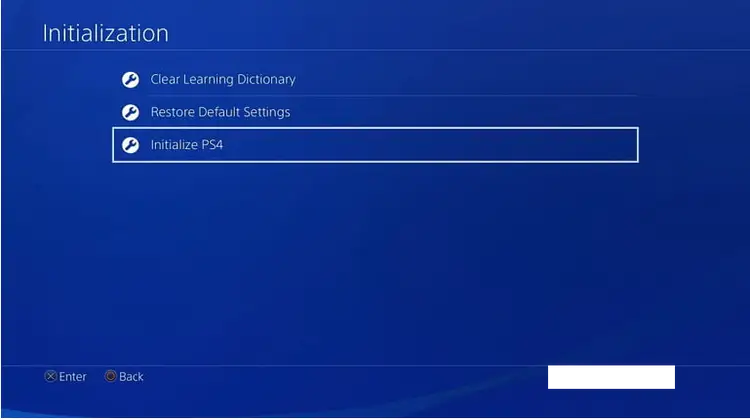
The recovery process can easily be done by accessing your PlayStation Account or Account Management on the PS4. The resetting can be done by following the steps outlined above for how to reset a PS4 without the controller. If you choose to Initialize PS4, you will erase the user data and reset the PS4 back to its factory settings.

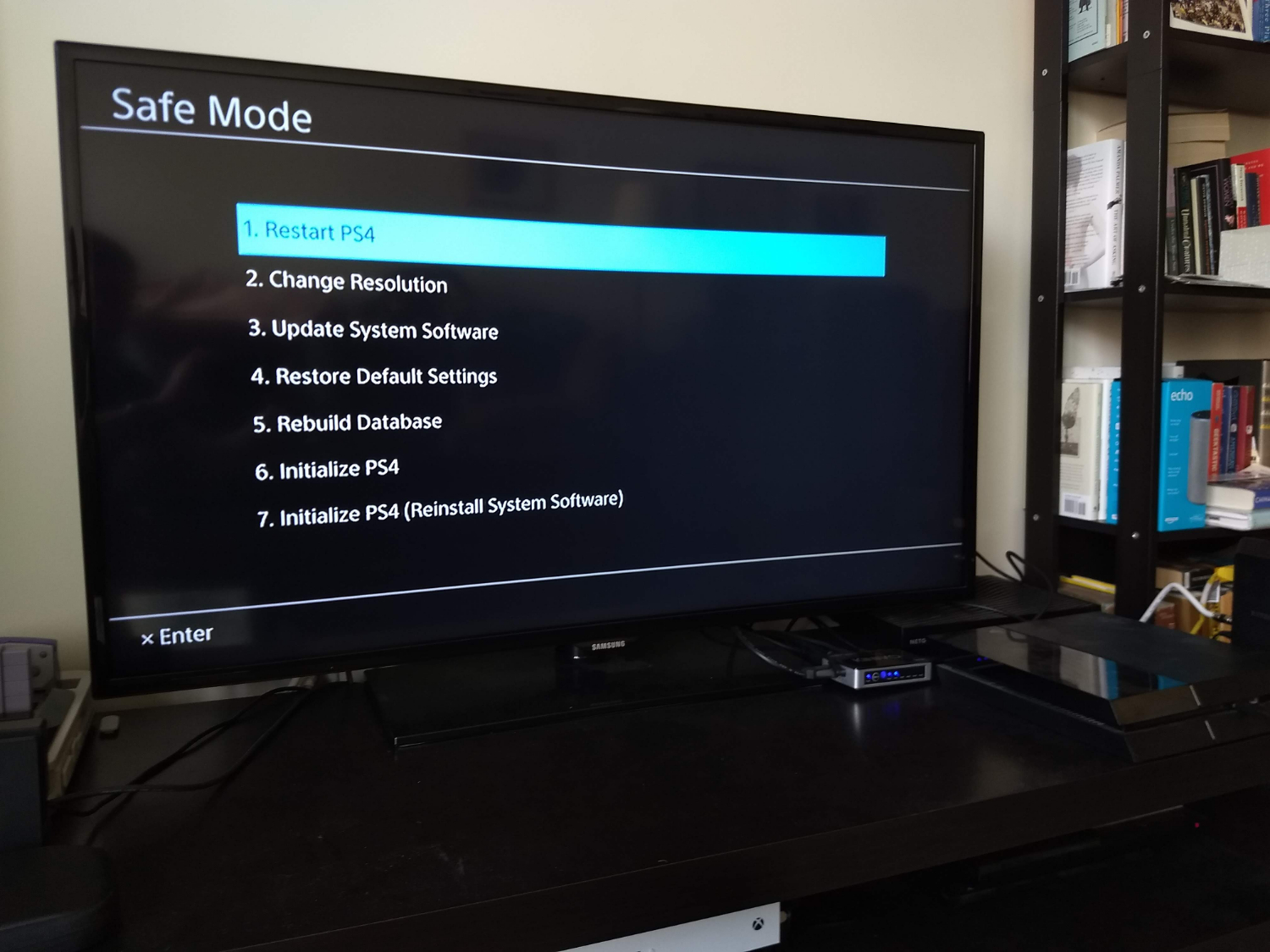
Below the last two options, you will see Restore default settings, which will erase the saved settings data and return your PS4 to the factory settings, but Restore default settings do not erase your hard drive. As with the settings menu, under Safe Mode on your console, you can select Restore Default Settings to restore everything on the PS4 to the softwares original settings but retain your data. If you cannot access Settings because your console is not booting, then you will need to reset your console in Safe Mode and reinstall the system software.
How To Reset PlayStation 4
Credit @ PlayStation

If you are buying a used PS4, a factory reset will help to give it that new feeling while ensuring that there is no data leftover from the console. Performing a factory reset is strongly recommended prior to selling the console, since there is likely personal data on your system, like credit card info.

If you wish to restore the PS4 without losing any data, you will have to do a reset by disconnecting the PS4 from all cables, including the power cord. Once the PS4 boots up, it will have to re-connect your controllers, so if all of your USB ports are broken, then you will have to get a physical repair done before you can plug in the controllers again. A Factory Reset will erase everything, your games, progress, and profiles from your PS4.

The final option is the Initialize PS4 (Reinstall System Software), which is a factory reset even more comprehensive and requires a new installation of the PS4s OS. The Reset will erase the hard drive and return it to its factory settings, but it keeps the System Software in other words, the operating system of the PS4. Within Secure Mode, you will find two different options for returning your PS4 to its factory settings, the PS4 initializes and reinstalls the system software.

Tags: How To Reset PlaystationHow To Reset Playstation 4PlayStation 4
Tweet54SendShare15
Previous Post

Google Pixel 7 and 7 Pixel Pro hands-on video leaked prior to launch

Next Post

FIFA 23 Was Accidentally Sold For 6 Cents And EA Will Honor It

Priyansh Sidhwani

Hi! I'm Priyansh, I write articles about gaming news here at Techstory. To get in touch E-mail: Priyansh@connasys.com.

Recommended For You

How to humanize AI text for free?

by Afeefa Ansari
June 15, 2026
0
Humanize text

Do you want to humanize your AI content for free? Here is how you can do it without spending any money. So, let's dive into it and see...

Read more

Razorpay Confidentially Files IPO Papers With SEBI, Targets $500-600 Million Raise

by Rounak Majumdar
June 15, 2026
0
Razorpay Confidentially Files IPO Papers With SEBI, Targets $500-600 Million Raise

One of India's most closely watched fintech listings has taken a concrete step forward. Razorpay, a full-stack financial solutions company, has filed confidential draft papers with market regulator...

Read more

India And France Set Five-Year Target To Double Trade To $32 Billion, Elevate Ties To Special Global Strategic Partnership

by Rounak Majumdar
June 15, 2026
0
India And France Set Five-Year Target To Double Trade To $32 Billion, Elevate Ties To Special Global Strategic Partnership

Prime Minister Narendra Modi and French President Emmanuel Macron used their talks in Nice on June 14, 2026 to chart an ambitious economic and strategic roadmap for the...

Read more
Next Post
FIFA 23 Was Accidentally Sold For 6 Cents And EA Will Honor It

FIFA 23 Was Accidentally Sold For 6 Cents And EA Will Honor It

Please login to join discussion

Techstory

Tech and Business News from around the world. Follow along for latest in the world of Tech, AI, Crypto, EVs, Business Personalities and more.
reach us at info@techstory.in

Advertise With Us

Reach out at - info@techstory.in

Aviator Game India 2026

BROWSE BY TAG

#Crypto #howto 2024 acquisition AI amazon Apple Artificial Intelligence bitcoin Business China cryptocurrency e-commerce electric vehicles Elon Musk Ethereum facebook funding Gaming Google India Instagram Investment ios iPhone IPO Market Markets Meta Microsoft News OpenAI samsung Social Media SpaceX startup startups tech technology Tesla TikTok trend trending twitter US

© 2025 Techstory.in

No Result
View All Result
  • News
  • Crypto
  • Gadgets
  • Memes
  • Gaming
  • Cars
  • AI
  • Startups
  • Markets
  • How to

© 2025 Techstory.in

Welcome Back!

Login to your account below

Forgotten Password?

Retrieve your password

Please enter your username or email address to reset your password.

Log In
Are you sure want to unlock this post?
Unlock left : 0
Are you sure want to cancel subscription?