As we all know, Microsoft Excel is one of the most vital tools of Microsoft Office Suite that allows you to assemble your tasks quickly and arrange your extensive data in the Excel spreadsheets for proper analysis. Nowadays, Excel is very much used and preferred by business organizations to handle their administrative duties and execute their financial accounting with ease. If you know the basic level of Microsoft Excel, it’s not enough to expand your business growth. To boost your firm’s productivity and extend it on a large scale, join this Microsoft Excel Training Program and work on Excel as professionals.
In this article, I have brought something new for the readers who wish to know the significant difference between Microsoft Excel Online and the downloaded version of Excel on Desktop. If you have already purchased the Microsoft Office Suite subscription, you can access all the features. Still, in the online version of Microsoft Excel, you might not find all the features which are accessible in the downloaded version of Excel.
List of things which you would lack in the Online Version of Microsoft Excel:
- The Home Menu in Excel
The home button in Microsoft Excel online lacks several options, easily accessible in the downloaded version of the Excel. In the downloaded version of Microsoft Excel, you can see the features shown below:
- Locking a cell
- Filling rows and columns in any direction.
- Protecting a sheet
- Styles such as comma style and percent style in number group
- Customizing new cell and new table format style
- An Entire straightforward menu is missing in the online version of Excel.
- The Find and Select menu are missing in the online version of Excel.
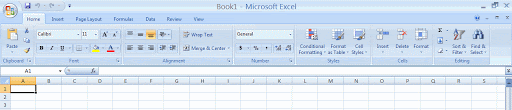
If you are working on the online version of Microsoft Excel, you miss out on these crucial features of Excel, which help you carry out your task quickly and smoothly. The formatting, for instance, conditional formatting, can be easily performed by the users in the online version of Microsoft Excel.
- The Formulas Menu in Microsoft Excel
If we talk about the formulas menu in the online version of Microsoft Excel is quite different as presented in the downloaded version of Excel. In the downloaded version of Microsoft Excel, you will find that the menus are clubbed in the form of dropdown menus in which they are organized in submenus. You just have to find formulas in different manners in the Microsoft Excel online version while calculating clarifies your calculation. In contrast, in the installed version of Excel on Desktop, you need to click on the formulas menu; you will see a pop-up window appear on your screen, which consists of several types of formulas. You can click on the formulas as per your need to apply in your spreadsheet, but you need to locate formulas to use them in the online version.

- The Insert Bar of Microsoft Excel
The insert menu in the online version differs from the downloaded version of Microsoft Excel. In the online version, the features are arranged under submenus. In contrast, by simply clicking the bar of the Insert menu in the downloaded version, you can find out the advanced features of Excel and execute your work efficiently. The major problem that arises while working on the online version of Microsoft Excel is that you don’t have the accessibility to the features that you can use in the downloaded version of Excel. The features such as:
- Pivot table is missing in the online version of Excel, which is one of the most crucial Excel features. It helps users summarize the information from the big data and analyze multiple tables together.
- You can’t use icons, 3D models, and Smart Art options to present your data in a better way.
- You can’t use charts and diagrams as they are missing from the online version of Excel. Charts and graphs help you to do a deep study of your data.
- No symbols are available in the online version.
- Objects, Textbox, WordArt, Signature line are missing.

The significant difference between the Insert menu of the online version and the downloaded version of Microsoft Excel is the limitation of the charts option. The online version has basic charts but installed versions of Microsoft Excel have various chart options such as 2D charts, 3D charts, treemap, sunburst, histogram, bubble charts, etc. If you want to use advanced Excel features, you must use the downloaded version of Microsoft Excel.
- The View Menu of Excel
The view menu of the downloaded version of Excel contains many features that you won’t find in the online version of Excel. You can only create a private sheet view, open a new spreadsheet window, freeze or hide or show your grid but in the downloaded version of Excel, and you can use several features such as:
- Page break and page layout option
- Zoom features
- Macros
- Arranging, splitting, and hiding the windows.
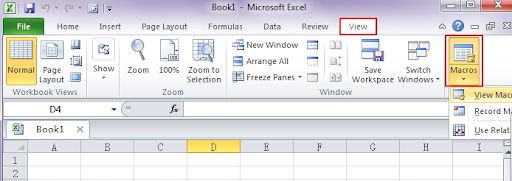
Advanced features such as VBA Macros are not available in the online version of Excel, so you must download the Excel in your system if you want to use these features.
- Menus which are lacking in the online version of Excel
In this section of my article, I would talk about the menu bar that is completely missing in the online version of Excel. Here is the list of menus that are entirely missing from the online version of Excel:
- Draw: The menu allows you to draw or pinpoint specific areas.
- Timeline: The menu shows visually important schedules or things such as project schedules.
- Page Layout: With the help of this menu, you can apply margins, themes, alignment, and organize objects in a presentable manner.
- Advanced Features: Features like macros and VBA are easily accessible in downloaded versions of Excel.
You can’t add additional add-ins or menus to Microsoft Excel’s online version as the file menu lacks specifications available in the downloaded version of Microsoft Excel. I hope this article clarifies the difference between the downloaded version of Excel and its online version.