• Send Us A Tip
  • Calling all Tech Writers
  • Advertise
Thursday, August 20, 2026
  • Login
TechStory
  • News
  • Crypto
  • Gadgets
  • Memes
  • Gaming
  • Cars
  • AI
  • Startups
  • Markets
  • How to
No Result
View All Result
  • News
  • Crypto
  • Gadgets
  • Memes
  • Gaming
  • Cars
  • AI
  • Startups
  • Markets
  • How to
No Result
View All Result
TechStory
No Result
View All Result
Home How to

How to turn off your iPhone

by Arya Roy
July 4, 2021
in How to, Tech
Reading Time: 2 mins read
0
How to turn off your iPhone

Source: https://www.howtogeek.com/387763/how-to-turn-off-the-iphone-x-xs-and-xr/

TwitterWhatsappLinkedin

Turning your iPhone can have multiple advantages, and it provides your device with a chance to reset its memory, clear its cache, and wipe away any possible temporary glitches.

You might also like

How Voice Search Will Impact AI Search in 2026?

Why You Don’t Always Need an App for Instagram Video Download

Google Pays $10 Million for 100 Million Spirit Airlines Emails and 500 Million Teams Chats to Train AI

Unfortunately, there’s no ‘off’ button per se, and most of the newer models of the iPhone require you to remember a specific button combination in order to switch it off. The method also varies depending on whether or not your iPhone has a Face ID.
If you are struggling with turning your iPhone off, here is a guide on how to do so.
Face ID method
On more recent iPhones, such as iPhone XS, iPhone 11, and iPhone 12, you cannot simply hold down the power button to turn the device off. In fact, this will most probably summon Siri if the voice assistant happens to be active.
  1. Long press both the power button, which is on the right side of the iPhone, and either volume button, which is on the left side of the iPhone, simultaneously for a few seconds.
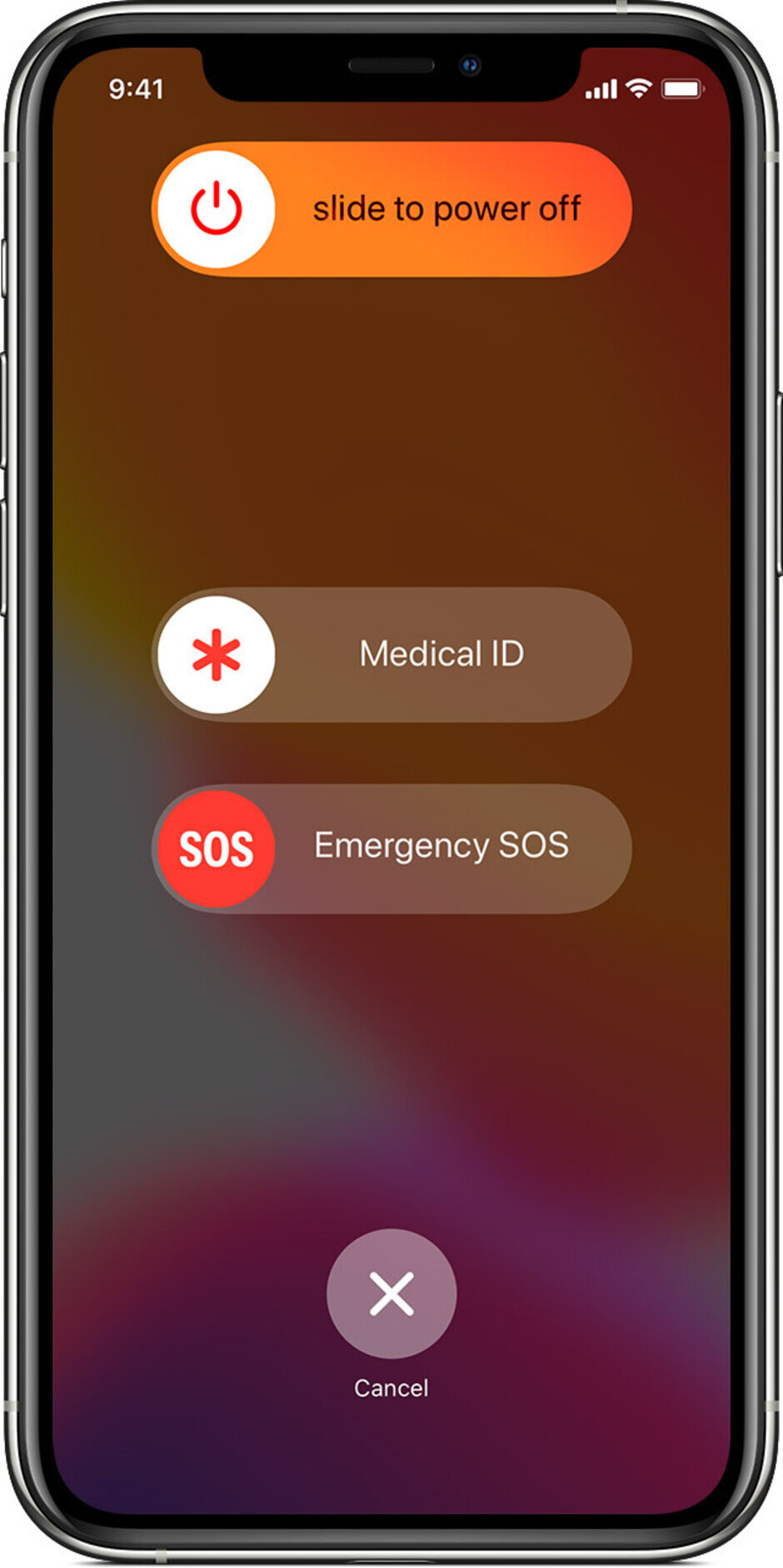
  2. Your phone will start to vibrate and the menu pictured below will appear.
  3. Swipe your finger right on the slider which reads ‘Slide to power off’ to turn your iPhone off.
If you ever happen to forget this combination, you can also turn off your iPhone by using the Settings app.
To use this method, navigate to Settings > General, and scroll down to the bottom to find Shut Down. Select that option and swipe your finger right to turn the phone off.
Source: https://ipsnews.net/business/2020/06/09/how-to-turn-off-your-iphone/
Home button
If you want to turn off iPhones that are older than 8, such as iPhone SE (2020) and iPhone 8, you will have to do the following:
  1. Long press the power button on the right side of the iPhone to summon the power-off slider.
  2. Swipe your finger right on the slider to turn the phone off.
Tags: AppleiPhone
Tweet54SendShare15
Previous Post

How to use Apple Arcade on your Mac

Next Post

India’s New ecommerce rules will impact businesses says, Amazon and Tata

Arya Roy

Hi, this is Arya! Writing has always been a passion of mine, regardless of the topic I choose. Besides that, I am a huge foodie and music lover, whose interests range from world politics to horror films to everything in between.

Recommended For You

How Voice Search Will Impact AI Search in 2026?

by Techstory Guest
August 20, 2026
0
How Voice Search Will Impact AI Search in 2026?

Over the past years, Search engine technology is rapidly changing and introduces new techniques and algorithms. If you talk about Google then it creates better search engines to...

Read more

Why You Don’t Always Need an App for Instagram Video Download

by Rohan Mathawan
August 19, 2026
0
Photo by Solen Feyissa on Unsplash

Instagram is built around quick, visual content, but saving videos for later use is not always as straightforward as watching them. While dedicated mobile apps can provide download...

Read more

Google Pays $10 Million for 100 Million Spirit Airlines Emails and 500 Million Teams Chats to Train AI

by Shailja Jha
August 19, 2026
0
Google Pays $10 Million for 100 Million Spirit Airlines Emails and 500 Million Teams Chats to Train AI

Google is reportedly paying $10 million for a massive collection of internal data from Spirit Airlines, including approximately 100 million emails and 500 million Microsoft Teams messages, as...

Read more
Next Post
Ecommerce sector

India's New ecommerce rules will impact businesses says, Amazon and Tata

Please login to join discussion

Techstory

Tech and Business News from around the world. Follow along for latest in the world of Tech, AI, Crypto, EVs, Business Personalities and more.
reach us at info@techstory.in

Advertise With Us

Reach out at - info@techstory.in

Aviator Game India 2026

BROWSE BY TAG

#Crypto #howto 2024 acquisition AI amazon Apple Artificial Intelligence bitcoin Business China cryptocurrency e-commerce electric vehicles Elon Musk Ethereum facebook funding Gaming Google India Instagram Investment ios iPhone IPO Market Markets Meta Microsoft News OpenAI samsung Social Media SpaceX startup startups tech technology Tesla TikTok trend trending twitter US

© 2025 Techstory.in

No Result
View All Result
  • News
  • Crypto
  • Gadgets
  • Memes
  • Gaming
  • Cars
  • AI
  • Startups
  • Markets
  • How to

© 2025 Techstory.in

Welcome Back!

Login to your account below

Forgotten Password?

Retrieve your password

Please enter your username or email address to reset your password.

Log In
Are you sure want to unlock this post?
Unlock left : 0
Are you sure want to cancel subscription?