

• Send Us A Tip
  • Calling all Tech Writers
  • Advertise
Monday, June 15, 2026
  • Login
TechStory
  • News
  • Crypto
  • Gadgets
  • Memes
  • Gaming
  • Cars
  • AI
  • Startups
  • Markets
  • How to
No Result
View All Result
  • News
  • Crypto
  • Gadgets
  • Memes
  • Gaming
  • Cars
  • AI
  • Startups
  • Markets
  • How to
No Result
View All Result
TechStory
No Result
View All Result
Home Tech

How to delete only media from chats in Whatsapp?

by Reshab Agarwal
October 28, 2020
in Tech
Reading Time: 2 mins read
0
How to delete only media from chats in Whatsapp?
TwitterWhatsappLinkedin

We all have been there where our phone’s storage has run out due to media on Whatsapp chats. These chats are mainly WhatsApp groups of friends and family with a lot of memes and “Good Morning” messages. Most of the times, these media are useless, but the chats are not, and you might want to keep them. So, if you are in the same situation and want to delete only media from chats then here is how you can do it.

You might also like

OpenAI vs Anthropic: Who’s winning the AI supremacy race?

DeepSeek vs ChatGPT: The AI Battle Reshaping the Future

Rivian Maps Out Its Next Big Moves as R2 Takes Center Stage

How to clear specific media on iOS and Android?
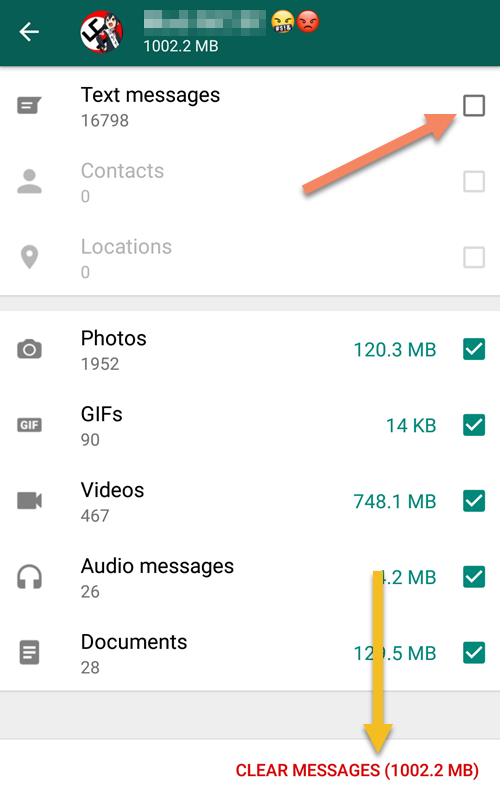
delete only media from chats

Well, as a writer, I am providing a method to present you with a choice on what you want to keep and what you don’t. You can individually select everything you want to delete from the specific chats. Let’s take a look:

  1. Open Whatsapp and click on the top right button and select settings.
  2. Select the Data and Storage Usage option and open storage usage
  3. Now select the contact/group from which you want to delete Media or text messages.
  4. Select the Free up space option and tick the items you want to delete
  5. Finally, select the delete button to clear the space.

How to remove WhatsApp images from saving in Gallery?

If you are in a family group, then you might know the pain of filling up your Gallery with useless “Good Morning” and “Good Night” messages every day. But no more here is how you can turn off auto-downloads of Media on all and specific WhatsApp chats on iOS and Android.

For android 
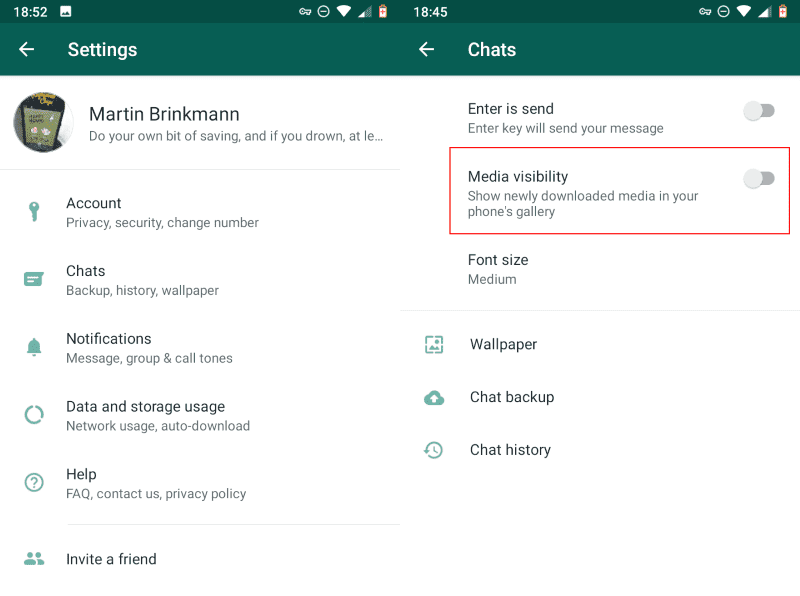
delete only media from chats

Go to the setting and chat option and turn off Media Visibility to stop the media of all chats from showing on Gallery. But if you want to do this for specific chats then:

  1. Open the chat/group
  2. Select the three dots on the top right corner and select contact/group info
  3. Turn of media visibility

For iOS

If you want to turn off media saving from all chats and groups, then go to settings>chats and turn off save to camera roll option. For individual chats/group, you need to:

  1. Open the chat/group
  2. Tap on the image of the chat/group
  3. Select the save to camera roll option and make it never.

I hope this article will solve the problem of storage and now you know how to delete only media from chats. If you have any queries, let us know in the comments below. Also, if you found our content informative, do like and share it with your friends.

Also Read: Google Pay temporarily removed from AppStore: Here’s Why?

Tweet55SendShare15
Previous Post

Tinder App to roll out “Face-to-Face” feature globally, enabling opt-in video chatting

Next Post

Micromax IN lineup arriving with MediaTek Helio G35 and G85

Reshab Agarwal

Reshab is a tech-enthusiast who likes to write about all things crypto. He is a Bitcoin bull and believes in a decentralized future of finance. Follow him on Twitter for more!

Recommended For You

OpenAI vs Anthropic: Who’s winning the AI supremacy race?

by Ishaan Negi
June 15, 2026
0
OpenAI vs Anthropic: Who’s winning the AI supremacy race?

The technological landscape has changed more quickly than nearly anyone anticipated thanks to the generative AI revolution. OpenAI and Anthropic, two businesses engaged in a fierce struggle for...

Read more

DeepSeek vs ChatGPT: The AI Battle Reshaping the Future

by Ishaan Negi
June 15, 2026
0
DeepSeek vs ChatGPT: The AI Battle Reshaping the Future

With businesses vying to create AI models that are smarter, faster, and more capable, artificial intelligence has emerged as one of the world's most competitive industries. The most...

Read more

Rivian Maps Out Its Next Big Moves as R2 Takes Center Stage

by Samir Gautam
June 15, 2026
0
Rivian future EV roadmap

As Rivian prepares to launch the highly anticipated R2, the electric vehicle maker is already looking far beyond its next SUV. The company has a packed product pipeline...

Read more
Next Post
Micromax is soon going to launch ‘IN’ branded smartphones in India

Micromax IN lineup arriving with MediaTek Helio G35 and G85

Please login to join discussion

Techstory

Tech and Business News from around the world. Follow along for latest in the world of Tech, AI, Crypto, EVs, Business Personalities and more.
reach us at info@techstory.in

Advertise With Us

Reach out at - info@techstory.in

Aviator Game India 2026

BROWSE BY TAG

#Crypto #howto 2024 acquisition AI amazon Apple Artificial Intelligence bitcoin Business China cryptocurrency e-commerce electric vehicles Elon Musk Ethereum facebook funding Gaming Google India Instagram Investment ios iPhone IPO Market Markets Meta Microsoft News OpenAI samsung Social Media SpaceX startup startups tech technology Tesla TikTok trend trending twitter US

© 2025 Techstory.in

No Result
View All Result
  • News
  • Crypto
  • Gadgets
  • Memes
  • Gaming
  • Cars
  • AI
  • Startups
  • Markets
  • How to

© 2025 Techstory.in

Welcome Back!

Login to your account below

Forgotten Password?

Retrieve your password

Please enter your username or email address to reset your password.

Log In
Are you sure want to unlock this post?
Unlock left : 0
Are you sure want to cancel subscription?
