

• Send Us A Tip
  • Calling all Tech Writers
  • Advertise
Thursday, June 18, 2026
  • Login
TechStory
  • News
  • Crypto
  • Gadgets
  • Memes
  • Gaming
  • Cars
  • AI
  • Startups
  • Markets
  • How to
No Result
View All Result
  • News
  • Crypto
  • Gadgets
  • Memes
  • Gaming
  • Cars
  • AI
  • Startups
  • Markets
  • How to
No Result
View All Result
TechStory
No Result
View All Result
Home How to

How to pin messages on iPhone

by Srestha Roy
September 23, 2021
in How to
Reading Time: 2 mins read
0
How to pin messages on iPhone
TwitterWhatsappLinkedin

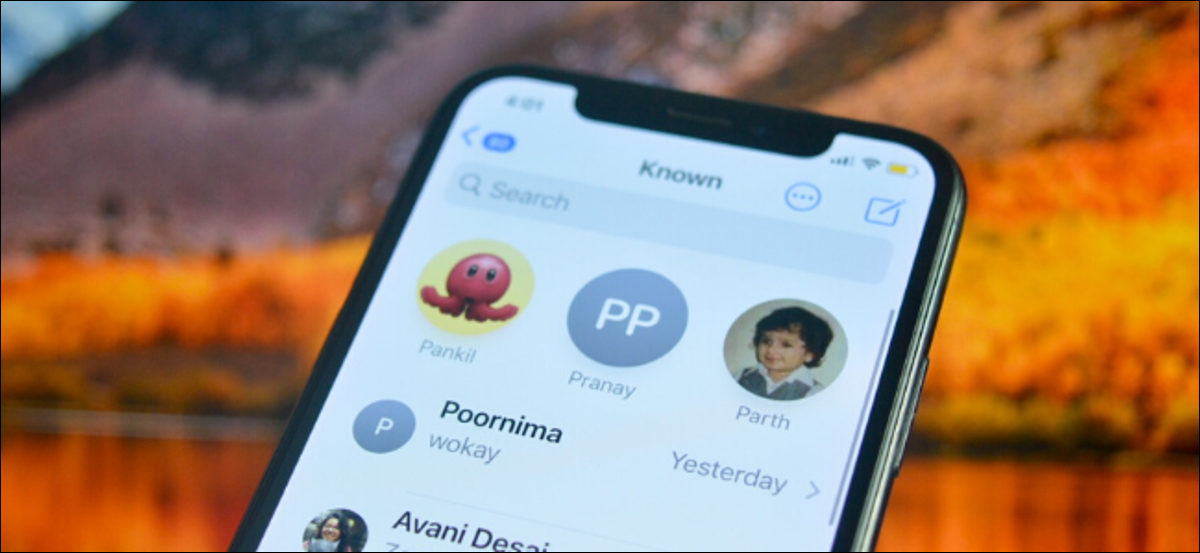
Pinned chats appear as big contact circles at the top of the main messages list. A maximum of nine pinned threads are allowed. In Messages, you may conduct one-on-one and group discussions, and threads can include both SMS texts (green bubbles) and iMessages (blue bubbles).
You might also like

How to Create Custom GPTs?

Syntropic Visibility The Blueprint for Disrupting Generative Search Engine Ecosystems

How To Get Euphony In Destiny 2

Source – How to Geek

In one-on-one chats, the other person’s contact profile is displayed, but in group threads, everyone’s profile image is displayed in a wider circle (unless a group photo has been chosen).

You may have been prompted to pin chats in your Messages app after updating to iOS 14. If you pin discussions, any unread messages that aren’t part of those conversations will display beneath your pins. In Messages, you may pin conversations in three different ways. Let’s take a look at each one individually.

First Method

  • On your iPhone or iPad, open the Messages app.
  • Long press the topic you want to pin to the top of your message list.
  • Select the option to Pin [name].

Second Method

  • On your iPhone or iPad, open the Messages app.
  • Swipe right across the discussion you wish to put to the top of your message list.
  • To the left of the chat, tap the yellow Pin symbol.

Third Method

  • On your iPhone or iPad, open the Messages app.
  • Tap Edit in the top-left corner of the screen to edit your message list.
  • From the pop-up menu, select Edit Pins.
  • On the right side of the discussion you wish to put to the top, tap the yellow pin symbol.

It’s worth noting that pinning a chat to the top of the screen removes it from the messages list below. If a contact doesn’t have an iMessage profile picture, the initial letter of their name will show on a grey backdrop in their contact circle.

The typing ellipsis (three dots) will appear on top of the contact circle if a message is being sent to you in a one-to-one discussion thread, and a preview of the coming message will display in the shape of a chat bubble.

How to Unpin Message Conversations

Simply long touch the huge contact symbol, then tap Unpin [name] in the pop-up menu to remove a discussion off the top of your messages list. Alternatively, go to the top-left of the screen and select Edit, then press the grey minus icon on the chat you wish to unpin.

How to Hide Pinned Conversation Alerts

Simply long click on the contact circle, then select Hide Alerts from the pop-up menu to hide the alerts for a pinned chat.


 

Tags: imessagesiosiOS 14iPhonePinning chatsYellow pin
Tweet54SendShare15
Previous Post

Tom Brady would love to be paid in crypto

Next Post

UN chief asks Musk, Bezos to stop “joyride to space”

Srestha Roy

Recommended For You

How to Create Custom GPTs?

by Afeefa Ansari
June 18, 2026
0
GPT

Ever got curious about GPTs? Today we will learn all about them, along with the process of customizing them to our needs. It is a critical and dense...

Read more

Syntropic Visibility The Blueprint for Disrupting Generative Search Engine Ecosystems

by Anochie Esther
June 18, 2026
0
how to rank in AI search results

The global search engine framework is undergoing its most radical architectural shift since the inception of the web index. For decades, the discipline of search engine optimization relied...

Read more

How To Get Euphony In Destiny 2

by Khilav Jadav
June 18, 2026
0
How to Get Seraph Title in Destiny 2

Euphony is one of the most sought-after Exotic weapons in Destiny 2. Introduced with the The Final Shape expansion, this powerful Strand Linear Fusion Rifle stands out because...

Read more
Next Post
UN chief asks Musk, Bezos to stop "joyride to space"

UN chief asks Musk, Bezos to stop "joyride to space"

Please login to join discussion

Techstory

Tech and Business News from around the world. Follow along for latest in the world of Tech, AI, Crypto, EVs, Business Personalities and more.
reach us at info@techstory.in

Advertise With Us

Reach out at - info@techstory.in

Aviator Game India 2026

BROWSE BY TAG

#Crypto #howto 2024 acquisition AI amazon Apple Artificial Intelligence bitcoin Business China cryptocurrency e-commerce electric vehicles Elon Musk Ethereum facebook funding Gaming Google India Instagram Investment ios iPhone IPO Market Markets Meta Microsoft News OpenAI samsung Social Media SpaceX startup startups tech technology Tesla TikTok trend trending twitter US

© 2025 Techstory.in

No Result
View All Result
  • News
  • Crypto
  • Gadgets
  • Memes
  • Gaming
  • Cars
  • AI
  • Startups
  • Markets
  • How to

© 2025 Techstory.in

Welcome Back!

Login to your account below

Forgotten Password?

Retrieve your password

Please enter your username or email address to reset your password.

Log In
Are you sure want to unlock this post?
Unlock left : 0
Are you sure want to cancel subscription?