• Send Us A Tip
  • Calling all Tech Writers
  • Advertise
Tuesday, July 14, 2026
  • Login
TechStory
  • News
  • Crypto
  • Gadgets
  • Memes
  • Gaming
  • Cars
  • AI
  • Startups
  • Markets
  • How to
No Result
View All Result
  • News
  • Crypto
  • Gadgets
  • Memes
  • Gaming
  • Cars
  • AI
  • Startups
  • Markets
  • How to
No Result
View All Result
TechStory
No Result
View All Result
Home How to

How to use VLOOKUP in Excel

by Srestha Roy
August 2, 2021 - Updated On November 3, 2021
in How to
Reading Time: 2 mins read
0
How to use VLOOKUP in Excel

Source : https://www.educba.com/vlookup-function-in-excel/

TwitterWhatsappLinkedin

Microsoft Excel 2016 has several useful features and services, which are overlooked by the  users. Nevertheless, if you keep frequently accessing the same table for data, have a look at VLOOKUP. VLOOKUP, which stands for “vertical lookup,” uses vertically aligned tables to rapidly identify data linked with a given value.
You might also like

How To Get Hardwood In Palworld

How to speed up Windows without changing hardware?

How To Unlock World Tree In Palworld

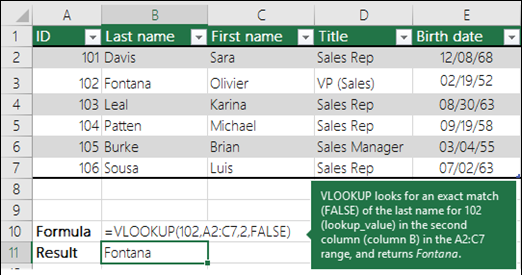
Source : https://support.microsoft.com/en-us/office/vlookup-function-0bbc8083-26fe-4963-8ab8-93a18ad188a1

In Microsoft Excel, coordinating a large volume of data is a time-consuming task. When you’re about to compare data from various spreadsheets, that issue might become considerably worse and even more time-consuming. The VLOOKUP tool in Microsoft Excel is a lot easier to use than you would believe. Furthermore, it is quite strong, and you should certainly include it in your inventory of analytic tools in Excel.

Once you remember the name of a product and really want to instantly ascertain its value, simply type the name of the product into Excel, and VLOOKUP will do the rest. The VLOOKUP function examines your data for a certain value, and once it finds it, it may locate — and show — any other information that’s connected with that value.

Setting up VLOOKUP might appear overwhelming to a new Excel user, but it isn’t as complicated as it seems. Wherever you locate your data, it must be listed vertically when you look it up.

  •  Select the cell where the VLOOKUP formula should be executed according to you. At the top of the screen, click on Formulas.
  • On the Ribbon, select Lookup & Reference. At the bottom of the drop-down menu, click on VLOOKUP.
  • Choose the cell where you’ll input the value whose detail or data you’re looking for.  
  • In the table array box, specify the data you intend VLOOKUP to consider for its search.
  •  In the col_index_num box, specify the column number that VLOOKUP will be using to find the appropriate data.
  • VLOOKUP requires you to utilize the column’s numerical value rather than its letter value, which might be a little confusing. 
  • Enter FALSE (exact match) or TRUE (approximate match) in the range_lookup box to specify if you want an exact match. At the bottom of the popup window, click OK.
  • Enter the value for which you’re looking for information. 

Here’s an example of a VLOOKUP function for your convenience:

VLOOKUP(lookup_value , table_array , col_index_num , range_lookup)

VLOOKUP can be used to not only find individual values, but also to merge two spreadsheets or combine excel files into one. If one spreadsheet contains a vertical list of names and another spreadsheet has an unstructured list of those names and their contact information, for example, you may use VLOOKUP to get those contact details in the order they appear in the first spreadsheet.

To gain a comprehensive view of prospect generation, marketers must evaluate data from a several sources (and more). Microsoft Excel, notably the VLOOKUP function, is the ideal tool for doing this accurately and at a massive scale.


Tags: EXCELspreadsheetVLOOKUP
Tweet55SendShare15
Previous Post

As the NFT craze spreads, a rare CryptoPunk is being sold for $90.5 million

Next Post

Flipkart to host 2nd round of Big Saving Days Sale starting August 6

Srestha Roy

Recommended For You

How To Get Hardwood In Palworld

by Khilav Jadav
July 14, 2026
0
How to Level Up Quickly in Palworld

Hardwood is one of the most useful crafting materials in Palworld, the open-world survival and monster-collecting game developed by Pocketpair. While regular Wood is easy to gather from...

Read more

How to speed up Windows without changing hardware?

by Afeefa Ansari
July 14, 2026
0
Windows

Is Windows feeling stuck? We've got your back. Here are a few things you can try to speed up the performance of your Windows on PC without having...

Read more

How To Unlock World Tree In Palworld

by Khilav Jadav
July 14, 2026
0
How To Get Anti-Gravity Belt in Palworld

The World Tree is one of the biggest mysteries in Palworld, the open-world survival, crafting, and creature-collecting game developed by Pocketpair. From the moment players first notice the...

Read more
Next Post
Flipkart Big Saving Days Sale Banner Image

Flipkart to host 2nd round of Big Saving Days Sale starting August 6

Please login to join discussion

Techstory

Tech and Business News from around the world. Follow along for latest in the world of Tech, AI, Crypto, EVs, Business Personalities and more.
reach us at info@techstory.in

Advertise With Us

Reach out at - info@techstory.in

Aviator Game India 2026

BROWSE BY TAG

#Crypto #howto 2024 acquisition AI amazon Apple Artificial Intelligence bitcoin Business China cryptocurrency e-commerce electric vehicles Elon Musk Ethereum facebook funding Gaming Google India Instagram Investment ios iPhone IPO Market Markets Meta Microsoft News OpenAI samsung Social Media SpaceX startup startups tech technology Tesla TikTok trend trending twitter US

© 2025 Techstory.in

No Result
View All Result
  • News
  • Crypto
  • Gadgets
  • Memes
  • Gaming
  • Cars
  • AI
  • Startups
  • Markets
  • How to

© 2025 Techstory.in

Welcome Back!

Login to your account below

Forgotten Password?

Retrieve your password

Please enter your username or email address to reset your password.

Log In
Are you sure want to unlock this post?
Unlock left : 0
Are you sure want to cancel subscription?