Meta, the parent company of WhatsApp, has introduced an exciting new feature to bolster the security of its popular messaging app. This upcoming update will introduce a chat lock option, empowering users to hide specific conversations within a separate folder and ensuring enhanced privacy and confidentiality.
The innovative chat lock lets users discreetly remove selected conversations from the regular inbox and store them in a secluded folder. This means that sensitive or private discussions can be kept separate from the main chat list, providing an added layer of protection against prying eyes.
What makes this feature even more impressive is its robust security measures. Instead of relying solely on the app’s default security settings, users can secure the hidden chat folder with a separate password or biometric authentication methods such as facial recognition or fingerprint scanning. This means that even if someone gains access to the app, they will still need an additional layer of authentication to unlock and view the hidden conversations.
With this upcoming update, WhatsApp users can enjoy heightened privacy and control over their sensitive discussions. Whether it’s confidential work-related matters, personal conversations, or sensitive information, the chat lock feature offers peace of mind, knowing that your private chats are safeguarded from unauthorized access.
Fortify Your WhatsApp Chats: Introducing Chat Lock for Enhanced Privacy
As technology advances, ensuring the privacy and security of our digital conversations becomes increasingly vital. In response to this need, WhatsApp, a subsidiary of Meta, has unveiled an exciting new feature that allows users to further fortify their chat privacy. With the introduction of the chat lock functionality, WhatsApp users can add an extra layer of security and hide specific conversations within a password-protected folder.
Most smartphones offer basic passwords or biometric locks to secure the device. However, once someone gains access to the unlocked device, they can freely browse through chats and conversations within messaging apps. This new chat lock feature addresses this concern by allowing users to secure individual chats, adding protection.
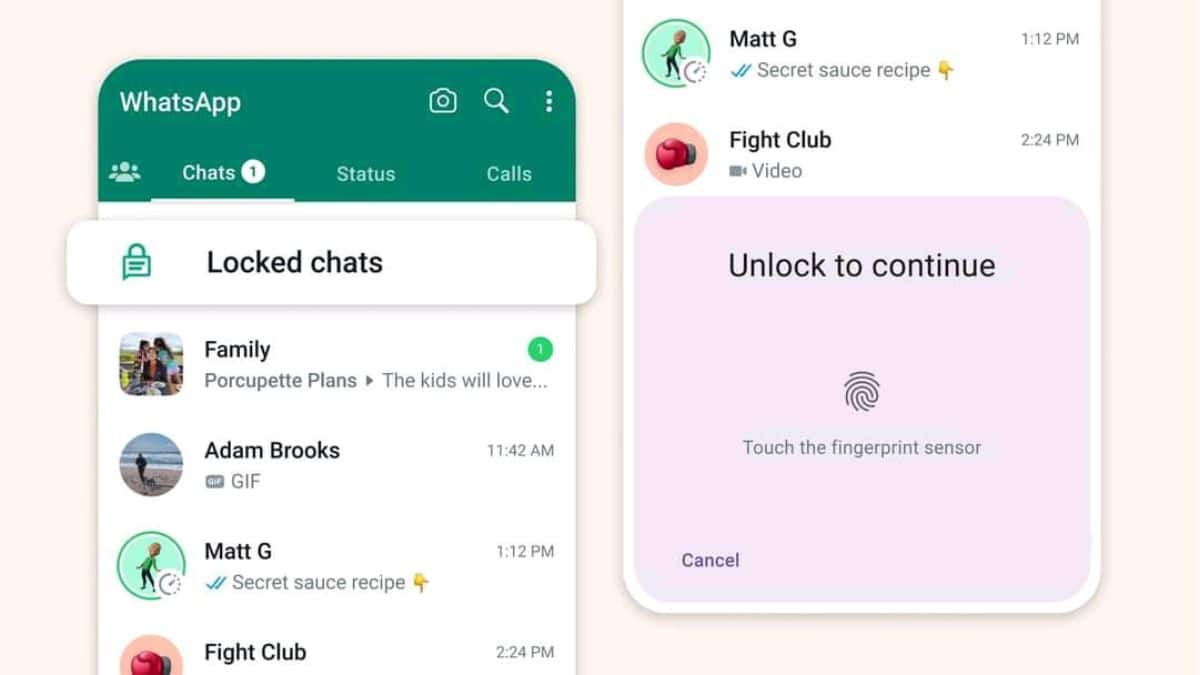
Mark Zuckerberg, the CEO of Meta, shared his excitement about this new development in a recent Facebook post. He explained, “New locked chats in WhatsApp make your conversations more private. They’re hidden in a password-protected folder, and notifications won’t display the sender or message content.” This means that even if someone gains physical access to your unlocked device, they won’t be able to view or access the locked conversations without the necessary authentication.
Enabling the chat lock on WhatsApp is a straightforward process. Simply navigate to the specific chat you wish to secure, and click on the contact’s Display Picture (DP). You’ll notice the Chat Lock option appear below the disappearing message menu. You can add an extra security shield to that conversation by enabling Chat Lock. You’ll use your phone’s password or biometric features such as fingerprint scanning or facial recognition to authenticate the lock.
Advanced Privacy Features for Enhanced Security on the social media account
With this new feature, WhatsApp empowers its users to have more control over the privacy of their conversations. Whether you want to protect sensitive work-related discussions, personal conversations, or confidential information, the chat lock feature offers an additional safeguard against unauthorized access.
To further enhance privacy, WhatsApp offers encrypted chat backup. This feature ensures that your chat history, including messages, photos, and videos, is securely stored in the cloud. Even in the event of a device change or data loss, you can restore your chats without compromising the confidentiality of your conversations.
To prevent unauthorized distribution of your conversations, WhatsApp includes screenshot blocking. This feature restricts users from taking screenshots within the app, offering additional protection for your privacy.
Furthermore, WhatsApp lets you control who can view your last seen status. This feature empowers you to manage the visibility of your online presence, ensuring that only desired contacts can see when you were last active on the platform.
Discover the power of WhatsApp, where your conversations are safeguarded by end-to-end encryption, and you have control over your privacy settings. Experience secure messaging and peace of mind with WhatsApp’s comprehensive privacy features.