

• Send Us A Tip
  • Calling all Tech Writers
  • Advertise
Wednesday, June 17, 2026
  • Login
TechStory
  • News
  • Crypto
  • Gadgets
  • Memes
  • Gaming
  • Cars
  • AI
  • Startups
  • Markets
  • How to
No Result
View All Result
  • News
  • Crypto
  • Gadgets
  • Memes
  • Gaming
  • Cars
  • AI
  • Startups
  • Markets
  • How to
No Result
View All Result
TechStory
No Result
View All Result
Home Gadgets

Switch Your Amazon Echo’s wake word to Ziggy

by Keziah George
July 26, 2021
in Gadgets, How to, Tech
Reading Time: 2 mins read
0
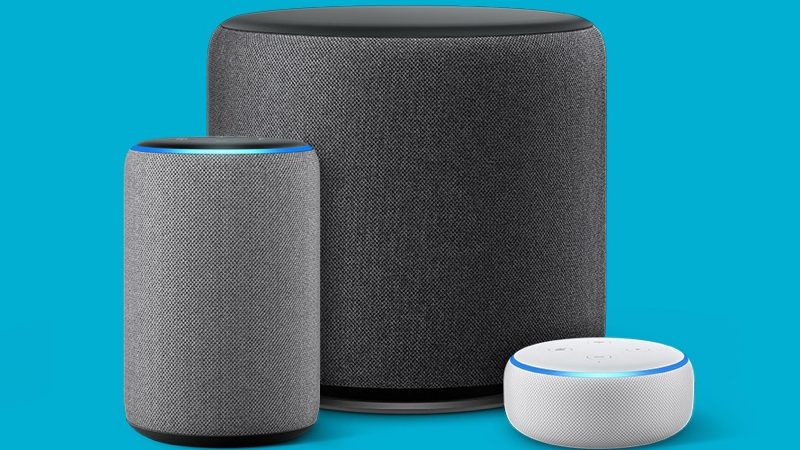
Amazon Unveiled a New Subwoofer and amp for the Echo line
TwitterWhatsappLinkedin

Amazon released a new masculine-sounding voice alongside Alexa which was introduced way back in 2014. Alexa’s new male-sounding gender-neutral counterpart is available to all Echo smart speakers and allied devices. Amazon has also given options for voice control to sound like some well-known celebrities like Samuel L. Jackson, Shaquille O’Neil, and Mellisa McCarthy who can respond to some catchphrases, jokes, and the weather. From the advent, voice-controlled digital assistants have been female including Alexa, Siri, Cortana, Google Assistant, enraging some gender-neutral activists although the device responds as being gender-neutral to the question, ‘what is your gender?’.  Companies now have all released male assistant counterparts, Amazon has been late to the game but better late than never. Here is how to set Ziggy as your Echo’s new wake word.

You might also like

Battle for the Skies Decoding the Global Starlink Competitors Matrix

SpaceX Revenue Breakdown: Why Starlink Now Drives Nearly 70% of Sales

VPN vs Proxy Explained: Which One Should You Use?

How to Enable the Male Voice on Amazon Echo Speakers https://t.co/wOO45A0juY

— XDA (@xdadevelopers) July 23, 2021

How to set Ziggy as your Echo’s new wake word

Echo speakers have Alexa as their in-built voice assistant to change it to respond to another wake word follow the steps below.

  1.  Go to the Alexa app
  2. Tap Devices placed at the bottom menu
  3. Press Echo & Alexa at the top of your screen and click the name of the device whose wake word you would like to change
  4. Go to the Settings icon at the upper right corner of your screen
  5. You will find Wake Word when you scroll down and tap ‘Ziggy‘
  6. You will be reminded that the change will occur in a few minutes

You can also change the Wake Word using the command “Alexa, change your voice” your Echo will respond back with the new voice if the command is followed out successfully.

? “Hey Samuel, tell me a joke.”

Today, we’re launching an entirely new wake word experience for customers featuring our @SamuelLJackson celebrity voice. https://t.co/hbS7LIHdAR pic.twitter.com/UdITCGNbXy

— Amazon News (@amazonnews) September 16, 2020

The company had previously worked with ‘Wake Words’ like Computer, Amazon, and Echo but nothing seemed to stick like its female version Alexa. Amazon is also on its way to make its devices more user-friendly, by introducing the new ‘built-in concept’ in collaboration with fashion designer and philanthropist Diane von Furstenberg, the company is now taking suggestions on ways to improve and what features to add to the devices they introduce to the market, directly from the customers read more on the developments here. To learn more on how to operate voice control, click here.

Tags: Alexa DevicesAmazon Echo DotHow to
Tweet54SendShare15
Previous Post

US condemns spyware use on civil society, regime critics, journalists

Next Post

How to gameshare: PS4- PS5 new Share Play feature

Keziah George

Recommended For You

Battle for the Skies Decoding the Global Starlink Competitors Matrix

by Anochie Esther
June 17, 2026
0
Starlink competitors

The global telecommunications sector is undergoing a historic orbital migration. For decades, satellite internet was synonymous with high latency, restrictive data caps, and bulky geostationary (GEO) infrastructure suspended...

Read more

SpaceX Revenue Breakdown: Why Starlink Now Drives Nearly 70% of Sales

by Ishaan Negi
June 16, 2026
0
SpaceX Revenue Breakdown: Why Starlink Now Drives Nearly 70% of Sales

For years, SpaceX was known as the company that revolutionized space travel with reusable rockets and ambitious plans to send humans to Mars. But in 2025, the company’s...

Read more

VPN vs Proxy Explained: Which One Should You Use?

by Ishaan Negi
June 16, 2026
0
VPN vs Proxy Explained: Which One Should You Use?

Internet users now have serious worries about security and privacy in today's digital world. Virtual Private Networks (VPNs) and proxies are two common technologies that you've probably encountered,...

Read more
Next Post
Upcoming Game Releases In 2021

How to gameshare: PS4- PS5 new Share Play feature

Please login to join discussion

Techstory

Tech and Business News from around the world. Follow along for latest in the world of Tech, AI, Crypto, EVs, Business Personalities and more.
reach us at info@techstory.in

Advertise With Us

Reach out at - info@techstory.in

Aviator Game India 2026

BROWSE BY TAG

#Crypto #howto 2024 acquisition AI amazon Apple Artificial Intelligence bitcoin Business China cryptocurrency e-commerce electric vehicles Elon Musk Ethereum facebook funding Gaming Google India Instagram Investment ios iPhone IPO Market Markets Meta Microsoft News OpenAI samsung Social Media SpaceX startup startups tech technology Tesla TikTok trend trending twitter US

© 2025 Techstory.in

No Result
View All Result
  • News
  • Crypto
  • Gadgets
  • Memes
  • Gaming
  • Cars
  • AI
  • Startups
  • Markets
  • How to

© 2025 Techstory.in

Welcome Back!

Login to your account below

Forgotten Password?

Retrieve your password

Please enter your username or email address to reset your password.

Log In
Are you sure want to unlock this post?
Unlock left : 0
Are you sure want to cancel subscription?
