• Send Us A Tip
  • Calling all Tech Writers
  • Advertise
Sunday, June 21, 2026
  • Login
TechStory
  • News
  • Crypto
  • Gadgets
  • Memes
  • Gaming
  • Cars
  • AI
  • Startups
  • Markets
  • How to
No Result
View All Result
  • News
  • Crypto
  • Gadgets
  • Memes
  • Gaming
  • Cars
  • AI
  • Startups
  • Markets
  • How to
No Result
View All Result
TechStory
No Result
View All Result
Home Tech

Windows 11 is getting Android apps support very soon, reveals screenshots

by Chhavideep Singh
October 17, 2021
in Tech
Reading Time: 2 mins read
0
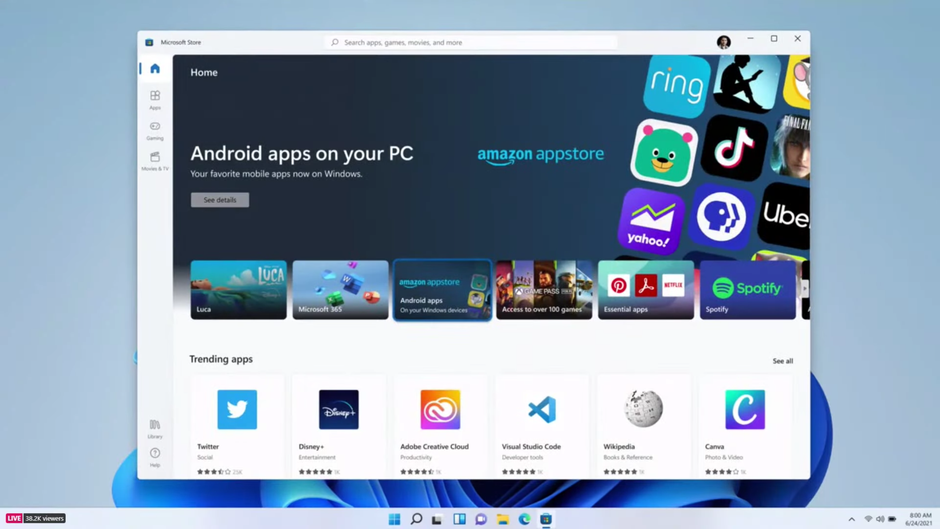
Android Windows 11

Source: CNET

TwitterWhatsappLinkedin
Android Windows 11
Source:
CNET

Microsoft has recently released its latest iteration of the Windows Operating System- Windows 11 and honestly, it is a big upgrade from all the previous year’s Windows. The design is more modern, elegant and sophisticated to look at. The software looks and feel very smooth and offers a seamless Windows experience, something that makes us love our Windows PCs.

You might also like

How to Increase Gas Mileage: Small Driving Changes That Save Big at the Pump

Paradigms of Luminance and Chemistry The Definitive OLED vs Mini LED Display Audit

Next-Generation Wireless The Architectural Breakthrough of Wi-Fi 7 Explained

Having said that, the release did not offer the full set of features as was introduced during the grand unveiling at the Microsoft event. Yes, I am talking about the Android app support in Windows 11 which is one of the most intriguing aspects of the new Windows experience. Prior to the launch, there were a lot of talks about this alleged new feature where Windows 11 will be able to run Android apps on PCs but the feature did not arrive with the Operating System’s official launch.

According to recent reports from XDA Developers, multiple screenshots have been released that show Android apps running on Windows 11. The reports further highlight the fact that we can expect to test this new feature through Windows Insider Program. As per the screenshots, WeChat app was prominently visible running on Windows 11 PCs and there was one more that we cannot be sure of. We would have attached the screenshots with this article but unfortunately, the screenshots are no longer available from the original source. However, one thing is for sure, the interface with which WeChat was running on Windows 11 was different from the mobile interface we are used to using. This means that Windows 11 is has customized a special interface for all available Android apps on Windows 11 to offer a seamless and smooth user experience.

Having Android apps support or ‘Multiple-instance support’ for Android apps in Windows 11 is a big deal because Microsoft has never pulled something like this before. Although, it is a programable feature on the latest Windows but it will be very much relevant as and when we start using it.

Anyhow, Microsoft has not spoken anything about the compatibility of Android apps on Windows 11 and considering the appearance of the new Windows Subsystem for Android on the Microsoft Windows Store, we can hope that the new feature launches soon. Forget the launch for a second and let’s focus on when it will be readily available for testing under the Windows Insider Program.


Tags: Android appsMicrosoftWindows 11
Tweet54SendShare15
Previous Post

Apple Watch Series 7 does not show third-party app icons on homescreen

Next Post

TechStory: Top tech highlights this week

Chhavideep Singh

Hi! I'm Chhavideep, If you like reading about technology, business and start-ups, you've come to the right place. Catch me: chhavideep@connasys.com

Recommended For You

How to Increase Gas Mileage: Small Driving Changes That Save Big at the Pump

by Samir Gautam
June 21, 2026
0
Fuel prices may rise and fall, but one thing stays constant: drivers want to make every litre go further. The good news is that improving gas mileage does not always require buying a new hybrid or changing cars altogether. A few disciplined habits behind the wheel, along with basic maintenance, can make a noticeable difference over time. For most drivers, the biggest gains come from reducing waste. That means less aggressive acceleration, fewer unnecessary trips, correctly inflated tyres and a car that is mechanically healthy. Smooth Driving Uses Less Fuel The quickest way to burn more fuel is to drive as if every traffic light is a starting grid. Hard acceleration, sharp braking and sudden changes in speed force the engine to work harder and consume more petrol. A smoother approach works better. Accelerate gradually, maintain a steady speed where possible and look ahead to anticipate traffic. If a red light is visible in the distance, easing off the accelerator early is usually more efficient than rushing forward and braking hard at the last moment. Speed also matters. As speeds rise, aerodynamic drag increases and the engine needs more energy to keep the vehicle moving. On highways, staying within a sensible cruising range rather than constantly pushing at high speeds can help reduce fuel consumption. Check Tyre Pressure Regularly Tyres are easy to ignore until something goes wrong, but they play a major role in fuel economy. Under-inflated tyres create more rolling resistance, which means the engine has to use more fuel just to move the car forward. Drivers should check tyre pressure at least once a month, preferably when the tyres are cold. The correct pressure is usually listed on the driver-side door frame or in the owner’s manual. It is important not to use the maximum pressure printed on the tyre sidewall as a target. That figure is not necessarily the recommended setting for the vehicle. The US Environmental Protection Agency notes that under-inflation reduces fuel economy, increases tyre wear and adds to emissions. Stop Carrying Extra Weight A car is not a storage room. Heavy items in the boot may seem harmless, but extra weight makes the engine work harder, especially in city traffic where the vehicle is constantly stopping and starting. Clear out unnecessary tools, boxes, sports gear and other items that have been sitting in the car for weeks. Roof racks and cargo boxes can also hurt mileage by increasing aerodynamic drag. If they are not being used, remove them. This is especially relevant for drivers who spend most of their time on highways, where wind resistance becomes a bigger factor. Keep Up With Maintenance A well-maintained vehicle is usually a more fuel-efficient vehicle. Delayed oil changes, worn spark plugs, clogged air filters, dragging brakes and poor wheel alignment can all affect how efficiently a car runs. Following the manufacturer’s service schedule is the safest route. Use the recommended engine oil grade and get warning lights checked instead of ignoring them. A sudden drop in mileage can be an early sign that something needs attention. The EPA advises motorists to follow their vehicle maintenance schedule and use the recommended motor oil to support better fuel efficiency and safer operation. Combine Trips and Avoid Long Idling Short trips can be surprisingly fuel-hungry because the engine has not had enough time to reach its most efficient operating temperature. Combining errands into one planned route can reduce cold starts, unnecessary kilometres and fuel use. Idling is another quiet fuel drain. If you are waiting for an extended period, switching off the engine can be more sensible than leaving it running. Modern cars do not need long warm-up periods before driving. Start, settle for a few seconds and drive gently. The Bottom Line Better gas mileage is less about one miracle trick and more about consistent habits. Drive smoothly, maintain the right tyre pressure, remove excess weight and service the car on time. These small changes may not feel dramatic on a single trip, but over months of commuting, school runs and highway drives, they can add up to real savings.

Fuel prices may rise and fall, but one thing stays constant: drivers want to make every litre go further. The good news is that improving gas mileage does...

Read more

Paradigms of Luminance and Chemistry The Definitive OLED vs Mini LED Display Audit

by Anochie Esther
June 21, 2026
0
OLED vs Mini LED

The global display and consumer electronics sectors are locked in a historic technological civil war. For years, the gold standard of premium visual performance was dictated by a...

Read more

Next-Generation Wireless The Architectural Breakthrough of Wi-Fi 7 Explained

by Anochie Esther
June 21, 2026
0
Wi-Fi 7 Explained

The global networking landscape is entering a period of massive data scaling. For years, consumer and enterprise spaces managed their growing hardware ecosystems by relying on iterative upgrades...

Read more
Next Post
Top tech News

TechStory: Top tech highlights this week

Please login to join discussion

Techstory

Tech and Business News from around the world. Follow along for latest in the world of Tech, AI, Crypto, EVs, Business Personalities and more.
reach us at info@techstory.in

Advertise With Us

Reach out at - info@techstory.in

Aviator Game India 2026

BROWSE BY TAG

#Crypto #howto 2024 acquisition AI amazon Apple Artificial Intelligence bitcoin Business China cryptocurrency e-commerce electric vehicles Elon Musk Ethereum facebook funding Gaming Google India Instagram Investment ios iPhone IPO Market Markets Meta Microsoft News OpenAI samsung Social Media SpaceX startup startups tech technology Tesla TikTok trend trending twitter US

© 2025 Techstory.in

No Result
View All Result
  • News
  • Crypto
  • Gadgets
  • Memes
  • Gaming
  • Cars
  • AI
  • Startups
  • Markets
  • How to

© 2025 Techstory.in

Welcome Back!

Login to your account below

Forgotten Password?

Retrieve your password

Please enter your username or email address to reset your password.

Log In
Are you sure want to unlock this post?
Unlock left : 0
Are you sure want to cancel subscription?